Whatever message this page gives is out now! Go check it out!


Passing data to custom tags
Last update:
Jun 9, 2026
To make your custom tags flexible, you often pass data to them for processing. To do so, you write custom tags that take tag attributes and other data as input from a calling page.
Passing values to and from custom tags
Because custom tags are individual ColdFusion pages, variables and other data are not automatically shared between a custom tag and the calling page. To pass data from the calling page to the custom tag, you can specify attribute name-value pairs in the custom tag, just as you do for normal HTML and CFML tags. For example, to pass the value of the NameYouEntered variable to the cf_getmd tag, you can call the custom tag as follows:
<cf_getmd Name=#NameYouEntered#>To pass multiple attributes to a custom tag, separate them with a space in the tag as follows:
<cf_mytag Firstname="Thadeus" Lastname="Jones">In the custom tag, you use the Attributes scope to access attributes passed to the tag. Therefore, in the getmd.cfm page, you access the passed attribute as Attributes.Name. The mytag.cfm custom tag page refers to the passed attributes as Attributes.Firstname and Attributes.Lastname. The custom tag page can also access variables set in the calling page by prefixing the calling page's local variable with Caller. However, this technique is not the best way to pass information to a custom tag, because each calling page would be required to create variables with the names required by the custom tag. You can create more flexible custom tags by passing parameters using attributes. Variables created within a custom tag are deleted when the processing of the tag terminates. Therefore, if you want to pass information back to the calling page, write that information back to the Caller scope of the calling page. You cannot access the custom tag's variables outside the custom tag itself. For example, use the following code in the getmd.cfm page to set the variable Doctor on the calling page:
<cfset Caller.Doctor="Doctor " & Attributes.Name>If the variable Doctor does not exist in the calling page, this statement creates it. If the variable exists, the custom tag overwrites it. The following image shows the relationship between the variables on the calling page and the custom tag:
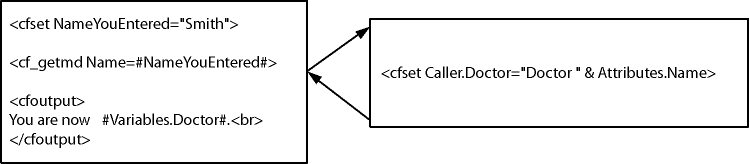
One common technique used by custom tags is for the custom tag to take as input an attribute that contains the name of the variable to use to pass back results. For example, the calling page passes returnHere as the name of the variable to use to pass back results:
<cf_mytag resultName="returnHere">In mytag.cfm, the custom tag passes back its results using the following code:
<cfset "Caller.#Attributes.resultName#" = result>Be careful not to overwrite variables in the calling page from the custom tag. Adopt a naming convention to minimize the chance of overwriting variables. For example, prefix the returned variable with customtagname_, where customtagname is the name of the custom tag.
Note:
Data that pertains to the HTTP request or to the current application is visible in the custom tag page. This data includes the variables in the Form, URL, Cgi, Request, Cookies, Server, Application, Session, and Client scopes.
Using tag attributes summary
Custom tag attribute values are passed from the calling page to the custom tag page as name-value pairs. CFML custom tags support required and optional attributes. Custom tag attributes conform to the following CFML coding standards:
- ColdFusion passes any attributes in the Attributes scope.
- Use the Attributes.attribute_name__syntax when referring to passed attributes to distinguish them from custom tag page local variables.
- Attributes are not case sensitive.
- Attributes can be listed in any order within a tag.
- in the tag invocation, a space must separate attribute name-value pairs.
- Passed values that contain spaces must be enclosed in double-quotation marks.
- Use the cfparam tag with a defaultattribute at the top of a custom tag to test for and assign defaults for optional attributes that are passed from a calling page. For example:
the calling page does not set it, make it "Who". --->

<cfparam name="Attributes.Name" default="Who"><cfabort showError="The Name attribute is required.">
</cfif>Custom tag example with attributes
The following example creates a custom tag that uses an attribute that is passed to it to set the value of a variable called Doctor on the calling page.
- Create a ColdFusion page (the calling page) with the following content:
<head>

<title>Enter Name</title>

</head>

<body>

<!--- Enter a name, which could also be done in a form. --->

<!--- This example simply uses a cfset. --->

<cfset NameYouEntered="Smith">


<!--- Display the current name. --->

<cfoutput>

Before you leave this page, you're #Variables.NameYouEntered#.<br>

</cfoutput>


<!--- Go to the custom tag. --->

<cf_getmd Name="#NameYouEntered#">

<!--- Come back from the Custom tag --->


<!--- Display the results of the custom tag. --->

<cfoutput>

You are now #Variables.Doctor#.<br>

</cfoutput>

</body>

</html>- Save the page as callingpage .cfm.
- Create another page (the custom tag) with the following content:
If the calling page does not set it, make it "Who". --->

<cfparam name="Attributes.Name" default="Who">


<!--- Create a variable called Doctor, make its value "Doctor "

followed by the value of the variable Attributes.Name.

Make its scope Caller so it is passed back to the calling page.

--->

<cfset Caller.Doctor="Doctor " & Attributes.Name>- Save the page as getmd.cfm.
- Open the file callingpage .cfm in your browser. The calling page uses the getmd custom tag and displays the results.
Reviewing the code
The following table describes the code and its function:
| Code | Description |
<cfset NameYouEntered="Smith"> | In the calling page, create a variable NameYouEntered and assign it the value Smith. |
Before you leave this page, you're #Variables.NameYouEntered#.<br> </cfoutput> | In the calling page, display the value of the NameYouEntered variable before calling the custom tag. |
<cf_getmd Name="#NameYouEntered#"> | In the calling page, call the getmd custom tag and pass it the Name attribute whose value is the value of the local variable NameYouEntered. |
<cfparam name="Attributes.Name" default="Who"> | The custom tag page normally gets the Name variable in the Attributes scope from the calling page. Assign it the value Who if the calling page did not pass an attribute. |
<cfset Caller.Doctor="Doctor " & Attributes.Name> | In the custom tag page, create a variable called Doctor in the Caller scope so it exists in the calling page as a local variable.Set its value to the concatenation of the string "Doctor" and the value of the {{Attributes.Name }}variable. |
You are now #Variables.Doctor#.<br> </cfoutput> | In the calling page, display the value of the Doctor variable returned by the custom tag page. (This example uses the Variables scope prefix to emphasize the fact that the variable is returned as a local variable.) |
Passing custom tag attributes by using CFML structures
You can use the reserved attribute attributeCollection to pass attributes to custom tags using a structure. The attributeCollection attribute must reference a structure containing the attribute names as the keys and the attribute values as the values. You can freely mix attributeCollection with other attributes when you call a custom tag. The key-value pairs in the structure specified by the attributeCollection attribute get copied into the Attributes scope of the custom tag pages. This action has the same effect as specifying the attributeCollection entries as individual attributes when you call the custom tag. The custom tag page refers to the attributes passed using attributeCollection the same way as it does other attributes; for example, as Attributes.CustomerName or Attributes.Department_number.
Note:
You can combine tag attributes and the attributeCollection attribute when you use a custom tag directly or when you use the cfmodule tag to invoke a custom tag. If you pass an attribute with the same name both explicitly and in the attributeCollection structure, ColdFusion passes only the tag attribute to the custom tag and ignores the corresponding attribute from the attribute collection. You cannot combine tag attributes and the attributeCollection attribute when you use standard (built in) ColdFusion tags.
Custom tag processing reserves the attributeCollection attribute for the structure holding a collection of custom tag attributes. If attributeCollection does not reference such a collection, ColdFusion generates a template exception.
The following example uses an attributeCollection attribute to pass two of four attributes:
<cfset zort.x = "-X-">

<cfset zort.y = "-Y-">

<cf_testtwo a="blab" attributeCollection=#zort# foo="16">
If testtwo.cfm contains the following code:
<cfoutput>#attributes.a# #attributes.x# #attributes.y#

#attributes.foo#</cfoutput><br>

--- end custom tag ---
its output is the following statement:
blab -X- -Y- 16

--- end custom tag ---
One use for attributeCollection is to pass the entire Attributes scope of one custom tag to another. This technique is useful when you have one custom tag that calls a second custom tag and you want to pass all attributes from the first tag to the second. For example, you call a custom tag with the following code:
<cf_first attr1="foo" attr2="bar">To pass all the attributes of the first custom tag to the second, you include the following statement in first.cfm:
<cf_second attributeCollection="#attributes#">Within the body of second.cfm, you reference the parameters passed to it as follows:
<cfoutput>#attributes.attr1#</cfoutput>

<cfoutput>#attributes.attr2#</cfoutput>
We're glad. Tell us how this page helped.
We're sorry. Can you tell us what didn't work for you?
Share additional feedback to help us improve.
0/255
|