Whatever message this page gives is out now! Go check it out!


Install the server configuration
Last update:
May 18, 2026
Gathering information necessary to install the server configuration
The ColdFusion server configuration contains an embedded copy of Tomcat and is most similar to earlier versions of ColdFusion.
Note: The cf_root directory refers to your installation directory. By default, this directory is C:\ColdFusion2025 in Windows, and /opt/ColdFusion 2025 in UNIX.
Although the Adobe ColdFusion (2025 release) installer provides an intuitive interface, it helps to plan your answers to the questions asked by the installer. Use the steps below to install the server configuration of Adobe ColdFusion (2025 release).
License Agreement  | Accept the license agreement. |
ColdFusion Install Type  | License type: With the release of ColdFusion (2025 release), Adobe has transitioned from a traditional serial key-based licensing model to a more modernized, secure, flexible licensing system. This change will provide better control and security in various deployment environments, whether online, offline, or isolated. The licensing system introduces the following:
Developer edition: This free, fully functional version of ColdFusion is for local host development of applications that will be deployed on either standard or enterprise servers — and that can be simultaneously accessed from only two remote IP addresses. 30-day trial: If you choose this option, you get a fully functional ColdFusion Enterprise edition for a trial period of 30 days. You can add a license key through the ColdFusion Administrator also. |
ColdFusion license Type  | Enter the serial number. Select either Named User Licensing or Feature Restricted Licensing. |
ColdFusion FRL  | If you select FRL, you must specify the path to the license file. |
Installer Configuration  | Choose the type of installation:
|
ColdFusion deployment types  | Deployment Type:
|
ColdFusion Server Profiles  | Select one of the supported Server profiles. For more information on the profiles, see Understanding ColdFusion Server Profiles. |
Sub-components Installation  | Select the sub-components to install. |
Enable or Disable Servlets  | Enable/disable the servlets to use. This option is valid only for the following profiles:
Note: In case of Production and Production + Secure profiles,if you select RDS, ColdFusion only enables the RDS servlet mapping. There is no impact in the ColdFusion Administrator. |
Enable or Disable RDS  | Enable or disable RDS. RDS allows the server to interact with remotely connected developers. Adobe recommends that you disable RDS for production servers. Disabling RDS also disables the directory browsing applets in the ColdFusion Administrator. Note: The implementation of RDS module is a developer-focused feature, which we do not recommend to be used on a Production Server. |
Access Add-on Services Remotely  | Access add-on services remotely by allowed certain IP addresses. If you selected PDFg or Solr sub-components (when installing sub-components), the add-on services are installed. When you leave the option Access Add-on Services Remotely unchecked, you can only access the add-on services from localhost. If you want to access the services from multiple ColdFusion servers and not just the localhost, choose the option Access Add-on Services Remotely, and specify the IP addresses of the remote ColdFusion servers. |
ColdFusion Installation Directory  | Enter the installation folder for ColdFusion. |
Web Server Port  | Specify the port of the built-in web server. |
Performance Monitoring Toolset  | Enter the hostname/DNS of the server where ColdFusion is installed. |
Administrator Credentials  | Specify the credentials to log in to ColdFusion administrator. Note: For the Production Profile and Production + Secure Profile, there is a certain amount of password strength that is expected. If the password is not strong enough, you get the following warning message: 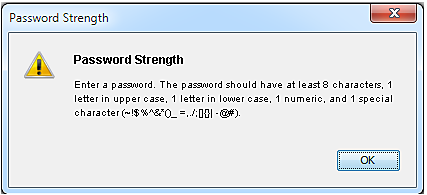 |
check for server updates  | Specify if you want to check for server updates. Select Automatically check for server and package updates. This only identifies a new update; it does not install the update. |
Pre-installation Details  | View the pre-installation details. |
Installing ColdFusion using the server configuration
Once you have determined the answers to the questions in the above section Gathering information necessary to install the server configuration, you can install the ColdFusion server configuration in Windows or UNIX, as applicable.
Installing ColdFusion server configuration in Windows or MAC
Note:
(Windows only) The Windows installer requires a computer that supports at least 256 colors.
Install ColdFusion in Windows or MAC
- Read the online version of the Release Notes for any late-breaking information or updates. For more information, see Release notes.
- Ensure that your operating system meets the system requirements.
- Review Installation considerations for Windows and Installation considerations for all platforms (Refer to the Installing Adobe ColdFusion).
- Determine the answers to the questions in the above table in "Gathering information necessary to install the server configuration" section.
- Close any applications that are currently running on your computer.
- If you plan to configure an external web server, ensure that the web server is running.
- Insert the DVD or download the setup file from the Adobe website.
- If the installation wizard does not start automatically when you insert the DVD, locate the appropriate installer file on the DVD and double-click it. If you are installing from a network or a downloaded file, locate the ColdFusion installer *Windows only:* coldfusion_2025_WWEJ_win64.exe and double-click it.*MAC only:*Extract the coldfusion_2025_WWEJ_osx2025.dmg file and double-click the installer.
- Follow the instructions in the installation wizard, and let it run to completion.
- Click OK to open the ColdFusion Administrator and configure the server.
- To install any other integrated Adobe or third-party technologies, see Installing Integrated Technologies.
- Configure and manage your system, as described in Configuring your System your System.
- To learn about ColdFusion, read the documentation, which is accessible through the Documentation link on the Resources page of the ColdFusion Administrator.
Installing the ColdFusion server configuration in UNIX
By default, ColdFusion installs into the /opt/coldfusion2025 directory. You can also choose to install ColdFusion in a different directory.
Note:
The default user is nobody for the UNIX installer running ColdFusion.
Install the ColdFusion server configuration in UNIX
- Read the online version of the Release Notes for any late-breaking information or updates. For more information, see Release notes.
- Ensure that your operating system meets the system requirements.
- Review Installation considerations for UNIX and Installation considerations for all platforms (Refer to the Installing Adobe ColdFusion).
- Determine the answers to the questions in the above section "Gathering information necessary to install the server configuration".
- If you plan to configure an external web server, ensure that the web server is running.
- Log in as root.
Copy the installation file that is appropriate for your platform and locale from the DVD or Adobe website, and save it to a directory on your local disk. The following installation files are those for the supported server configuration platforms:
- ColdFusion_2025_WWEJ_linux64.bin (64-bit systems)SolarisColdFusion_2025_WWEJ_solaris64.bin
- Using the cd command, go to the directory that contains the installation file.
- Start the installation with the following command:
| ./<filename> |
Note:
To run the Linux installer in GUI mode, type ./<filename> -i gui.
- Follow the prompts in the installation program, and let it run to completion.
Note:
For security reasons, it is crucial that you do not use root for the runtime user.
- Start ColdFusion with the following command:
/cf_root/cfusion/bin/coldfusion start |
If you specified the use of an external web server when you ran the installer, ColdFusion automatically runs the cf_root/cfusion/bin/cf-connectors.sh script when it starts the first time. This shell script runs the Web Server Configuration Tool by using the settings that you specified during the installation. If there are problems running this script, review the configuration and bin directory specifications, modify as necessary, and rerun the script. You can also configure your web server by using the scripts in cf_root/cfusion/bin/connectors, as appropriate. To stop ColdFusion, use the following command:
/cf_root/cfusion/bin/coldfusion stop |
For more information on managing processes, see Managing the ColdFusion process in UNIX.
- Open ColdFusion Administrator to run the Configuration wizard.
- Configure and manage your system, as described in Configuring your System.
- To install any other integrated Adobe or third-party technologies, see Installing Integrated Technologies.
- To learn about ColdFusion, read the documentation, which is accessible through the Documentation link on the Resources page of the ColdFusion Administrator.
ColdFusion installation directory structure
By default, ColdFusion2025 is your installation directory. The following table describes the directory structure:
Directory | Description |
cfusion | Contains the following directories:
|
config | Contains instances.xml and connector configuration files. Also, contains cluster configuration file, cluster.xml. |
jre | Java runtime files. |
uninstall | Files to uninstall ColdFusion. |
Note:
The ColdFusion_install\cfusion\bin directory contains the Jvm.config file.
Using the built-in web server
ColdFusion provides in-built Tomcat application server that you can use to develop ColdFusion applications.
Note:
The version of Tomcat application server bundled with Adobe ColdFusion (2025 release) is 10.1.34.
During the ColdFusion installation, choose a web server. If you select the built-in web server, your web root directory is located in the cfroot / wwwroot directory. By default, the web server runs on port 8500. It means that to display a page in your application, append:8500 to the host name or IP address in the URL; for example, http://localhost:8500/YourApp1/index.cfm. If the page does not appear, ensure that the document is located in the built-in web server's web root directory; for example, C:\ColdFusion2025\cfusion\wwwroot\YourApp1\index.cfm.
Note:
If port 8500 is in use, the installer checks up to 100 ports (starting with 8501) to find a port that is not used. ColdFusion uses that port and displays a message to indicate the selected port.
If you select an external web server during installation, the built-in web server is deactivated.
Change the port of the built-in web server
- Back up the server.xml file. This file is in the cfroot\cfusion\runtime\conf directory.
- Open the original server.xml file for editing.
- Search for internal webserver start.Update the port number.
port="8500" protocol="org.apache.coyote.http11.Http11Protocol"

connectionTimeout="20000"

redirectPort="8445" compression="on" useSendfile="no" compressableMimeType="text/html,text/xml"/>- Save the file and then restart ColdFusion.
Configuring the built-in web server (Tomcat)
While installing, if you have configured ColdFusion on an external web server, do the following to configure ColdFusion on in-built Tomcat:
- Open the cfroot\cfusion\runtime\conf\server.xml file.
- Search for internal webserver start.Uncomment the following connector XML.
port="8500" protocol="org.apache.coyote.http11.Http11Protocol"

connectionTimeout="20000"

redirectPort="8445"/>
Save the file, and then restart ColdFusion.
To enable OS Symbolic links after switching to Tomcat, edit the context.xml file found in /cfusion/runtime/conf/ to add allowLinking="true" attribute to the context element.
Starting, stopping, and restarting ColdFusion
On Windows
At prompt, go to the directory cfroot\cfusion\bin and run the following command: coldfusion.exe -start -console. To stop ColdFusion, use the command coldfusion.exe -stop -console. To restart, use the command coldfusion.exe -restart -console.Alternatively, you could also start, stop, and restart ColdFusion server using Windows Services.
Note:
Paused tasks misfire when restarting ColdFusion.
Note:
As possible in previous versions of ColdFusion, you can also use the cfstart script to start/stop the ColdFusion sever.
Note:
The -console argument is optional. If it is not provided, the logs are saved in the cfroot\cfusion\logs directory.
On UNIX/Linux/Solaris/MAC OSX
At prompt, go to the directory cfroot\cfusion\bin and run the following command: ./coldfusion start}}To stop ColdFusion, use the command ./{{coldfusion stop. }}To restart, use the command {{./coldfusion restart.
Note:
Paused tasks misfire when restarting ColdFusion.
Note:
Use the status command to find the status of ColdFusion server.
Editing the JVM settings
To edit the JVM settings, open the cfroot\cfusion\bin\jvm.config file and update the following details:
- java.home: Java home. If not set, ColdFusion verifies the default JRE in the cfroot\jre folder, in the registry, or in the J{{AVA_HOME}} environment variable.
- java.args: Settings for -Xmx, ColdFusion classpath, and so on.
- java.library.path: Settings for library path.
- java.class.path: Additional classpath settings in a comma-separated list.
- application.home: Default is cfroot\cfusion
Creating and editing a new ColdFusion instance
After installing ColdFusion in stand-alone mode, create an instance of ColdFusion using the ColdFusion Administrator.
- In the ColdFusion Administrator, go to Enterprise Manager > Instance Manager.
- Click Add New Instance.
- Enter the server name and server directory.
- (Optional) Check Create Windows Service.
- Click Submit. In the Instance Manager, start, stop, restart, delete, access website, or access administrator.
- Click the Edit icon to edit the instance manager.
- Edit the internal webserver port and load balancing factor.Load balancing factor represents the load the instance takes up. Load balancing factor is applicable only if the instance is part of the cluster. For example, the load balancing factor for the first instance is 1 and that of the second instance is 2. The second instance receives two times more requests.
- Click Submit.
Registering a remote instance
Register a new remote instance of ColdFusion using the ColdFusion Administrator.
- In the ColdFusion Administrator, click Enterprise Manager > Instance Manager > Register Remote Instance.
- Specify the details such as instance name, remote host, remote port, http port, and JVM route. Instance name is a string that is used to identify the instance. Remote port and HTTP port are displayed in the Instance Manager page. These ports are provided in the server.xml file available in the runtime\conf folder of the instance. Remote port is the AJP port and the instance port is the connector port.JVM route is the remote instance name. The JVM route is an attribute that acts as an identifier for a particular Tomcat worker. JVM route is provided in the server.xml file available in the runtime\conf folder of the instance. For more information on JVM route, see http://tomcat.apache.org/tomcat-8.0-doc/cluster-howto.html.
Note:
A remote instance and a local instance cannot have the same JVM route if they are added in a cluster with sticky session enabled.
- If you want remote start and stop functionality over HTTP, enter Admin Component port, Admin Component user name, and Admin Component password. The default Admin Component port is 8985.
Note:
To enable this feature, install admin component on the remote host.
- In the remote host, open the ColdFusion_installtion\cfusion\jetty\etc\jetty.xml.
- Search for the string, org.mortbay.jetty.bio.SocketConnector.
- Update the host with the IP address of the remote host.
- Restart the jetty server.
- Click Submit.
Adding start and stop functionality to a remote instance over HTTPS
You can start and stop a remote instance over HTTPS or HTTP. To enable this feature, install admin component while installing ColdFusion. You can install Solr, admin component, or both while installing ColdFusion.
- Do the following in the remote host.
- In the remote host, generate a private key in a keystore file. Provide the details at prompt.
cfroot\jre\bin\keytool -genkeypair -alias certificatekey -keyalgRSA -validity 7 -keystore keystore.jksb. Export the certificate. You can have a self-signed certificate or a certificate from a Certificate Authority.
cfroot\jre\bin\keytool -export -alias certificatekey -keystorekeystore.jks -rfc -file selfsignedcert.cerc. Copy the jks file created in the jetty\etc directory.
d. Open the jetty\etc\jetty.xml file.
e. Search for the string, To add an HTTPS SSL Listenerand add the following entry:
d. Open the jetty\etc\jetty.xml file.
e. Search for the string, To add an HTTPS SSL Listenerand add the following entry:
<Arg>

<New class="org.mortbay.jetty.security.SslSocketConnector">

<Set name="Port">8443</Set>

<Set name="maxIdleTime">30000</Set>

<Set name="keystore"><SystemProperty name="jetty.home" default="." />/etc/jks-file.jks</Set>

<Set name="password">changeit</Set>

<Set name="keyPassword">changeit</Set>

<Set name="truststore"><SystemProperty name="jetty.home" default="." />/etc/jks-file.jks</Set>

<Set name="trustPassword">changeit</Set>

</New>

</Arg>

</Call>
f. Update the keystore name, password, key password, and jks file in the entry.
g. Search for the string org.mortbay.jetty.bio.SocketConnector.
h. Update the host with the IP address of the remote host.
i. Restart the jetty server.
g. Search for the string org.mortbay.jetty.bio.SocketConnector.
h. Update the host with the IP address of the remote host.
i. Restart the jetty server.
- Do the following in the local host from where you add the remote instance:
- Copy the .cer file created in the remote host to any of the locations.
- Import the certificate.
cfroot\jre\bin\keytool.exe -importcert -keystore"cfroot\jre\lib\security\cacerts" -file selfsignedcert.cer -storepass password c. Register the remote instance using the ColdFusion Administrator. For more information, see Registering a remote instance section in this document.
d. In the Register Remote Instance page, enter the admin component port, admin component user name, and admin component password (user name and password. These details you specified while installing the Remote Instance Administrator). The default https port is 8443.
e. Select the HTTPS check box.
f. Click Submit.
Setting up remote start and stop functionality using HTTPS in Server Manager
You can set up start and stop remote instance functionality in Server Manager. To enable this feature, install Remote Instance Administrator while installing ColdFusion.
- Do the following in the remote host.
- In the remote host, generate a private key in a keystore file. Provide the details at prompt.
cfroot\jre\bin\keytool -genkeypair -alias certificatekey -keyalgRSA -validity 7 -keystore keystore.jksb. Export the certificate. You can have a self-signed certificate or a certificate from a Certificate Authority.
cfroot\jre\bin\keytool -export -alias certificatekey -keystorekeystore.jks -rfc -file selfsignedcert.cerc. Copy the .jks file created in the remote host to the jetty\etc directory.
d. Open the jetty\etc\jetty.xml file.
e. Search for the string, To add a HTTPS SSL Listenerand then add the following entry:
d. Open the jetty\etc\jetty.xml file.
e. Search for the string, To add a HTTPS SSL Listenerand then add the following entry:
<Arg>

<New class="org.mortbay.jetty.security.SslSocketConnector">

<Set name="Port">8443</Set>

<Set name="maxIdleTime">30000</Set>

<Set name="keystore"><SystemProperty name="jetty.home" default="." />/etc/server.jks</Set>

<Set name="password">changeit</Set>

<Set name="keyPassword">changeit</Set>

<Set name="truststore"><SystemProperty name="jetty.home" default="." />/etc/server.jks</Set>

<Set name="trustPassword">changeit</Set>

</New>

</Arg>

</Call>
f. Update the keystore name, password, key password, and jks file in the entry.
g. Search for the string, org.mortbay.jetty.bio.SocketConnector.
h. Update the host with the port number of the remote host.
i. Restart the jetty server.
g. Search for the string, org.mortbay.jetty.bio.SocketConnector.
h. Update the host with the port number of the remote host.
i. Restart the jetty server.
- Do the following in the local host from where you add remote instance:
- Copy the .cer file created in the remote host to any of the locations.
- Import the certificate.
cfroot\jre\bin\keytool.exe -importcert -keystore "cfroot\jre\lib\security\cacerts" -file selfsignedcert.cer -storepass password- Open wwwroot\CFIDE\ServerManager\ServerManager.air on the local host.
- Specify the connection details.
- Click Start/Stop Details.
- Select HTTPS.
- Provide the following information:
- App Server Username: User name for the admin component that you specified while installing ColdFusion. Default value is admin .
- App Server Password: Password for the admin component.
- Port: ColdFusion remote instances HTTPS port.
- Server: ColdFusion remote instance name.
- ColdFusion Version: For 2025 version of ColdFusion.
- Admin Server Port: Default https port is 8443. Port of the Jetty server.
- Context Root: Value is AdminServlet.
- Click Apply.
Setting up remote start and stop functionality using HTTP in Server Manager
You can set up start and stop remote instance functionality in Server Manager. To enable this feature, install Remote Instance Administrator while installing ColdFusion.
- Do the following in the remote host:
- In the remote host, open the ColdFusion_installation\cfusion\jetty\etc\jetty.xml.
- Search for the string, org.mortbay.jetty.bio.SocketConnector.
- Update the host with the IP address of the remote host.
- Start the jetty server. Go to the ColdFusion_installation\cfusion\jetty directory and use jetty.exe. You can also use the jetty services in the Windows services.
- Open wwwroot\CFIDE\ServerManager\ServerManager.air on the local host.
- Specify the connection details.
- Click Start / Stop Details.
- Select HTTP.
- Provide the following information:
- App Server Username: Username for the admin component that you specified while installing ColdFusion. The default value is admin .
- App Server Password: Password for the admin component.
- Port: ColdFusion remote instance's HTTP port.
- Server: ColdFusion remote instance name.
- ColdFusion Version: For ColdFusion (2025 release), the value 2025.
- Admin Server Port: Default https port is 8985. Port of the Jetty server.
- Context Root: Value is AdminServlet.
- Click Apply.
Managing clusters
- In the ColdFusion Administrator, click Enterprise Manager > Cluster Manager.
- Enter a cluster name and then click Add.
- Click the cluster name and move the servers to the cluster based on the requirement.
- (If necessary) Edit the multicast port. Multicast port is used to group the cluster members together. Default value of multicast port is 45564. After you create a cluster, the port is added in the cfroot\config\cluster.xml file. For more information on multicast port, see http://tomcat.apache.org/tomcat-8.0-doc/config/cluster-membership.html.
- Specify if you need sticky session.Sticky session ensures that after a session is established on an instance, all future requests from the client are mapped to that instance.
Click Submit.
Note:
Restart the web server if cluster instances are modified.
Adding a remote instance to a cluster
To add a remote instance to a cluster, add the cluster block to the remote instance's server.xml. Then, register the remote instance and add the instance to the cluster. For more information on configuring clusters on Tomcat, see http://tomcat.apache.org/tomcat-8.0-doc/cluster-howto.html.
- Register the remote instance to the local machine.
- Create a cluster in the local machine.
- Open the cfroot_instance-name_runtime\conf\server.xml file of the remote instance.
- Add the following block between the entries </host> }}and {{</engine>:
<Manager notifyListenersOnReplication="true"

expireSessionsOnShutdown="false" className="org.apache.catalina.ha.session.DeltaManager">

</Manager>

<Channel className="org.apache.catalina.tribes.group.GroupChannel">

<Membership port="45565" dropTime="3000" address="228.0.0.4" className="org.apache.catalina.tribes.membership.McastService" frequency="500">

</Membership>

<Receiver port="4003" autoBind="100" address="auto" selectorTimeout="5000" maxThreads="6" className="org.apache.catalina.tribes.transport.nio.NioReceiver">

</Receiver>

<Sender className="org.apache.catalina.tribes.transport.ReplicationTransmitter">

<Transport className="org.apache.catalina.tribes.transport.nio.PooledParallelSender">

</Transport>

</Sender>

<Interceptor className="org.apache.catalina.tribes.

group.interceptors.TcpFailureDetector">

</Interceptor>

<Interceptor className="org.apache.catalina.tribes.group.

interceptors.MessageDispatch15Interceptor">

</Interceptor>

</Channel>

<Valve className="org.apache.catalina.ha.tcp.ReplicationValve"

filter="">

</Valve>

<Valve className="org.apache.catalina.ha.session.JvmRouteBinderValve">

</Valve>


<ClusterListener className="org.apache.catalina.ha.session.

JvmRouteSessionIDBinderListener">

</ClusterListener>

<ClusterListener className="org.apache.catalina.ha.session.ClusterSessionListener">

</ClusterListener>


</Cluster>- In the entry, update the membership port with the multicast port of the cluster.
- Using the ColdFusion Administrator of the local host, add the local instance and the remote instance to the cluster.
Note:
If you enable sticky session, the JVM route of the remote instance and local instance must not be the same.
- Restart all the instances.
Note:
When adding a remote instance in a cluster, ensure that you comment out <Manager pathname="" /> in content.xml file located in <cf_home>\runtime\conf directory.
Configuring other web servers
Use the Web Server Configuration Tool to configure other web servers.
- Run cfroot\runtime\bin\wsconfig.exe.
You can also configure web servers using the command-line interface as follows.
Configuring IIS
wsconfig.exe -ws iis -site <site_no>or
wsconfig.exe -ws iis -site <site_name>Configuring cluster
wsconfig.exe -ws iis -site <site_no> -cluster <cluster-name>Configuring Apache
(Linux or MAC only) ./wsconfig -ws apache -dir <apache_conf_directory>or
(Windows only) wsconfig.exe ws apache dir <apache_conf_directory> bin <apache_bin_directory>/httpd script <apache_bin_directory>/apachectl

(Linux or Mac only) ./wsconfig ws apache dir <apache_conf_directory> bin <apache_bin_directory>/httpd script <apache_bin_directory>/apachectl
Configuring cluster
(Linux or MAC only) ./wsconfig -ws apache dir <apache_conf_directory> -cluster <cluster-name>Unconfiguring IIS
wsconfig.exe -remove -ws iis -site <site_no>or
wsconfig.exe -remove iis -site <site_name>Unconfiguring Apache
./wsconfig -remove ws apache dir <apache_conf_directory>or
Unconfiguring all webservers
./wsconfig -uninstallSeeing the list of webservers
./wsconfig -listConfiguring Secured Socket Layer (SSL)
SSL allows the browser and the server to communicate over a secured connection. Data that is sent is encrypted at one side, transmitted, and then decrypted at the other end. For more information about SSL configuration on Tomcat, see http://tomcat.apache.org/tomcat-8.0-doc/ssl-howto.html.
To configure SSL for ColdFusion using the keytool utility, do the following:
- Create a certificate file:
- Run the following command:cfroot\jre\bin\keytool -genkey -alias tomcat -keyalg RSA
- Type the details as per the instruction.If you do not provide a password, the default password for keystore and key is changeit. If you don't want to use the default password, ensure that you provide the same password for the keystore and the key.Running this command creates a certificate.keystore in the following location:
- Windows: C:\Documents and Settings_user's_director_y
- Linux: usr/home
- Open the cfroot\cfusion\runtime\conf\server.xml file and search for the string Define a SSLHTTP/1.1.
- Uncomment the connector details and update the section as follows:
<Connector port="8443" protocol="HTTP/1.1"

SSLEnabled="true" maxThreads="150" scheme="https"

secure="true" keystoreFile="<certificate_location>\.keystore" keystorePass="<password>" keyAlias="tomcat" clientAuth="false" sslProtocol="TLS" />- Restart ColdFusion.
- Access ColdFusion using the following URL: https://<ip-address>:8443/CFIDE/administrator
Changing virtual directory and the doc root
Do the following to change the virtual directory and doc root:
- Open CFInstallation\cfusion\runtime\conf\server.xml.
- Under host block, search for the string, "To add virtual directory."
- Uncomment the entry context path below.
- To add a virtual directory, add the aliases attribute as shown below:
<Context path="/" docBase="<absolute_path_to_cfrootectory>\wwwroot" WorkDir="<cf_home>\runtime\conf\Catalina\localhost\tmp" aliases="/path1=<absolute_path_to_directory1>,/path2=<absolute_path_to_directory2>"></Context>Note:
Alias path must include a leading /.
To change the doc root, change the docBase value in the above entry. For more details on the Context attributes, see http://tomcat.apache.org/tomcat-8.0-doc/config/context.html.
Changing the connector port for cfstat
You can use the connector output for logging cfstat metric. The cfconnector port is defined in the CFInstallation/cfusion/lib/neo-metric.xml file. If you have configured a connector, update the port with the connector port. The connector port (AJP port) is provided in the CFInstallation/cfusion/runtime/conf/server.xml.
To update the connector port using the Administrator console:
To update the connector port using the Administrator console:
- Login ColdFusion Administrator.
- Click Debugging & Logging > Debug Output.
- Update the connector port and click Submit Changes.
Enabling Search Engine Safe URLs
Search Engine Safe URL (SES) helps the search engines to index dynamic web pages. SES URLs pass parameters using slashes instead of default URL pattern. By default, SES is enabled for stand-alone installation of ColdFusion on Tomcat.
Note:
SES is applicable only for stand-alone installation of Tomcat. It does not work if ColdFusion is deployed as a WAR file on Tomcat.
Note:
If you wish to use custom SES URLs, also add the URL entry to the uriworkermap.properties file found in the wsconfig folder for your web server.
To enable SES URLs on an app server other than Tomcat, add the tags mentioned below to the web.xml file present inside WEB-INF.
This is applicable from ColdFusion 11 Update 12 and ColdFusion (2016 release) Updates 3 and 4.
<servlet-mapping id="coldfusion_mapping_6">

        <servlet-name>CfmServlet</servlet-name>

        <url-pattern>*.cfml/*</url-pattern>

</servlet-mapping>

<servlet-mapping id="coldfusion_mapping_7">

        <servlet-name>CfmServlet</servlet-name>

        <url-pattern>*.cfm/*</url-pattern>

</servlet-mapping>

<servlet-mapping id="coldfusion_mapping_8">

        <servlet-name>CFCServlet</servlet-name>

        <url-pattern>*.cfc/*</url-pattern>

</servlet-mapping>

<servlet-mapping id="coldfusion_mapping_24">

        <servlet-name>CfmServlet</servlet-name>

        <url-pattern>*.CFML/*</url-pattern>

</servlet-mapping>

<servlet-mapping id="coldfusion_mapping_25">

        <servlet-name>CfmServlet</servlet-name>

        <url-pattern>*.Cfml/*</url-pattern>

</servlet-mapping>

<servlet-mapping id="coldfusion_mapping_26">

        <servlet-name>CfmServlet</servlet-name>

        <url-pattern>*.CFM/*</url-pattern>

</servlet-mapping>

<servlet-mapping id="coldfusion_mapping_27">

        <servlet-name>CfmServlet</servlet-name>

        <url-pattern>*.Cfm/*</url-pattern>

</servlet-mapping>

<servlet-mapping id="coldfusion_mapping_28">

        <servlet-name>CFCServlet</servlet-name>

        <url-pattern>*.CFC/*</url-pattern>

</servlet-mapping>

<servlet-mapping id="coldfusion_mapping_29">

        <servlet-name>CFCServlet</servlet-name>

        <url-pattern>*.Cfc/*</url-pattern>

</servlet-mapping>
Enabling Secure Profile
ColdFusion allows you to secure ColdFusion server furthermore by enabling or disabling certain settings. When installing ColdFusion, you can enable Secure Profile by selecting the option when prompted on the Secure Profile screen. Further, you could provide a comma separate list of IP addresses that may be allowed to access the ColdFusion Administrator. In ColdFusion, IP address restriction is supported at the connector-level. For more information, see this document.
Changing the log rotation settings
You can change the log rotation settings such as maximum number of backup files and the size of the backup files.
- Specify log file settings in the neo-logging.xml, located in the <ColdFusion_Home>\lib directory.
- The size of coldfusion-out.log and coldfusion-error.log is set to 20MB by default. You can change the size of the log in the neo-logging.xml file by changing the maxOutLogSize setting.
- You can also change the maximum number of backups of coldfusion-out.log and coldfusion-error.log that ColdFusion takes during log rotation within the neo-logging.xml file. Change the maxOutFileBackup setting.
You can change the settings of the remaining files in the ColdFusion Administrator by going to the Debugging and Logging > Logging Settings section. Change the Maximum file size and Maximum number of Archives settings accordingly.
Enabling persistent session
To persist a session after a Tomcat restart, do the following:
- Open the cfroot\cfusion\runtime\conf\context.xml file.
Uncomment the Manager pathname node.
Note:
Flex sessions are not persisted after a Tomcat restart.
Updating from an earlier version
If you have skipped the migration or you have to make modifications to the previous installation that has to be migrated, do the following:
- Stop the server.
- Create a folder named cfXsettings (in which X is the earlier version of ColdFusion) in cf_webapp_new_installation_root_directory/cfusion/lib. For example, name the folder cf2016settings.
- Save settings by copying the files cf_webapp_root/WEB-INF/cfusion/lib/neo-*.xml (of previous installation) to cfXsettings.
- Edit the ColdFusion cfusion/lib/adminconfig.xml file by setting the value of the runmigrationwizard and the {{migratecf}}X (in which X is the earlier version of ColdFusion) switch to true.
- Restart the ColdFusion application.
- To run the migration wizard, launch ColdFusion Administrator.
Uninstalling ColdFusion
Uninstalling ColdFusion deletes all program files and related components from your computer.
Uninstall ColdFusion from Windows
- Select Start > Settings > Control Panel > Add/Remove Programs > Adobe ColdFusion 2025.
- Click Change/Remove.
- When the program completes, remove any remaining files and directories in the cf_root directory.
Uninstall ColdFusion from UNIX
- Log in as root.
- To go to the cf_root/uninstall directory, enter the following command:
cd cf_root/uninstall- Enter the following command:
./uninstall.sh- When the program completes, remove any remaining files and directories in the cf_root directory. ColdFusion is deleted from your server.
We're glad. Tell us how this page helped.
We're sorry. Can you tell us what didn't work for you?
Share additional feedback to help us improve.
0/255
|