Whatever message this page gives is out now! Go check it out!


Using Ajax form controls and features
Last update:
May 18, 2026
ColdFusion HTML forms and controls provide the following Ajax-based features:
- The cfgrid, cfinput, cfselect, cftextarea, and cftree controls support binding to get control contents.
- ColdFusion functions support asynchronous submission of forms without refreshing the entire page. When a form is in an Ajax container control, it is done automatically. Also, the ColdFusion.Ajax.SubmitForm JavaScript function and Ajax proxy setForm function support manual asynchronous submissions.
- The cfgrid and cftree tags provide HTML grids and trees that do not require a Java applet or Flash.
- The cftextarea control has a rich text editor option. The text editor is configurable.
- The cfinput tag supports a datefield type with an Ajax-based pop-up calendar from which user can select the date.
- The cfinput tag with text type supports an autosuggest attribute that lets you dynamically supply a drop-down list of field completions based on the current user input.
- The cfinput, cfselect, and cftextarea tags support a tooltip attribute that specifies a pop-up tool tip to display when the user moves the mouse over the control. The cftooltip tag displays a tool over any region of a page, not just a form control.
Using Ajax form controls
ColdFusion Ajax-based form controls let you submit Ajax forms in your applications without refreshing the entire page.
Note:
When you use Ajax to submit forms asynchronously from the page, you cannot use cfinputor input tags to upload files.
Using Ajax containers for form submission
The ColdFusion Ajax container tags, cfdiv, cflayoutarea, cfpod, and cfwindow, automatically submit any forms that they contain asynchronously. When the form is submitted, the result returned by the action page replaces the contents of the container, but has no effect on the rest of the page.
The following example shows this behavior in the submitSimple.cfm page:
The following example shows this behavior in the submitSimple.cfm page:
<html xmlns="http://www.w3.org/1999/xhtml">

<head>

</head>

<body>

<cflayout type="vbox" name="layout1">

<cflayoutarea>

<h3>This area is not refreshed when the form is submitted.</h3>

<br />

</cflayoutarea>


<cflayoutarea>

<h3>This form is replaced by the action page</h3>

<cfform name="myform" format="html" action="showName.cfm">

<cfinput type = "Text" name = "name">

<cfinput type = "submit" name = "submit" value = "Enter name">

</cfform>

</cflayoutarea>

</cflayout>


</body>

</html>
In the following example, when you enter a name in the text input and click the Enter name button, the entered text replaces the form on the page, but the rest of the page is not refreshed. This example shows the showName.cfm action page:
<cfoutput>The Name is : <strong>#Form.name#</strong></cfoutput>

</cfif>
Using the cfajaxproxy SetForm function
The SetForm function of the proxy object created by the cfajaxproxy tag causes the proxy to pass the form values as arguments to the next CFC function that you call after the SetForm function. This way, you can pass the current values of fields in a form to a CFC function, which can then do the necessary processing and return a result.
When you use the SetForm function, the following rules apply to the arguments in the called CFC function:
When you use the SetForm function, the following rules apply to the arguments in the called CFC function:
- The function does not need to specify the form fields in cfargument tags, and the function gets the field values passed by name.
- Form fields that have the same names as CFC arguments override the CFC argument values.
- If you do not specify form fields in the cfargument tags, they do not necessarily follow any declared arguments, when you use positional (array) notation to access them in the arguments structure.
- The arguments scope in the CFC function includes two fields that ColdFusion uses to control its behavior. These fields are intended for internal use, and their names might change in future releases. Both field values are set to true:
- _CF_NODEBUG tells ColdFusion not to return debugging output in the call response.
- _CF_NOCACHE tells ColdFusion to send a no cache header on the response, which prevents the browser from caching the response and ensures that every Ajax request results in a network call. The following example shows how to use the SetForm tag to submit the contents of a login form. When the user clicks the Login! button, the doLogin function calls the proxy setForm function and then the AuthenticationSystem.cfcvalidateCredentials method. The validateCredentials method checks the password of the user and if it is valid, returns true to the proxy. Because the proxy is synchronous (the default), the doLogin method gets the returned value. If the value is true, it hides the login window; the user can then access the page contents. If the return value is false, the doLogin function displays a message in the login window title bar. The following example shows the setForm.cfm application:
<head>

<script type="text/javascript">

function doLogin() {

// Create the Ajax proxy instance.

var auth = new AuthenticationSystem();


// setForm() implicitly passes the form fields to the CFC function.

auth.setForm("loginForm");

//Call the CFC validateCredentials function.

if (auth.validateCredentials()) {

ColdFusion.Window.hide("loginWindow");

} else {

var msg = document.getElementById("loginWindow_title");

msg.innerHTML = "Incorrect username/password. Please try again!";

}

}

</script>

</head>


<body>

<cfajaxproxy cfc="AuthenticationSystem" />


<cfif structKeyExists(URL,"logout") and URL.logout>

<cflogout />

</cfif>


<cflogin>

<cfwindow name="loginWindow" center="true" closable="false"

draggable="false" modal="true"

title="Please login to use this system"

initshow="true" width="400" height="200">

<!--- Notice that the form does not have a submit button.

Submit action is performed by the doLogin function. --->

<cfform name="loginForm" format="xml">

<cfinput type="text" name="username" label="username" /><br />

<cfinput type="password" name="password" label="password" />

<cfinput type="button" name="login" value="Login!" onclick="doLogin();" />

</cfform>

</cfwindow>

</cflogin>


<p>

This page is secured by login.

You can see the window containing the login form.

The window is modal; so the page cannot be accessed until you log in.

<ul>

<li><a href="setForm.cfm">Continue using the application</a>!</li>

<li><a href="setForm.cfm?logout=true">Logout</a>!</li>

</ul>

</p>

</body>

</html>
The following example shows the AuthenticationSystem.cfc file:
<cffunction name="validateCredentials" access="remote" returntype="boolean"

output="false">

<cfargument name="username" type="string"/>

<cfargument name="password" type="string"/>


<cfset var validated = false/>

<!--- Ensure that attempts to authenticate start with new credentials. --->

<cflogout/>


<cflogin>

<cfif arguments.username is "user" and arguments.password is "secret">

<cfloginuser name="#arguments.username#"

password="#arguments.password#" roles="admin"/>

<cfset validated = true/>

</cfif>

</cflogin>


<cfreturn validated/>

</cffunction>

</cfcomponent>
Using the ColdFusion.Ajax.submitForm function
You can use the ColdFusion.Ajax.submitForm function to submit form contents to a CFML page (or other active page) at any time. For example, you could use this function to automatically save a partially completed form. This function does not support uploading a file attachment to the form.
When you use this function, you pass it the name of the form to submit and the URL of the page that processes the form. You can also specify the following optional parameters:
When you use this function, you pass it the name of the form to submit and the URL of the page that processes the form. You can also specify the following optional parameters:
- A callback function that handles the returned results
- An error handler that takes two parameters, an HTTP error code and a message
- The HTTP method (by default, POST)
- Whether to submit the form asynchronously (by default, true) The following proof of concept example uses the ColdFusion.Ajax.submitForm function to submit two form fields to an asyncFormHandler.cfm page, which simply echoes the form values. The callback handler displays an alert with the returned information.
<head>

<!--- The cfajaximport tag is required for the submitForm function to work

because the page does not have any Ajax-based tags. --->

<cfajaximport>


<script>

function submitForm() {

ColdFusion.Ajax.submitForm('myform', 'asyncFormHandler.cfm', callback,

errorHandler);

}


function callback(text)

{

alert("Callback: " + text);

}


function errorHandler(code, msg)

{

alert("Error!!! " + code + ": " + msg);

}

</script>


</head>

<body>


<cfform name="myform">

<cfinput name="mytext1"><br />

<cfinput name="mytext2">

</cfform>


<a href="javascript:submitForm()">Submit form</a>

</body>

</html>
The asynchFormHandler.cfm page consists of a single line, as follows:
<cfoutput>Echo: #form.mytext1# #form.mytext2#</cfoutput>Using the ColdFusion.navigate function to submit a form
The ColdFusion.navigate JavaScript function can submit a form to a URL and have the returned output appear in a specified container control, such as a cfdiv, cflayout, cfpod, or cfwindow tag. This function lets you populate a control other than the one that contains the form when the user submits the data. You can also use the function to submit the form asynchronously when a user performs an action outside the form, such as clicking a menu item.
For an example that uses this function, see the ColdFusion.navigate function in the CFML Reference.
For an example that uses this function, see the ColdFusion.navigate function in the CFML Reference.
Using HTML grids
The ColdFusion HTML cfgrid control lets you use a bind expression to dynamically populate the grid. HTML grids that use bind expressions are paged; as users navigate from page to page of the grid, the grid dynamically gets the data for only the required page from the data source. You also use bind expressions when you let users edit form contents, and other ColdFusion controls can bind to the grid. Also, HTML grids provide several JavaScript functions that you can use to manage and manipulate the grids.
You can also create a static HTML grid by specifying a cfgrid tag that does not use a bind expression. With static grids, all data is initially available.
In HTML mode, if you move the mouse over a column heading, a down arrow button appears. Clicking the button displays a list with the following options:
You can also create a static HTML grid by specifying a cfgrid tag that does not use a bind expression. With static grids, all data is initially available.
In HTML mode, if you move the mouse over a column heading, a down arrow button appears. Clicking the button displays a list with the following options:
- Sort the grid in ascending or descending order based on the column's content.
- Select the columns to display.
- If the grid has a groupfield attribute: turn grouping off and on and group by the column value. If you specify selectMode="edit" for an HTML grid, the grid displays Insert, Save, Cancel, and Delete buttons to the bottom bar. The Insert button opens a new editable row. The Save button commits any changes to the bind source. The Cancel button rolls back any changes that have not been saved. The Delete button deletes a selected row. You need not press the Save button after clicking the Delete button.
Dynamically filling form data
HTML grids can dynamically fill the grid data by using a bind attribute with a bind expression that calls a CFC or JavaScript function, or a URL. The bind expression uses bind parameters to specify dynamic information provided by the grid and the values of any other form field attributes.
Pass the following bind parameters to the bind expression. If you omit any of the parameters in the function call or URL, you get an error. These parameters send information about the grid and its state to the data provider function. The data for these parameters is provided automatically. You do not set any values manually.
Pass the following bind parameters to the bind expression. If you omit any of the parameters in the function call or URL, you get an error. These parameters send information about the grid and its state to the data provider function. The data for these parameters is provided automatically. You do not set any values manually.
Parameter name | Description |
cfgridpage | The number of the page for which to retrieve data. |
cfgridpagesize | The number of rows of data in the page. The value of this parameter is the value of the pageSize attribute. |
cfgridsortcolumn | The name of the column that determines the sorting order of the grid. This value is set only after the user clicks a column heading. |
cfgridsortdirection | The direction of the sort, may be 'ASC' (ascending) or 'DESC' (descending). This value is set only after the user clicks a column heading. |
The cfgridsortcolumn and cfgridsortdirection parameters can be empty if the user or application has not sorted the grid, for example, by clicking a grid column header. |
For more information on binding and bind parameters, see Using Ajax Data and Development Features in the CFML Reference.
You can use optional parameters to specify additional information to pass to the called function. These parameters provide data that the called function requires to determine the data to return. For example, if the function returns the cities in a state, you would pass it the state name. Any or all of the optional function parameters can be bind parameters. A state name, for example, could come from the selection in a states cfselect control.
If you do not want the grid to refresh automatically when other controls change, you can use the @none specifier on all optional bind parameters. Doing this, prevents automatic updating of the grid based on the bound control values. Use the ColdFusion.Grid.refresh JavaScript function to explicitly refresh the grid contents. For more information on the use of the @none specifier and explicitly refreshing the control, see Specifying bind parameters in Binding data to form fields.
If the grid supports user sorting of the data (the sort attribute is true), the function called by the bind expression must return data in the desired sorted order, and must use the values of the cfgridsortcolumn and cfgridsortdirection bind parameters to determine the order. Even if you do not allow user sorting, still pass these parameters to the function; otherwise, you get an error. Also, your function or action page must handle cases where these parameters are empty strings, because their values are not set until the user selects a column header to sort the grid, or you call the JavaScript ColdFusion.Grid.sort function.
The format of the returned data depends on how you get the data:
You can use optional parameters to specify additional information to pass to the called function. These parameters provide data that the called function requires to determine the data to return. For example, if the function returns the cities in a state, you would pass it the state name. Any or all of the optional function parameters can be bind parameters. A state name, for example, could come from the selection in a states cfselect control.
If you do not want the grid to refresh automatically when other controls change, you can use the @none specifier on all optional bind parameters. Doing this, prevents automatic updating of the grid based on the bound control values. Use the ColdFusion.Grid.refresh JavaScript function to explicitly refresh the grid contents. For more information on the use of the @none specifier and explicitly refreshing the control, see Specifying bind parameters in Binding data to form fields.
If the grid supports user sorting of the data (the sort attribute is true), the function called by the bind expression must return data in the desired sorted order, and must use the values of the cfgridsortcolumn and cfgridsortdirection bind parameters to determine the order. Even if you do not allow user sorting, still pass these parameters to the function; otherwise, you get an error. Also, your function or action page must handle cases where these parameters are empty strings, because their values are not set until the user selects a column header to sort the grid, or you call the JavaScript ColdFusion.Grid.sort function.
The format of the returned data depends on how you get the data:
Bind type | Return value |
CFC | A ColdFusion structure. ColdFusion automatically converts the structure for return to the caller. Alternatively, you can return a JSON representation of the structure. |
URL | A JSON representation of a structure. No other body contents is allowed. |
JavaScript | A JavaScript object. |
When you specify a CFC in the bind attribute, use the queryConvertForGrid function to convert a query directly into a structure that you can use as your CFC return value.
When you specify a CFML page in the bind attribute, use the queryConvertForGrid function to convert a query into a structure, and then use the serializeJSON function to convert the structure into a JSON representation.
If you manually create a JavaScript object or its JSON representation, it must have two top-level keys:
When you specify a CFML page in the bind attribute, use the queryConvertForGrid function to convert a query into a structure, and then use the serializeJSON function to convert the structure into a JSON representation.
If you manually create a JavaScript object or its JSON representation, it must have two top-level keys:
- TOTALROWCOUNT: The total number of rows in the query data set being returned. This value is the total number of rows of data in all pages in the grid, and not the number of rows in the current page.
- QUERY: The contents of the query being returned{{.}} The QUERYvalue must also be an object with two keys:
- COLUMNS: An array of the column names.
- DATA: A two-dimensional array, where the first dimension corresponds to the rows and the second dimension corresponds to the field values, in the same order as the COLUMNS array.
Note:
If a CFC manually creates a return structure, the QUERY value can be a ColdFusion query object; ColdFusion automatically converts it for remote access.
The following example defines an object that a JavaScript bind function can return to provide the data for a cfgrid tag:
{"TOTALROWCOUNT":6,"QUERY":{"COLUMNS":["EMP_ID","FIRSTNAME",

"EMAIL"],"DATA":[[1,"Carolynn","CPETERSON"],

[2,"Dave","FHEARTSDALE"], [3,"Linda","LSTEWART"],

[4,"Aaron","ASMITH"], [5,"Peter","PBARKEN"],

[6,"Linda","LJENNINGS"],]}};
The following example uses a bind expression and a CFC to populate a dynamic, paged, data grid. The CFML page contains the following form:
<html xmlns="http://www.w3.org/1999/xhtml">

<head>

</head>


<body>

<cfform name="form01">

<cfgrid format="html" name="grid01" pagesize=5 sort=true

bind="cfc:places.getData({cfgridpage},{cfgridpagesize},

{cfgridsortcolumn},{cfgridsortdirection})">

<cfgridcolumn name="Emp_ID" display=true header="eid" />

<cfgridcolumn name="FirstName" display=true header="Name"/>

<cfgridcolumn name="Email" display=true header="Email" />

</cfgrid>

</cfform>

</body>

</html>
The places.cfc file looks as follows. Notice that the query gets the full data set each time the function gets called. the QueryConvertForGrid function selects and returns only the required page of data:
<cffunction name="getData" access="remote" output="false">

<cfargument name="page">

<cfargument name="pageSize">

<cfargument name="gridsortcolumn">

<cfargument name="gridsortdirection">

<cfquery name="team" datasource="cfdocexamples">

SELECT Emp_ID, FirstName, EMail

FROM Employees

<cfif gridsortcolumn neq "" or gridsortdirection neq "">

order by #gridsortcolumn# #gridsortdirection#

</cfif>

</cfquery>

<cfreturn QueryConvertForGrid(team, page, pageSize)>

</cffunction>

</cfcomponent>
The following example is equivalent to the previous one, but uses a URL bind expression in the main page and a CFML page to return the data.
The main page contains the following form:
The main page contains the following form:
<html xmlns="http://www.w3.org/1999/xhtml">

<head>

</head>


<body>

<cfform name="form01">

<cfgrid format="html" name="grid01" pagesize=5 sort=true

bind="url:getdata.cfm?page={cfgridpage}&pageSize={cfgridpagesize}

&sortCol={cfgridsortcolumn}&sortDir={cfgridsortdirection}">

<cfgridcolumn name="Emp_ID" display=true header="eid" />

<cfgridcolumn name="FirstName" display=true header="Name"/>

<cfgridcolumn name="Email" display=true header="Email" />

</cfgrid>

</cfform>

</body>

</html>
The following example shows the getdata.cfm page:
<cfset queryEnd="">


<cfquery name="team" datasource="cfdocexamples">

SELECT Emp_ID, FirstName, EMail

FROM Employees

<cfif sortcol neq "" or sortdir neq "">

order by #sortcol# #sortdir#

</cfif>

</cfquery>


<!--- Format the query so that the bind expression can use it. --->

<cfoutput>#serializeJSON(QueryConvertForGrid(team, page, pageSize))#

</cfoutput>
If your database lets you specify SQL to retrieve only the required page of data in a query, you can optimize efficiency by using such a query. Do not use the QueryConvertForGrid function. Instead, manually create the return structure and return only the single page of data. Ensure that you set the TotalRowCount field to the number of rows in the entire data set, not the number of rows in the returned page of data.
Using the bindOnLoad attribute
The bindOnLoad attribute causes a control to execute its bind expression immediately when it loads, and not wait until the event that normally triggers the bind expression evaluation to occur. This way, the control can be filled with an initial value. This attribute is false by default for all ColdFusion Ajax controls that have the attribute, except cfdiv and cfgrid, for which it is true by default. Having a true bindOnLoad value on these controls ensures that they are populated when they load.
When a control with a true bindOnLoad attribute is bound to a control that also binds when the page loads, the first and second control load themselves at the onLoad page event. Then the first control loads itself again in response to a change event from the second control when that control completes loading. So, the first control makes two Ajax calls, whereas it must make only one, when the second control finished loading.
Because the cfinput, cfselect, and cftextarea control bindOnLoad attributes are false by default, you do not encounter any problems if a cfgrid or cfdiv tag binds to any of these controls and you do not explicitly set the bindOnLoad attributes. However, if the control does set its bindOnLoad attribute to true, set the cfgrid or cfdiv attribute to false to ensure that the control only fetches data when the control that it is bound to returns.
You can also get a double loading if a grid binds to a Spry data set. By default, the grid and data set load data at page load, and then the grid loads data again in response to a selection change event from the data set when it sets focus to its first row. Set bindOnLoad to false to ensure that the grid fetches data only when it receives a selection change event from the data set.
Because the cfinput, cfselect, and cftextarea control bindOnLoad attributes are false by default, you do not encounter any problems if a cfgrid or cfdiv tag binds to any of these controls and you do not explicitly set the bindOnLoad attributes. However, if the control does set its bindOnLoad attribute to true, set the cfgrid or cfdiv attribute to false to ensure that the control only fetches data when the control that it is bound to returns.
You can also get a double loading if a grid binds to a Spry data set. By default, the grid and data set load data at page load, and then the grid loads data again in response to a selection change event from the data set when it sets focus to its first row. Set bindOnLoad to false to ensure that the grid fetches data only when it receives a selection change event from the data set.
Dynamically editing grid contents
When you use a bind expression to get cfgrid data dynamically, you can also update the data source dynamically with user input, without requiring the user to submit the form. You can use dynamic updating to update or delete data in the data source. (To edit cfgrid data, select the contents of a field and type the new value; to delete a row, select a field in the row and click the delete button at the bottom of the grid.)
You cannot insert new rows directly in a grid that uses a bind expression. To add rows, enter the data in a form, and make sure that the grid refreshes after the form has been submitted.
To update or delete data dynamically, do the following:
You cannot insert new rows directly in a grid that uses a bind expression. To add rows, enter the data in a form, and make sure that the grid refreshes after the form has been submitted.
To update or delete data dynamically, do the following:
- Specify selectmode="edit" in the cfgrid tag. This lets the user edit the grid.
- Specify an onChange attribute in the cfgrid tag. The attribute must use a bind expression to specify a CFC method, JavaScript function, or URL of a page that updates the data source. The bind expression has the same format as the bind expression described in Dynamically filling form data below; however, it must take the following bind parameters that the grid automatically passes. These parameters send information about the grid and its state to the onChange function.
Parameter name | Description |
cfgridaction | The action performed on the grid. 'U' for update, or 'D' for delete. |
cfgridrow | A structure or JavaScript Object whose keys are the column names and values are the original values of the updated or deleted row. |
cfgridchanged | A structure or JavaScript Object with a single entry, whose key is the name of the column with the changed value, and whose value is the new value of the field. If the grid action is delete, this structure exists but is empty. |
When you update data dynamically, you can also use the onError attribute to specify the name of a JavaScript function to handle any errors that result in a CFC or URL returning an HTTP error status. The method must take two parameters: the HTTP error code and a text message that describes the error. The following example shows an onError handler function:
<script type="text/javascript">

function errorhandler(id,message) {

alert("Error while updating \n Error code: "+id+" \nMessage:

"+message);}

</script>
The following example displays the members of a department and lets users edit the data in the fields. When the focus leaves the edited field an onChange event triggers and the form calls the editData CFC function to update the data source.
<html xmlns="http://www.w3.org/1999/xhtml">

<head>

<script type="text/javascript">

function errorhandler(id,message) {

alert("Error while updating\n Error code: "+id+"\n Message: "+message);

}

</script>

</head>


<body>

<cfform name="form01">

<cfgrid format="html" name="grid01" pagesize=11

stripeRows=true stripeRowColor="gray"

bind="cfc:places.getData({cfgridpage},{cfgridpagesize},

{cfgridsortcolumn},{cfgridsortdirection})"

delete="yes" selectmode="edit"

onchange="cfc:places.editData({cfgridaction},{cfgridrow},{cfgridchanged})">

<cfgridcolumn name="Emp_ID" display=true header="Employee ID"/>

<cfgridcolumn name="FirstName" display=true header="Name"/>

<cfgridcolumn name="Email" display=true header="Email"/>

</cfgrid>

</cfform>

</body>

</html>
The getData function is identical to the getData function in Dynamically filling form data below. This example shows the editData function in the CFC:
<cfargument name="gridaction">

<cfargument name="gridrow">

<cfargument name="gridchanged">


<cfif isStruct(gridrow) and isStruct(gridchanged)>

<cfif gridaction eq "U">

<cfset colname=structkeylist(gridchanged)>

<cfset value=structfind(gridchanged,#colname#)>

<cfquery name="team" datasource="cfdocexamples">

update employees set <cfoutput>#colname#</cfoutput> =

'<cfoutput>#value#</cfoutput>'

where Emp_ID = <cfoutput>#gridrow.Emp_ID#</cfoutput>

</cfquery>

<cfelse>

<cfquery name="team" datasource="cfdocexamples">

delete from employees where emp_id = <cfoutput>#gridrow.Emp_ID#

</cfoutput>

</cfquery>

</cfif>

</cfif>

</cffunction>
Binding controls to grid contents
You can bind the contents of a form control to the data in a grid field by specifying a bind parameter as the form control bind attribute value. To do so, use the following syntax:
<cfinput name="name" type="text" bind="{gridName.columnName}">By default, each time the selected row in the grid changes, the bind parameter is re-evaluated, and the control value changes to the value of the specified column of selected grid cell.
Grid JavaScript functions
You can use the following JavaScript functions to manage an HTML format grid:
Function | Description |
ColdFusion.Grid.getGridObject | Gets the underlying Ext JS JavaScript library object. |
ColdFusion.Grid.refresh | Manually refreshes a displayed grid. |
ColdFusion.Grid.sort | Sorts the grid. |
For more information, see the ColdFusion.Grid.getGridObject, ColdFusion.Grid.refresh, and ColdFusion.Grid.sort functions in the CFML Reference.
Using the Boolean column and grouping
The example in this section shows how to use the Boolean column. The code also illustrates how to group data in a grid on a selected grid column.
This example uses all types of Boolean representations. For grouping, groupField is set to active and the grid data is grouped accordingly.
This example uses all types of Boolean representations. For grouping, groupField is set to active and the grid data is grouped accordingly.
<cfset queryaddrow(emps,10)>

<cfset querysetcell(emps,"firstname","Debra",1)>

<cfset querysetcell(emps,"department","Accounting",1)>

<cfset querysetcell(emps,"salary","100000",1)>

<cfset querysetcell(emps,"active","Y",1)>

<cfset querysetcell(emps,"firstname","Doherty",2)>

<cfset querysetcell(emps,"department","Finance",2)>

<cfset querysetcell(emps,"salary","120000",2)>

<cfset querysetcell(emps,"active","Yes",2)>

<cfset querysetcell(emps,"firstname","Ben",3)>

<cfset querysetcell(emps,"department","Law",3)>

<cfset querysetcell(emps,"salary","200000",3)>

<cfset querysetcell(emps,"active","true",3)>

<cfset querysetcell(emps,"firstname","Aaron",4)>

<cfset querysetcell(emps,"department","Accounting",4)>

<cfset querysetcell(emps,"salary","200000",4)>

<cfset querysetcell(emps,"active","1",4)>

<cfset querysetcell(emps,"firstname","Josh",5)>

<cfset querysetcell(emps,"department","CF",5)>

<cfset querysetcell(emps,"salary","400000",5)>

<cfset querysetcell(emps,"active",true,5)>

<cfset querysetcell(emps,"firstname","Peterson",6)>

<cfset querysetcell(emps,"department","Accounting",6)>

<cfset querysetcell(emps,"salary","150000",6)>

<cfset querysetcell(emps,"active","0",6)>

<cfset querysetcell(emps,"firstname","Damon",7)>

<cfset querysetcell(emps,"department","Finance",7)>

<cfset querysetcell(emps,"salary","100000",7)>

<cfset querysetcell(emps,"active","N",7)>

<cfset querysetcell(emps,"firstname","Tom",8)>

<cfset querysetcell(emps,"department","CF",8)>

<cfset querysetcell(emps,"salary","100000",8)>

<cfset querysetcell(emps,"active","false",8)>

<cfset querysetcell(emps,"firstname","Adam",9)>

<cfset querysetcell(emps,"department","CF",9)>

<cfset querysetcell(emps,"salary","300000",9)>

<cfset querysetcell(emps,"active",false,9)>

<cfset querysetcell(emps,"firstname","Sean",10)>

<cfset querysetcell(emps,"department","CF",10)>

<cfset querysetcell(emps,"salary","250000",10)>

<cfset querysetcell(emps,"active","No",10)>

<cfform name="form01">

<cfgrid format="html" insert="yes" insertButton="Add Row"

name="grid01"

selectmode="edit"

width=600

collapsible="true"

title="Employees"

autowidth="yes"

query="emps"

sort="yes"

groupField="active">

<cfgridcolumn name="FirstName" header="FirstName"/>

<cfgridcolumn name="Department" header="Department" />

<cfgridcolumn name="Salary" display=true header="Salary" type="numeric" values="1000000,1200000" valuesdisplay="1000000,1200000"/>

<cfgridcolumn name="Active" display=true header="Contract" type="boolean" />

</cfgrid>

</cfform>
Using the date column
The following example shows how to use the date column. In the code, startdatecolumn is of type date. A mask, Y/m/d is used. Y is year in four digits, m months with leading zero, and d the days with leading zero.
<cfset emps = querynew("firstname,department, salary,startdate")>

<cfset queryaddrow(emps,3)>

<cfset querysetcell(emps,"firstname","Debra",1)>

<cfset querysetcell(emps,"department","Accounting",1)>

<cfset querysetcell(emps,"salary","100000",1)>

<cfset querysetcell(emps,"startdate","2009/1/1",1)>

<cfset querysetcell(emps,"firstname","Doherty",2)>

<cfset querysetcell(emps,"department","Finance",2)>

<cfset querysetcell(emps,"salary","120000",2)>

<cfset querysetcell(emps,"startdate","2005/2/21",2)>

<cfset querysetcell(emps,"firstname","Ben",3)>

<cfset querysetcell(emps,"department","Law",3)>

<cfset querysetcell(emps,"salary","200000",3)>

<cfset querysetcell(emps,"startdate","2008/03/03",3)>

<cfform name="form01">

<cfgrid format="html" insert="yes" insertButton="Add Row"

name="grid01"

selectmode="edit"

width=600

collapsible="true"

title="Employees"

autowidth="yes"

query="emps"

sort="yes"

groupField="department">

<cfgridcolumn name="FirstName" header="FirstName"/>

<cfgridcolumn name="Department" header="Department" />

<cfgridcolumn name="Salary" display=true header="Salary" type="numeric" values="1000000,1200000" valuesdisplay="1000000,1200000"/>

<cfgridcolumn name="StartDate" display=true header="StartDate" type="date" mask="Y/m/d"/>

</cfgrid>

</cfform>
For details of various types of masks that can be used, see the CFML Reference Guide.
Datehandling when the attribute mask is used in ColdFusion 9.0.1
If the attribute mask is applied to a datefield column in an HTML grid, ColdFusion converts the date to an intermediate format as shown here:
MMMMM, dd yyyy HH:mms
for example,
January, 19 2005 07:35:42
This is required for proper date conversion and is applicable both when data is sent to the server (for example, when using an onChange grid event) and when data is received from the server (for example, populating a date field in a grid). Therefore, in some cases, users might have to format the date if they are updating a date column in the database.
MMMMM, dd yyyy HH:mms
for example,
January, 19 2005 07:35:42
This is required for proper date conversion and is applicable both when data is sent to the server (for example, when using an onChange grid event) and when data is received from the server (for example, populating a date field in a grid). Therefore, in some cases, users might have to format the date if they are updating a date column in the database.
Note:
Date values which are NULL are sent as empty strings when the form is submitted. In such cases, set the value to NULL explicitly while updating the date column in the database.
Using HTML trees
An HTML cftree tag creates an Ajax-based tree data representation that you can populate from a query or a bind expression. The behavior with a query is equivalent to the behavior of applet or Flash trees. Bind expressions let you populate the tree based on the values of other controls or Spry data sets. Also, when you use a bind expression, the tree loads dynamically, getting only the data required for the current display.
Populating the tree using a bind expression
You use the bind attribute and bind expressions to dynamically and incrementally load and display tree data as the user navigates the tree. The child tree items do not exist until the parent node expands. This behavior avoids prefilling a tree with large amounts of data. It lets the tree children change dynamically (you can optionally get the children each time the item expands) and can enhance application responsiveness.
For more information about binding and bind parameters, see Binding data to form fields.
Bind expressions in trees work in the following ways:
For more information about binding and bind parameters, see Binding data to form fields.
Bind expressions in trees work in the following ways:
- If you use a bind expression, the cftree tag can have only a single cftreeitem tag. Therefore, the function or URL called by the bind expression must be able to populate all levels of the tree.
- When a tree item expands, the CFC or JavaScript function or active page specified by the bind attribute returns an array with the values for the child nodes of the item. The dynamic tree code on the client constructs the child items by using these values.
- When a control to which the tree is bound generates an event that the tree is listening for, the tree is refreshed. For example, if the tree uses a bind expression that includes a select box as a bind parameter, the tree collapses to the root nodes when the selected value in the select box changes. When you use a bind expression to populate a cftree control, specify a CFC function, JavaScript function, or URL, and pass the following bind parameters. If you omit either of the parameters from your function call or URL, you get an error. These parameters provide information about the tree and its state, and are automatically provided by the control.
Bind parameter | Description |
{cftreeitempath} | Passes the path of the current (parent) node to the method, which uses it to generate the next node. |
{cftreeitemvalue} | Passes the current tree item value (normally the value attribute) |
The called function or URL cannot return nested arrays and structures, that is, it can only return a single level of items.
When a function or URL is first called to populate the root-level tree items, the value passed in thecftreeitemvalue variable is the empty string. Your bind function can test for an empty string to determine that it is populating the root level of the tree.
The @none event specifier is also useful if you use the ColdFusion.Tree.refresh JavaScript function to manually refresh the tree. When you call the Refresh function, the bind expression fetches data from all bind parameters, including @none parameters. If you specify @none in all bind parameters that specify other controls, the tree does not respond automatically to changes in the other controls, but it does pick up data from the bind parameters when you use the ColdFusion.Tree.Referesh function to explicitly refresh the tree.
The format of the data that the function or URL in a bind expression must return depends on the type of bind expression
When a function or URL is first called to populate the root-level tree items, the value passed in thecftreeitemvalue variable is the empty string. Your bind function can test for an empty string to determine that it is populating the root level of the tree.
The @none event specifier is also useful if you use the ColdFusion.Tree.refresh JavaScript function to manually refresh the tree. When you call the Refresh function, the bind expression fetches data from all bind parameters, including @none parameters. If you specify @none in all bind parameters that specify other controls, the tree does not respond automatically to changes in the other controls, but it does pick up data from the bind parameters when you use the ColdFusion.Tree.Referesh function to explicitly refresh the tree.
The format of the data that the function or URL in a bind expression must return depends on the type of bind expression
Bind type | Return value |
CFC | A ColdFusion array of structures. ColdFusion automatically converts the structure to JSON format when it returns the result to the caller. Alternatively, you can return a JSON representation of the structure. |
JavaScript | A JavaScript Array of Objects. |
URL | A JSON representation of an array of structures. No other body content is allowed. |
Each structure in the array of structures or objects defines the contents and appearance of the node for a child item. Each structure must have a VALUE field, and can have the following fields. Except for LEAFNODE, these structure keys correspond to cftreeitem attributes.
- DISPLAY
- EXPAND
- HREF
- IMG
- IMGOPEN
- LEAFNODE
- TARGET
Note:
If a CFC does not return a value field, you do not get an error, but the tree does not work properly.
The LEAFNODE structure element is only used in the bind response structures. It must be a Boolean value that identifies whether the node is a leaf. If the value is true, the tree does not show a +/- expansion indicator in front of the node, and users cannot expand the node.
If your bind expression specifies a JavaScript function, the function must use all-uppercase letters for the field names; for example, use VALUE and DISPLAY, not value and display. ColdFusion uses all capital letters in the structure key names. ColdFusion is not case-sensitive, so CFCs can use lowercase letters for the field names; JavaScript is case-sensitive, so the JavaScript function must match the uppercase field names.
If you use a URL to get the tree items from a CFML page, you can use the serializeJSON function to convert the array to JSON format. If the array with the tree items is named itemsArray, for example, the following line specifies the page output:
If your bind expression specifies a JavaScript function, the function must use all-uppercase letters for the field names; for example, use VALUE and DISPLAY, not value and display. ColdFusion uses all capital letters in the structure key names. ColdFusion is not case-sensitive, so CFCs can use lowercase letters for the field names; JavaScript is case-sensitive, so the JavaScript function must match the uppercase field names.
If you use a URL to get the tree items from a CFML page, you can use the serializeJSON function to convert the array to JSON format. If the array with the tree items is named itemsArray, for example, the following line specifies the page output:
<cfoutput>#serializeJSON(itemsArray)#</cfoutput>Example 1: a simple tree
The following simple example creates a simple hierarchical tree of unlimited depth, with one node per level. Each node label (specified by the display attribute) identifies the node depth:
The following example shows the CFML page:
The following example shows the CFML page:
<cftree name="t1" format="html">

<cftreeitem bind="cfc:makeTree.getNodes({cftreeitemvalue},{cftreeitempath})">

</cftree>

</cfform>
The following example shows the maketree.cfc file with the getNodes method that is called when the user expands a node:
<cffunction name="getNodes" returnType="array" output="no" access="remote">

<cfargument name="nodeitemid" required="true">

<cfargument name="nodeitempath" required="true">

<!--- The initial value of the top level is the empty string. --->

<cfif nodeitemid IS "">

<cfset nodeitemid =0>

</cfif>

<!--- Create an array with one element defining the child node. --->

<cfset nodeArray = ArrayNew(1)>

<cfset element1 = StructNew()>

<cfset element1.value = nodeitemid + 1>

<cfset element1.display = "Node #nodeitemid#">

<cfset nodeArray[1] = element1>

<cfreturn nodeArray>

</cffunction>

</cfcomponent>
Handling leaf nodes
Code that returns the information for leaf nodes of the trees must always set the LEAFNODE structure field to true. This prevents the tree from displaying a + expansion indicator in the tree leaf node tree entries and from attempting to expand the node. The following example shows how you use the LEAFNODE field.
Example 2: a more complex tree with leaf node handling
The following tree uses the cfartgallery database to populate a tree where the top level is the art medium, the second level is the artist, and the leaf nodes are individual works of art. When the user clicks an artwork, the application shows the art image.
This example shows how to generate return values that are specific to the level in the tree and the parent value. It also shows the use of the LEAFNODE return structure element.
In this application, the CFC return structure keys are specified in lowercase letters, and ColdFusion automatically converts them to uppercase. Notice that the database contains entries only for the painting, sculpture, and photography categories, so just those top-level tree nodes have child nodes.
The following example shows the main application page:
This example shows how to generate return values that are specific to the level in the tree and the parent value. It also shows the use of the LEAFNODE return structure element.
In this application, the CFC return structure keys are specified in lowercase letters, and ColdFusion automatically converts them to uppercase. Notice that the database contains entries only for the painting, sculpture, and photography categories, so just those top-level tree nodes have child nodes.
The following example shows the main application page:
<html xmlns="http://www.w3.org/1999/xhtml">

<head>

<!--- The loadimage function displays the image of the selected art.

It is called when the user clicks the image item. --->

<script>

function loadImage(img) {

var imgURL = '<img src="/cfdocs/images/artgallery/'+img+'">';

var imgDiv = document.getElementById('image');

imgDiv.innerHTML = imgURL;

}

</script>


</head>

<body>


<!--- The form uses a table to place the tree and the image. --->

<cfform name="ex1" action="ex1.cfm" method="post">

<table>

<tr valign="top">

<td>

<cftree name="mytree" format="html">

<!--- When you use a bind expression, you must have only one

cftreeitem, which populates the tree level. --->

<cftreeitem bind="cfc:tree.getItems({cftreeitempath},

{cftreeitemvalue})">

</cftree>

</td>

<td>

<div id="image"></div>

</td>

</tr>

</table>

</cfform>

</body>

</html>
The following example shows the tree.cfc file:
<cfset variables.dsn = "cfartgallery">


<!--- Function to populate the current level of the tree. --->

<cffunction name="getItems" returnType="array" output="false" access="remote">

<cfargument name="path" type="string" required="false" default="">

<cfargument name="value" type="string" required="false" default="">

<cfset var result = arrayNew(1)>

<cfset var q = "">

<cfset var s = "">


<!--- The cfif statements determine the tree level. --->

<!--- If there is no value argument, the tree is empty. Get the media types. --->

<cfif arguments.value is "">

<cfquery name="q" datasource="#variables.dsn#">

SELECT mediaid, mediatype

FROM media

</cfquery>

<cfloop query="q">

<cfset s = structNew()>

<cfset s.value = mediaid>

<cfset s.display = mediatype>

<cfset arrayAppend(result, s)>

</cfloop>


<!--- If the value argument has one list entry, it is a media type. Get the artists for

the media type.--->

<cfelseif listLen(arguments.value) is 1>

<cfquery name="q" datasource="#variables.dsn#">

SELECT artists.lastname, artists.firstname, artists.artistid

FROM art, artists

WHERE art.mediaid = <cfqueryparam cfsqltype="cf_sql_integer"

value="#arguments.value#">

AND art.artistid = artists.artistid

GROUP BY artists.artistid, artists.lastname, artists.firstname

</cfquery>

<cfloop query="q">

<cfset s = structNew()>

<cfset s.value = arguments.value & "," & artistid>

<cfset s.display = firstName & " " & lastname>

<cfset arrayAppend(result, s)>

</cfloop>


<!--- We only get here when populating an artist's works. --->

<cfelse>

<cfquery name="q" datasource="#variables.dsn#">

SELECT art.artid, art.artname, art.price, art.description,

art.largeimage, artists.lastname, artists.firstname

FROM art, artists

WHERE art.mediaid = <cfqueryparam cfsqltype="cf_sql_integer"

value="#listFirst(arguments.value)#">

AND art.artistid = artists.artistid

AND artists.artistid = <cfqueryparam cfsqltype="cf_sql_integer"

value="#listLast(arguments.value)#">

</cfquery>

<cfloop query="q">

<cfset s = structNew()>

<cfset s.value = arguments.value & "," & artid>

<cfset s.display = artname & " (" & dollarFormat(price) & ")">

<cfset s.href = "javaScript:loadImage('#largeimage#');">

<cfset s.children=arrayNew(1)>

<!--- leafnode=true prevents node expansion and further calls to the

bind expression. --->

<cfset s.leafnode=true>

<cfset arrayAppend(result, s)>

</cfloop>


</cfif>


<cfreturn result>

</cffunction>


</cfcomponent>
Binding other controls to a tree
ColdFusion tags that use bind expressions can bind to the selected node of a tree by using the following formats:
- {_form_tree.node} retrieves the value of the selected tree node.
- {_form_tree.path} retrieves the path of the selected tree node. If the completePath attribute value is true, the bound path includes the root node. The bind expression is evaluated each time a select event occurs on an item in the tree. If you specify any other event in the bind parameter, it is ignored.
Tree JavaScript functions
You can use the following JavaScript functions to manage an HTML tree:
Function | Description |
ColdFusion.Tree.getTreeObject | Gets the underlying Yahoo User Interface Library TreeView JavaScript object. |
ColdFusion.Tree.refresh | Manually refreshes a tree. |
For more information, see the ColdFusion.Tree.getTreeObject and ColdFusion.Tree.refresh functions in the CFML Reference.
Using the rich text editor
The ColdFusion rich text editor lets users enter and format rich HTML text by using an icon-driven interface based on the open source CKeditor Ajax widget. The editor includes numerous formatting controls, and icons for such standard operations as searching, printing, and previewing text. Text editor controls are not covered.
For detailed information on the editor icons and controls, see http://docs.ckeditor.com/#!/guide/dev_installation.
Note:
Do not bind to a rich text area on load of a page, for example, from another control, such as a text box.
The following example shows a simple rich text editor. When a user enters text and clicks the Enter button, the application refreshes and displays the formatted text above the editor region.
<html xmlns="http://www.w3.org/1999/xhtml">

<head>

</head>


<body>

<!--- Display the text if the form has been submitted with text. --->

<cfif isdefined("form.text01") AND (form.text01 NEQ "")>

<cfoutput>#form.text01#</cfoutput><br />

</cfif>


<!--- A form with a basic rich text editor and a submit button. --->

<cfform name="form01" >

<cftextarea richtext=true name="text01" />

<cfinput type="submit" value="Enter" name="submit01"/>

</cfform>

</body>

</html>
Note:
If you use the rich text editor in your pages, you cannot configure your web server to have ColdFusion process files with the .html or .htm extensions. The default HTML processor must handle pages with these extensions.
Configuring the rich text editor
You can customize the rich text editor in many ways. The cftextarea attributes support some basic customization techniques. For more detailed information, see http://docs.ckeditor.com/.
Defining custom toolbars
You can use the following techniques to control the appearance of the toolbar:
Start toolbar definition with config.toolbar_<Your Custom Toolbar Name> (without quotes, use only single-word names). Use this name, case correct, in the cftextarea tag toolbar attribute.
- Follow the above with an equal sign (=).
- Place all the toolbar controls inside a set of square brackets ( [ ] ), and follow the definition with a semicolon (;).
- Group controls in curly brackets.
- Place each entry in single quotation marks (') and separate the entries with commas (,).
- Use the hyphen (-) to specify a separator.
- Use a forward slash (\/) character to start a new row.
For a complete list of the valid toolbar entries, see the Default configuration in config.js.
For more information, see http://docs.ckeditor.com/#!/guide/dev_toolbarconcepts-section-%22item-by-item%22-configuration.
config.toolbar = 'Custom';

    config.toolbar_Custom =

    [

        { name: 'document', items : [ 'NewPage','Preview' ] },

        { name: 'clipboard', items : [ 'Cut','Copy','Paste','PasteText','PasteFromWord','-','Undo','Redo' ] },

        { name: 'editing', items : [ 'Find','Replace','-','SelectAll','-','Scayt' ] },

        { name: 'insert', items : [ 'Image','Table','HorizontalRule','Smiley','SpecialChar','PageBreak'

                 ,'Iframe' ] },

                '/',

        { name: 'styles', items : [ 'Styles','Format' ] },

        { name: 'basicstyles', items : [ 'Bold','Italic','Strike','-','RemoveFormat' ] },

        { name: 'paragraph', items : [ 'NumberedList','BulletedList','-','Outdent','Indent','-','Blockquote' ] },

        { name: 'links', items : [ 'Link','Unlink','Anchor' ] },

        { name: 'tools', items : [ 'Maximize','-','About' ] }

    ];
Output
Basic toolbar  | Custom toolbar 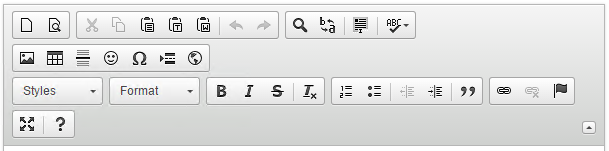 |
Defining custom styles
You can add custom styles that users choose in the Styles selector and apply to selected text. To create a custom style, refer to this document.
To set a style, copy the code below and add in styles.js. For more information, refer to this document.
Enter the following to set the style in config.js:
config.stylesSet = ‘<Custom Style Name>’ + ‘:’ + CKEDITOR.basePath + ‘styles.js’;
For example,
CKEDITOR.stylesSet.add( 'my_styles', [

    // Block-level styles.

    { name: 'Blue Title', element: 'h2', styles: { color: 'Blue' } },

    { name: 'Red Title',  element: 'h3', styles: { color: 'Red' } },


    // Inline styles.

    { name: 'CSS Style', element: 'span', attributes: { 'class': 'my_style' } },

    { name: 'Marker: Yellow', element: 'span', styles: { 'background-color': 'Yellow' } }

]);
Output
Default style 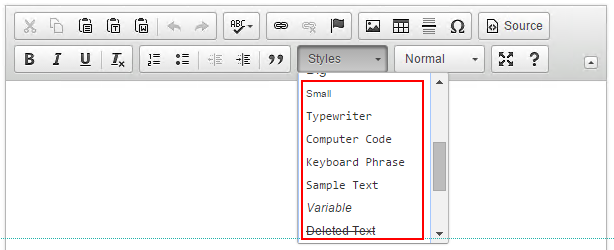 | Custom style 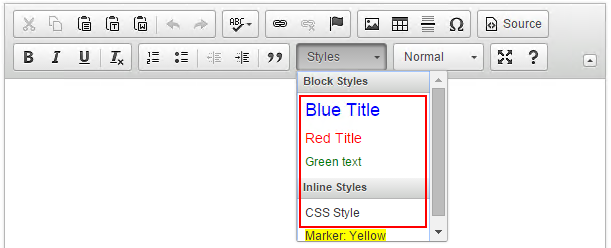 |
For more information on setting styles, refer to this document.
Using the basepath attribute of cftextarea
- Download the CKEditor library from http://ckeditor.com/download. The library must contain ckeditor.js.
- Copy the folder inside the webroot or in a subfolder.
- Set the value of the basepath to the webroot , starting with "/" .
- If you use multiple instances of CKEDITOR are on a page, the basepath value of the first textarea (with richtext=”true”) is used for all editor instances on the page. If this attribute is not set for the first richtext textarea , then the default CKEDITOR provided will be used.
Defining custom skins
To create a custom skin, refer to this document. To set up a new skin:
- Copy the source files in a folder inside the skins folder of a CKEditor installation.
- Name the folder as the name of your new skin (lower-case, no spaces).
- Use this skin in the skin attribute of cftextarea .
Using the file manager
CKeditor uses the file manager as a plugin, rather than an in-built component that was used by FCKeditor.
The settings.cfm file (located in the ckeditor folder) contains the settings of the file manager, such as, configuring upload directory, allowing uploads to the server, and allowed file types.
The default upload directory is /cf_scripts/scripts/ajax/ckeditor/plugins/filemanager/uploadedFiles.
Setting permissions for uploading and creating a directory
Set the following variables in settings. cfm (cf_scripts/scripts/ajax/ckeditor/) to true:
- settings.AllowUploads
- settings.AllowDirectoryCreation
Using the datefield input control
The HTML cfinput control with a type value of datefield lets users select dates from a pop-up calendar or enter the dates directly in the input box. When you use the control, keep in mind the following considerations:
- To correctly display label text next to the control in both Internet Explorer and Firefox, surround the label text in a <div style="float:left;"> tag and place three <br> tags between each line.
- Consider specifying an overflow attribute with a value of visible in the cflayoutarea tag so that if the pop-up calendar exceeds the layout area boundaries, it appears completely.
- If you use a mask attribute to control the date format, it does not prevent the user from entering dates that do not conform to the mask. The mask attribute determines the format for dates that users select in the pop-up calendar. Also, if the user types a date in the field and opens the pop-up calendar, the calendar displays the selected date only if the entered text follows the mask pattern. If you do not specify a mask attribute, the pop-up only matches the default matching pattern.
- If the user types a date with a month name or abbreviation in the control, instead of picking a date from the calendar, the selected date appears in the pop-up calendar only if both of the following conditions are true:
- The month position and name format match the mask pattern.
- The month name matches, case correct, the month names specified by the monthNames attribute, or, for an mmm mask, their three-letter abbreviations.
- If the date mask specifies yy for the years, the pop-up calendar uses dates in the range 1951-2050, so if the user enters 3/3/49 in the text field, the calendar displays March 3, 2049.
- If the user enters invalid numbers in a date, the pop-up calendar calculates a valid date that corresponds to the invalid input. For example, if the user enters 32/13/2007 for a calendar with a dd/mm/yyyy mask, the pop-up calendar displays 01/02/2008. The following example shows a simple tabbed layout where each tab contains a form with several datefield controls.:
<head>

</head>


<body>

<cflayout type="tab" tabheight="250px" style="width:400px;">

<cflayoutarea title="test" overflow="visible">

<br>

<cfform name="mycfform1">

<div style="float:left;">Date 1: </div>

<cfinput type="datefield" name="mydate1"><br><br><br>

<div style="float:left;">Date 2: </div>

<cfinput type="datefield" name="mydate2" value="15/1/2007"><br><br><br>

<div style="float:left;">Date 3: </div>

<cfinput type="datefield" name="mydate3" required="yes"><br><br><br>

<div style="float:left;">Date 4: </div>

<cfinput type="datefield" name="mydate4" required="no"><br><br><br>

</cfform>

</cflayoutarea>

<cflayoutarea title="Mask" overflow="visible">

<cfform name="mycfform2">

<br>

<div style="float:left;">Date 1: </div>

<cfinput type="datefield" name="mydate5" mask="dd/mm/yyyy">

(dd/mm/yyyy)<br><br><br>

<div style="float:left;">Date 2: </div>

<cfinput type="datefield" name="mydate6" mask="mm/dd/yyyy">

(mm/dd/yyyy)<br><br><br>

<div style="float:left;">Date 3: </div>

<cfinput type="datefield" name="mydate7" mask="d/m/yy">

(d/m/yy)<br><br><br>

<div style="float:left;">Date 4: </div>

<cfinput type="datefield" name="mydate8" mask="m/d/yy">

(m/d/yy)<br><br><br>

</cfform>

</cflayoutarea>

</cflayout>


</body>

</html>
Note:
In Internet Explorer versions previous to IE 7, this example shows the calendars for the first three fields in a page behind the following input controls.
Using autosuggest text input fields
When you create a text input (type="text") in HTML, use the autosuggest attribute to specify a static or dynamic source that provides field completion suggestions as the user types. Use the autosuggestMinLength attribute to specify the number of characters the user must type before first displaying any suggestions.
Note:
To place label text next to a cfinput control that uses an autosuggest attribute and have it display correctly in both Internet Explorer and Firefox, surround the label text in an HTML div tag with a style="float: left" attribute. Also if you have multiple controls, and place them on separate lines, follow the input controls with three <br> tags, as in the following example. Otherwise, the label and control do not lay out properly.
<div style="float: left"> Name: </div>

<cfinput name="userName" type="text" autosuggest="Andrew, Jane, Robert"> <br><br><br>
The control suggests entries from a static list of values. To use a static suggestion list, specify the list entries in the autosuggest attribute, and separate the entries by the character specified by the delimiter attribute (by default, a comma), as the following example shows:
autosuggest="Alabama\Alaska\Arkansas\Arizona\Maryland\Minnesota\Missouri"

name="city" delimiter="\">
In this example, if you type the character a (in uppercase or lowercase) in the cfinput control, the list of states that start with A appears in a drop-down list. You navigate to a selection by using the arrow keys, and press Enter to select the item.
You also have the control suggest values from a dynamically generated suggestion list. To use a dynamic list, specify a CFC function, JavaScript function, or URL in the autosuggest attribute. Use the autosuggestBindDelay attribute to specify the minimum time between function invocations as the user types. This limits the number of requests that are sent to the server. If you use a dynamic list, the input field has an icon to its right that animates while suggestions are fetched.
When you use a bind expression you must include a {cfautosuggestvalue} bind
parameter in the function call or URL parameters. This parameter
binds to the user input in the input control and passes it to the
function or page.
A CFC or JavaScript autosuggest function must return the suggestion values as a one-dimensional array or as a comma-delimited list.
The HTTP response body from a URL must consist only of the array or list of suggestion values in JSON format. In ColdFusion, you can use the serializeJSON function to convert an array to JSON format. If an array with the suggestions is named nodeArray, for example, the following line would specify the only output on a CFML page that is called by using a bind expression with a URL:
You also have the control suggest values from a dynamically generated suggestion list. To use a dynamic list, specify a CFC function, JavaScript function, or URL in the autosuggest attribute. Use the autosuggestBindDelay attribute to specify the minimum time between function invocations as the user types. This limits the number of requests that are sent to the server. If you use a dynamic list, the input field has an icon to its right that animates while suggestions are fetched.
When you use a bind expression you must include a {cfautosuggestvalue} bind
parameter in the function call or URL parameters. This parameter
binds to the user input in the input control and passes it to the
function or page.
A CFC or JavaScript autosuggest function must return the suggestion values as a one-dimensional array or as a comma-delimited list.
The HTTP response body from a URL must consist only of the array or list of suggestion values in JSON format. In ColdFusion, you can use the serializeJSON function to convert an array to JSON format. If an array with the suggestions is named nodeArray, for example, the following line would specify the only output on a CFML page that is called by using a bind expression with a URL:
<cfoutput>#serializeJSON(nodeArray)#</cfoutput>You do not have to limit the returned data to values that match the cfautosuggestvalue contents,because the client-side code displays only the values that match the user input. In fact, the called function or page does not even have to use the value of the cfautosuggestvalue parameter that you pass to it. However, use the parameter if the returned data would otherwise be long.
The following example shows how to use a bind expression to populate autosuggest lists. The Last Name text box displays an autosuggest list with all last names in the database that match the keys typed in the box. The First Name text box uses binding to the Last Name text box to display only the first names that correspond to the last name and the text entered in the box. The database query limits the responses to only include results that match the autosuggest criteria, so the autosuggest list displays all the returned results, and the suggestions only match if the database entry has a case-correct match.
To test this example with the cfdocexamples database, type S in the first box and the autosuggest list shows Smith and Stewart. If you select Smith and enter A or J in the First Name box, you get a name suggestion.
The following example shows the application:
The following example shows how to use a bind expression to populate autosuggest lists. The Last Name text box displays an autosuggest list with all last names in the database that match the keys typed in the box. The First Name text box uses binding to the Last Name text box to display only the first names that correspond to the last name and the text entered in the box. The database query limits the responses to only include results that match the autosuggest criteria, so the autosuggest list displays all the returned results, and the suggestions only match if the database entry has a case-correct match.
To test this example with the cfdocexamples database, type S in the first box and the autosuggest list shows Smith and Stewart. If you select Smith and enter A or J in the First Name box, you get a name suggestion.
The following example shows the application:
<html xmlns="http://www.w3.org/1999/xhtml">

<head>

</head>

<body>


<cfform>

Last Name:<br />

<cfinput type="text" name="lastName"

autosuggest="cfc:suggestcfc.getLNames({cfautosuggestvalue})"><br />

<br />

First Name:<br />

<cfinput type="text" name="firstName"

autosuggest="cfc:suggestcfc.getFNames({cfautosuggestvalue},{lastName})">

</cfform>

</body>

</html>
The following example shows the suggestcfc.cfc file:
<cffunction name="getLNames" access="remote" returntype="array" output="false">

<cfargument name="suggestvalue" required="true">

<!--- The function must return suggestions as an array. --->

<cfset var myarray = ArrayNew(1)>

<!--- Get all unique last names that match the typed characters. --->

<cfquery name="getDBNames" datasource="cfdocexamples">

SELECT DISTINCT LASTNAME FROM Employees

WHERE LASTNAME LIKE <cfqueryparam value="#suggestvalue#%"

cfsqltype="cf_sql_varchar">

</cfquery>

<!--- Convert the query to an array. --->

<cfloop query="getDBNames">

<cfset arrayAppend(myarray, lastname)>

</cfloop>

<cfreturn myarray>

</cffunction>


<cffunction name="getFNames" access="remote" returntype="array"

output="false">

<cfargument name="suggestvalue" required="true">

<cfargument name="lastName" required="true">

<cfset var myarray = ArrayNew(1)>

<cfquery name="getFirstNames" datasource="cfdocexamples">

<!--- Get the first names that match the last name and the typed characters. --->

SELECT FIRSTNAME FROM Employees

WHERE LASTNAME = <cfqueryparam value="#lastName#"

cfsqltype="cf_sql_varchar">

AND FIRSTNAME LIKE <cfqueryparam value="#suggestvalue & '%'#"

cfsqltype="cf_sql_varchar">

</cfquery>

<cfloop query="getFirstNames">

<cfset arrayAppend(myarray, Firstname)>

</cfloop>

<cfreturn myarray>

</cffunction>


</cfcomponent>
Issue with numeric data
For CFC methods that returns numeric data with a leading zero, for example, zip code 02674, the zero is interpreted by the bind expression as an octal number and its decimal equivalent (in this case 1468) even if you set returnformat="string". To resolve this issue, for URL binds or binds routed by way of a JavaScript function (for example, using cfajaxproxy), you can set returnformat=plain to retain the numeric value. Also, leading zeros are stripped from the suggestion list for autosuggest controls.
Using the cfslider tag
The cfslider tag places a slider control, for selecting a numeric value from a range, in a ColdFusion form. The slider can be used within a cfform tag for forms in HTML and applet format. The cfslider is not supported with Flash forms.
In HTML forms, you can specify maximum, minimum, and increment values, to help you quickly filter complex results. The available slider controls are: Vertical, with controls that can be adjusted to the top or bottom; Horizontal, with controls that can be adjusted to the left or right; Tip, that displays the values as data tips; and Snapping, that moves in incremental values.
In HTML forms, you can specify maximum, minimum, and increment values, to help you quickly filter complex results. The available slider controls are: Vertical, with controls that can be adjusted to the top or bottom; Horizontal, with controls that can be adjusted to the left or right; Tip, that displays the values as data tips; and Snapping, that moves in incremental values.
Manipulating slider at runtime
The following code illustrates how you can manipulate a slider at runtime:
//use Coldfusion AJAX functions

var sliderChange = function(slider,value)

{

//get slider name

slidername = slider.getId();

//get slider value

currValue = ColdFusion.Slider.getValue(slidername);

//set a new slider value

newValue = parseInt(currValue+10);

ColdFusion.Slider.setValue(slidername,newValue);

//hide slider

if(confirm("Do you want to hide slider?"))

{

ColdFusion.Slider.hide(slidername);

}

//show slider

if(confirm("Do you want to show slider?"))

{

ColdFusion.Slider.show(slidername);

}

//disable slider

if(confirm("Do you disable the slider?"))

{

ColdFusion.Slider.disable(slidername);

}

//enable slider

if(confirm("Do you enable the slider?"))

{

ColdFusion.Slider.enable(slidername);

}

}

var sliderDrag = function(slider)

{

//get slider name

slidername = slider.getId();

document.getElementById('currentSliderValue').innerHTML = "Current Slider value : <font color='red'><strong>" + ColdFusion.Slider.getValue(slidername) + "<strong></font>";

}

</script>

<br>

<cfform name="frm1">

<p>

<span id="currentSliderValue">Current Slider Value: <font color="red"><strong>50</strong></font></span><br>

</p>

</cfform>

<p>

<br><b>Volume</b>:

<cfslider

name="s"

format="html"

min=1

max=100

value="50"

tip="yes"

onChange="sliderChange"

onDrag = "sliderDrag"

vertical="no"

width="200pt"

>

</p>
We're glad. Tell us how this page helped.
We're sorry. Can you tell us what didn't work for you?
Share additional feedback to help us improve.
0/255
|