Whatever message this page gives is out now! Go check it out!


SerializeJSON
Last update:
May 18, 2026
Description
Converts ColdFusion data into a JSON (JavaScript Object Notation) representation of the data.
Returns
A string that contains a JSON representation of the parameter value.
Prior to 2018 release of ColdFusion, when handling the serialization of Strings ColdFusion checks whether it is of any of Boolean values (“yes”, “no”,”true”, “false”) or a numeric value (for e.g. “100”, “0.125”) converts to them to respective JSON Boolean or JSON Number. From 2018 onwards ColdFusion doesn’t do this check and treats them as valid Strings and converts them to JSON String (value inside double quotes).
For more information, see Charlie Arehart's blog.
Category
Syntax
SerializeJSON(data[, queryFormat[, useSecureJSONPrefix[, useCustomSerializer]]])See also
DeserializeJSON, IsJSON , cfajaxproxy , Using data interchange formats in the Developing ColdFusion Applications, http://www.json.org
History
ColdFusion (2018 release): Introduced named parameters.
ColdFusion (2016 release) Update 2: Added support for struct and array serialization using getMetadata.
ColdFusion 11: Added new parameters: useSecureJSONPrefix and useCustomSerializer.
ColdFusion 8: Added function
Parameters
Parameter | Description |
data | A ColdFusion data value or variable that represents one. |
queryFormat | This parameter can be a Boolean value that specifies how to serialize ColdFusion queries or a string with possible values "row", "column", or "struct". |
useSecureJSONPrefix | False by default. When Prefix Serialized JSON is enabled in the ColdFusion Administrator, then by default this function inserts the secure json prefix at the beginning of the json . |
useCustomSerializer | true/false. Whether to use the customSerializer or not. The default value is true. Note that the custom serialize will always be used for serialization. If false, the JSON serialization will be done using the default ColdFusion behavior. |
Usage
This function is useful for generating JSON format data to be consumed by an Ajax application.The SerializeJSON function converts ColdFusion dates and times into strings that can be easily parsed by the JavaScript Date object. The strings have the following format:
MonthName, DayNumber Year Hours:Minutes:SecondsThe SerializeJSON function converts the ColdFusion date time object for October 3, 2007 at 3:01 PM, for example, into the JSON string "October, 03 2007 15:01:00".The SerializeJSON function with a false serializeQueryByColumns parameter (the default) converts a ColdFusion query into a row-oriented JSON Object with the following elements:
Element | Description |
COLUMNS | An array of the names of the columns. |
DATA | A two-dimensional array, where:
|
For example, the SerializeJSON function with a serializeQueryByColumns parameter value of false converts a ColdFusion query with two columns, City, and State, and two rows of data into following format:
{"COLUMNS":["CITY","STATE"],"DATA":[["Newton","MA"],["San Jose","CA"]]}The SerializeJSON function with a serializeQueryByColumns parameter value of true converts a ColdFusion query into a column-oriented JSON Object that is equivalent to the WDDX query representation. The JSON Object has three elements:
Element | Description |
ROWCOUNT | The number of rows in the query. |
COLUMNS | An array of the names of the columns. |
DATA | An Object with the following:
|
For example, the SerializeJSON function with a serializeQueryByColumns parameter value of false converts a ColdFusion query with two columns, City, and State, and two rows of data into following format:
{"ROWCOUNT":2, "COLUMNS":["CITY","STATE"],"DATA":{"City":["Newton","San Jose"],"State":["MA","CA"]}}Note:
The SerializeJSON function generates an error if you try to convert binary data into JSON format.
The SerializeJSON function converts all other ColdFusion data types to the corresponding JSON types. It converts structures to JSON Objects, arrays to JSON Arrays, numbers to JSON Numbers, and strings to JSON Strings.
Note:
ColdFusion internally represents structure key names using all-uppercase characters, and, therefore, serializes the key names to all-uppercase JSON representations. Any JavaScript that handles JSON representations of ColdFusion structures must use all-uppercase structure key names, such as CITY or STATE. You also use the all-uppercase names COLUMNS and DATA as the keys for the two arrays that represent ColdFusion queries in JSON format.
Serialize a struct
In ColdFusion, the cases for struct keys are not preserved. The struct keys get converted to upper case automatically.
For example, in the following code snippet, the keys in the output are converted to upper case by default.
<cfscript>

    data = {empName="James", age="26"};

    serializedStr = serializeJSON(data);

    writeoutput(serializedStr);

</cfscript>
Output
{"EMPNAME":"James","AGE":"26"}
If you need to preserve the case of the keys at the application level, modify the following setting in application.cfc.
this.serialization.preservecaseforstructkey = true
With the application.cfc now containing the setting,
component

{

    this.name='serializeJSON'

    this.serialization.preservecaseforstructkey = true

}
If you re-run the snippet, you’ll see the following output:
{"empName":"James","age":"26"}
Enable case preservation at the server level
To enable case preservation of struct keys at the server level, perform the following:
- In the ColdFusion Administrator page, select Server Settings > Settings.
- Select Preserve case for Struct keys for Serialization.
Note that this setting is used during compilation of the CFML page and therefore if this flag is changed (in the administrator or programmatically), any pages relying on the change must be recompiled. This is done typically by simply editing the file (make any change at all) and re-executing it. If "trusted cache" is enabled in the ColdFusion Administrator, you must clear the template cache (of at least those affected files), which can also be done from within the ColdFusion Administrator Caching page.
Serialize a query
The serializeJSON function converts a ColdFusion query into a row-oriented JSON Object with the following elements:
| Element | Description |
| COLUMNS | An array of the names of the columns. |
DATA | A two-dimensional array, where:
|
For example, the SerializeJSON function with a serializeQueryByColumns parameter value of false converts a ColdFusion query with two columns, City, and State, and two rows of data into the following format:
{"COLUMNS":["CITY","STATE"],"DATA":[["Newton","MA"],["San Jose","CA"]]}Example 1
In this example, the code snippet uses queryFormat as a row. The output that the snippet produces has the data in the query arranged as arrays of rows.
<cfscript>

    myquery=QueryNew([

            {"Id":101,"Name":"John Adams","Paid":FALSE},

            {"Id":102,"Name":"Samuel Jackson","Paid":TRUE},

            {"Id":103,"Name":"Jack Michaels","Paid":TRUE},

            {"Id":104,"Name":"Tony Stark","Paid":FALSE}

    ])

    //writeDump(myquery)

    serializedQuery=serializeJSON(data=myquery,queryformat="row")

    writeOutput(serializedQuery)

</cfscript>
Output
{"COLUMNS":["PAID","ID","NAME"],"DATA":[[false,101,"John Adams"],[true,102,"Samuel Jackson"],[true,103,"Jack Michaels"],[false,104,"Tony Stark"]]}Example 2
In this example, the code snippet uses queryFormat as column. The snippet's output produces data in arrays associated with its row.
<cfscript>

    myquery=QueryNew([

            {"Id":101,"Name":"John Adams","Paid":FALSE},

            {"Id":102,"Name":"Samuel Jackson","Paid":TRUE},

            {"Id":103,"Name":"Jack Michaels","Paid":TRUE},

            {"Id":104,"Name":"Tony Stark","Paid":FALSE}

    ])

    //writeDump(myquery)

    serializedQuery=serializeJSON(data=myquery,queryformat="column")

    writeOutput(serializedQuery)

</cfscript>
Output
{"ROWCOUNT":4,"COLUMNS":["PAID","ID","NAME"],"DATA":{"PAID":[false,true,true,false],"ID":[101,102,103,104],"NAME":["John Adams","Samuel Jackson","Jack Michaels","Tony Stark"]}}Example 3
In this example, the code snippet uses queryFormat as struct. The output the snippet produces has the data as an array of structs.
<cfscript>

    myquery=QueryNew([

            {"Id":101,"Name":"John Adams","Paid":FALSE},

            {"Id":102,"Name":"Samuel Jackson","Paid":TRUE},

            {"Id":103,"Name":"Jack Michaels","Paid":TRUE},

            {"Id":104,"Name":"Tony Stark","Paid":FALSE}

    ])

    //writeDump(myquery)

    serializedQuery=serializeJSON(data=myquery,queryformat="struct")

    writeOutput(serializedQuery)

</cfscript>
Output
[{"PAID":false,"ID":101,"NAME":"John Adams"},{"PAID":true,"ID":102,"NAME":"Samuel Jackson"},{"PAID":true,"ID":103,"NAME":"Jack Michaels"},{"PAID":false,"ID":104,"NAME":"Tony Stark"}]Serialize a datetime
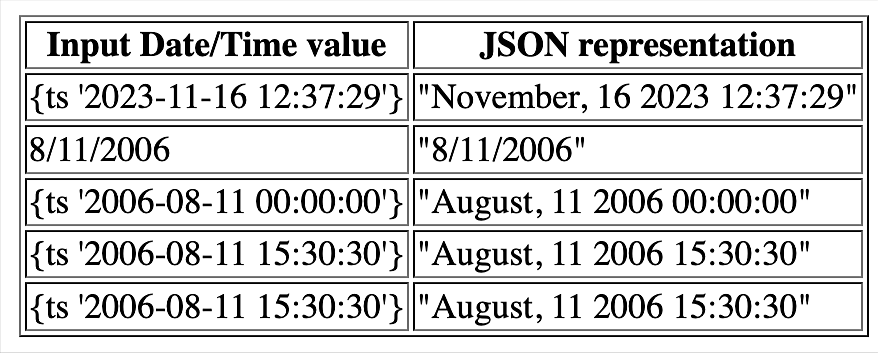
The SerializeJSON function converts ColdFusion dates and times into strings that can be easily parsed by the JavaScript Date object. The strings have the following format:
MonthName, DayNumber Year Hours:Minutes:Seconds
The SerializeJSON function converts the ColdFusion date time object for October 3, 2023 at 3:01 PM, for example, into the JSON string "October, 03 2023 15:01:00".
Example
<cfscript>

    currentdate = now()

    datetimeobj = arrayNew(1)

    datetimeobj[1] = currentdate

    datetimeobj[2] = "8/11/2006"

    datetimeobj[3] = CreateDate(2006,8,11)

    datetimeobj[4] = CreateDateTime(2006,8,11,15,30,30)

    datetimeobj[5] = CreateODBCDate(datetimeobj[4])

    datetimeobj[5] = CreateODBCDateTime(datetimeobj[4])

    // table in a loop

    writeOutput('<table border="1">');

    writeOutput('<tr><th>Input Date/Time value</th><th>JSON representation</th></tr>');

    for (i=1;i<=arrayLen(datetimeobj);i++){

        jsonstring = serializeJSON(datetimeobj[i])

        writeOutput('<tr>')

        writeOutput('<td>#datetimeobj[i]#</td>')

        writeOutput('<td>#jsonstring#</td>')

        writeOutput('</tr>')

    }

    // Close the table HTML

    writeOutput('</table>')

</cfscript>
Output
Serialize Null
Null is an important construct in modern programming languages, which improves language interoperability with other tech stack and programming languages.
Before the 2018 release of ColdFusion, a null returned from an external service was converted to an empty string. Therefore, if you were to code for null or make decisions based on null value in your ColdFusion applications, there was no inherent way to achieve this.
To introduce a Null value, you either had to assign an empty value or use javacast to force a null value.
Earlier, you’d use the following:
<cfscript>

    response={}

    response.result="Success"

    response.error="Error"

    //writeDump(response)

    response.error=javacast("null","")

    serializedResponse = serializeJSON(response)

    writeOutput(serializedResponse)

</cfscript>
Output
{"error":null,"result":"Success"}In the 2018 release of ColdFusion, we introduced a setting this.enableNullSupport = true in Application.cfc. If you enable this option, you’ll ssign a null value to a variable or a struct key.
Example
Application.cfc
component

{

    this.name='serializeJSON';

    this.serialization.preservecaseforstructkey = true

    this.enableNullSupport = true

}
File.cfm
<cfscript>

    response={}

    response.result="Success"

    response.error="Error"

    //writeDump(response)

    //response.error=javacast("null","")

    response.error=null

    serializedResponse = serializeJSON(response)

    writeOutput(serializedResponse)

</cfscript>
Output
{"error":null,"result":"Success"}Data type preservation
The ColdFusion language is typeless and does not evaluate or preserve the type information at the time of code generation. At runtime, ColdFusion tries to make its best guess to determine the datatype, which may cause some unexpected behavior. For example, at the time of JSON serialization, ColdFusion attempts at converting a string to a number. If the attempt is successful, then the passed data type is treated as number irrespective of whether you wanted it to be a string or not.
Starting from ColdFusion 11, the data type is preserved during the code execution time for Query and CFCs.
SerializeJSON considers datatypes defined in the database for serialization. If the database defines a column as a string, any number inserted into the column will still be treated as a string by SerializeJSON.
For instance,
<cfquery name="qry_Users" datasource="#DSN#">

select * from users

</cfquery>

<cfoutput>#SerializeJSON(qry_Users)#</cfoutput><br>
Serializing query
SerializeJSON honors the datatypes of columns defined in the database. The same would work for in-memory queries created using QueryNew() as long as the datatype is specified for the columns.
Consider the CFC property type example:
Employee.cfc
Component accessors="true"

{

property string empName;

property numeric age;

property string dept;

}
Index.cfm
<cfscript>

emp = new Employee({empName="James", age=26, dept="000"});

writeOutput(SerializeJSON(emp));

</cfscript>
OUTPUT: {"dept":"000","empName":"James","age":26}
In the previous version of ColdFusion, 000 will be automatically coverted to a number at runtime.
Additional format for query serialization
ColdFusion 10 supports 2 different ways to serialize a query object to a JSON string:
- Using row
- Using column
However, these 2 types are not the easiest to use with AJAX applications. ColdFusion 11 introduces a new way to serialize a query object to a JSON string:
- Using struct
All the 3 ways, can be defined at the application-level and will be used in serialized JSON functions if the type is not defined explicitly. In application.cfc, define:
this.serialization.serializeQueryAs = [row|column|struct]Note that "struct" is also available to be accessible through an AJAX argument. Now you can pass struct in an AJAX URL to serialize a query object as struct.
If you are calling CFC via URL, then you must specify queryformat=struct.
ColdFusion 11 now supports serializing the query object to a JSON string that is AJAX-friendly:
[

{"colour":"red","id":1},

{"colour":"green","id":2},

{"colour":"blue","id":3}

]
The current SerializeJSON function has been enhanced to support the 'key-value' format.
SerializeJSON( Object o, Object serializeQueryByColumns, boolean secure, boolean useCustomSerializer);If you are using the serialzeQueryAs property in application.cfc, you do not need to specify the serialzeQueryByColumns property unless you need to override the functionality.
Custom serializers
In the application.cfc file, you can register your own handler for serializing and deserializing the complex types. If the serializer is not specified, ColdFusion uses the default mechanism for serialization. For more information see Support for pluggable serializer and deserializer.
Serializing structs
Adobe ColdFusion (2016 release) Update 2 enables you to specify the datatype information for keys in a struct. This is known as metadata.
Before you get started on setting the metadata, familiarize yourself with the attributes used in a metadata. The table below lists the metadata attributes:
Attribute | Description |
Type | The datatype of the struct key. |
Name | While serializing a key in a struct, instead of using the key name as JSON key, the specified name in this is used. |
Keys | A struct that contains metadata information for nested structs. |
Items | Array of datatypes when setting the metadata for serializing elements in arrays or arrays inside structs. |
Ignore | When “true”, ignores specified keys in struct . Default is “false”. |
<cfscript>

       example = structnew();

       example.firstname = "Yes";

       example.lastname = "Man";

       // Default serialization converting ctring Yes to true

       writeoutput(SerializeJSON(example));

</cfscript>In the output below, you can see that the value of the key FIRSTNAME has been serialized to true (Boolean value), due to the absence of information on datatype .
{"LASTNAME":"Man","FIRSTNAME":true}Use the struct function, setMetadata, to specify the metadata.
The metadata is a struct where each key is struct key and the value of each key specifies the information on how to serialize in JSON.
The value of the key can be a string or a struct.
Value as string
metadata = {firstname: "string"}};Value as struct
metadata = {firstname: {type: "string"}};The datatype values are string, numeric, integer, boolean, date, array, and struct.
<cfscript>

       example = structnew();

       example.firstname = "Yes";

       example.lastname = "Man";

       // changing the default serialization by specifying the type of "firstname" as string

       metadata = {firstname: {type:"string"}};

       example.setMetadata(metadata);

       writeoutput(SerializeJSON(example));

</cfscript>
You can see that the value of the key FIRSTNAME is "Yes", which is the desired output.
{"LASTNAME":"Man","FIRSTNAME":"Yes"}In addition to passing the type info at struct level, you can also define the metadata in Application.cfc, as shown below:
this.serialization.structmetadata={firstname: {type:"string",name:"fname"},lastname:{name:"lname"}};
If defined as above, you need not define the datatype for firstname for the values that contains this key. For more information, see Application.cfc variables.
Note:
At runtime, if the metadata of the struct is not passed at struct level but is defined at the application level, then the application-level metadata is used for serializing the struct. But if you define the metadata in the struct, then the metadata at struct level takes priority over the one defined in Application.cfc
When you serialize a struct to JSON, the struct keys always appear in upper case. You can change this by specifying the exact name of the key in the struct, as shown below:
<cfscript>

       example = structnew();

       example.firstname = "Yes";

       example.lastname = "Man";

       writeoutput("<b>After serialization</b>:");

       // change the JSON key firstname to fname

       metadata = {firstname: {type:"string",name:"fname"}};

       example.setMetadata(metadata);

       writeoutput(SerializeJSON(example));

</cfscript>In the output below, you can see the the key FIRSTNAME has changed to fname.
{"LASTNAME":"Man","fname":"Yes"}If the metadata is not specified for a key in the struct, default serialization is applied.
Serialization in nested structs
A struct can have nested structs. There are two ways of specifying the metadata for a key whose value is a struct.
Setting the metadata of a struct key on the parent struct
Specify the metadata for a key whose value is a struct in a struct. The struct can contain the metadata for the keys existing in the nested struct. If you do not specify the metadata for such key asstruct, the ColdFusion checks if there is any metadata set explicitly on the nested struct. If yes, the metadata in the nested struct is honored and is used for serializing the nested struct.
If there is no metadata in both nested struct and parent struct, then ColdFusion default serialization is applied for the nested structs.
For example,
<cfscript>

       employee = structnew();

       // define the struct key-value pairs

       employee.firstname = "Yes";

       employee.lastname = "Man";

       // define a nested struct for the key address

       employee.address = {"doorno": "148", "street":"10 Down Street", "country": "UK"};

       metadata = {firstname: {type: "string", name: "fname"}, address: {keys:

       // set the metadata for a key in the nested struct

       {

             "doorno": {type: "string", name: "DoorNo"},

             "street": "string",

             "country": "string"

       }}};

       employee.setmetadata(metadata);

       writeoutput(SerializeJSON(employee));

</cfscript>The output is:
{"LASTNAME":"Man","ADDRESS":{"country":"UK","DoorNo":"148","street":"10 Down Street"}," fname ":"Yes"}The above situation is beneficial when, for example, an employee struct contains a physical address. The DoorNo key, in the above example, is specified as 148. But the DoorNo key can also contain alphanumeric values (148a,148-a, and so on). In such cases, the example above serializes the DoorNo key as string.
{"LASTNAME":"Man","ADDRESS":{"country":"UK","DoorNo":"148-a","street":"10 Down Street"}," fname ":"Yes"}Set the metadata for the key DoorNo as string. The metadata for the inner struct should be specified as a struct and should be in a key called keys.
Setting metadata on the nested struct using setMetadata function
If both parent and nested structs have metadata, then the parent's metadata is considered for serialization. For example,
<cfscript>

       employee = structnew();

       employee.firstname = "Yes";

       employee.lastname = "Man";

       employee.address = {"doorno": "148", "street":"10 Downing Street", "country": "UK"};

       employee.address.setmetadata({"doorno": {type: "string", name: "DoorNo"},"street": "string","country": "string"});


       // changing the default serialization by specifying the type of firstname as string and

       // changing JSON key firstname to fname

       metadata = {firstname: {type: "string", name: "fname"}};

       employee.setmetadata(metadata);

       writeoutput(SerializeJSON(employee));

</cfscript>The output is:
{"LASTNAME":"Man","ADDRESS":{"country":"UK","DoorNo":"148","street":"10 Downing Street"}," fname ":"Yes"}When serializing the address key in the employee struct and if the employee struct does not have any metadata for it, CodlFusion checks if there is any metadata set in the address struct. If there is metadata defined, the metadata is utilized for serialization, else default serialization happens.
Serializing an array inside a struct
A ColdFusion struct can contain an array representing a key. The array can contain values of different datatypes.
If the elements in the array have the same type, specify the datatypes as a struct with the keys having the values of the datatype. For example,
{title: {type:"string",name:"title"}, tags:{items:"string",name:"keywords"}};The code sample below illustrates serialization of an array inside a struct.
<cfscript>

       blogPost = structnew();

       blogPost.Title = "Struct Serialization";

       blogPost.referenceURL = "http://www.example.com";

       // define an array for a struct key. In the array all elements are of type string, except 2016

       blogPost.tags = ["struct", "json", "serialization", "2016", "HF2", "metadata"];

       // specify all elements as string in the metadata

       metadata = {title: {type: "string", name: "title"}, tags: {items: "string", name: "keywords"},referenceURL:{name:"url"}};

       blogPost.setmetadata(metadata);

       writeoutput(SerializeJSON(blogPost));

</cfscript>The output using default JSON serialization is as follows:
{"TITLE":"Struct Serialization","TAGS":["struct","json","serialization",2016,"HF2","metadata"],"REFERENCEURL":"http://www.example.com"}
All values inside the TAGS array get serialized as string except 2016 which gets serialized as numeric, which is not the desired output.
After specifying the metadata for TAGS array as specifieid in the sample above, the output is shown below:
{"title":"Struct Serialization","keywords":["struct","json","serialization","2016","HF2","metadata"],"url":"http://www.example.com"}
If an array contains values of different datatypes, assign the array of values specifying the metadata of each array element to the key items. For example,
<cfscript>

       example = structnew();

       example.firstname = "Yes";

       example.lastname = "Man";

       // define an array for a struct key. Elements are of different datatypes

       example.inputs = ["2500.12", 4.0, "Yes", "False", "339090", {"q1": "Yes"}, ["1","2","3"]];

       // set datatypes of first element as numeric, second element as integer, and so on

       example.setmetadata({firstname: "string", inputs: {items: ["numeric", "integer", "string", "boolean", "string",

       {q1: "boolean"}, {items: "string"}]}});

       writeoutput(serializeJSON(example));

</cfscript>
The output is:
{"LASTNAME":"Man","FIRSTNAME":"Yes","INPUTS":[2500.12,4,"Yes",false,"339090",{"q1":true},["1","2","3"]]}In the above sample, the inputs array also contains a struct and an array as elements. In such cases, the metadata can be specified on the metadata of inputs array.
Ignoring keys in a struct
You can ignore certain keys in a struct that need not be serialized. Specify the key ignore and set its value to true, as shown below:
{key:{ignore:true}}For example,
<cfscript>

       employee = structnew();

       employee.firstname = "Yes";

       employee.lastname = "Man";

       employee.salary = "100000";

       employee.salarygrade = "D";

       // ignore salary and salarygrade keys

       profileView = {firstname: {type:"string",name:"fname"}, salary: {ignore: true}, salarygrade: {ignore: true}};

       employee.setmetadata(profileView);

       writeoutput(serializeJSON(employee));

</cfscript>
The output is:
{"LASTNAME":"Man","fname":"Yes"}The salary and salarygrade keys are ignored, while the other keys are serialized, according to the metadata.
Retrieving metadata
You can retrieve metadata using the getMetadata function. In structs, this function provides the metadata information for the struct keys in addition to the type of struct (ordered or unordered). For example,
<cfscript>

    employee = structnew();

    employee.firstname = "Yes";

    employee.lastname = "Man";

    employee.salary = "100000";

    employee.salarygrade = "D";

    profileView = {firstname: {type:"string",name:"fname"}, salary: {ignore: true}, salarygrade: {ignore: true}};

    employee.setmetadata(profileView);

    writedump(employee.getMetadata());

</cfscript>
The sample produces the following output:
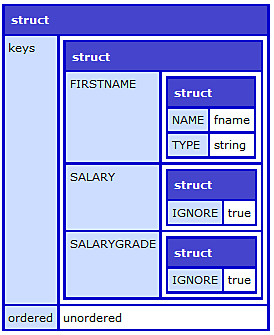
The returned metadata contains a key called keys that contains the metadata set on the struct. There is a second key ordered that returns if the struct is ordered or unordered.
Note: For ordered structs, the value of the key ordered is insertion.
Serializing arrays
Adobe ColdFusion (2016 release) Update 2 introduces setting metadata for an array. You can use the setMetadata function to set the metadata on the array.
If all the items in the array have the same datatype, you can specify the datatype of the values as a struct with the key items with the value of the datatype in string .
For example, without serialization:
<cfscript>

       tags  = ["struct", "json", "serialization", "2016", "HF2", "metadata"];

       WriteOutput(serializejSON(tags));

</cfscript>The sample produces the following output:
["struct"," json ","serialization",2016,"HF2","metadata"]Due to lack of datatype information, the string 2016 gets converted into a numeric value. The folllowing sample illustrates metadata set in the array:
<cfscript>

       tags  = ["struct", "json", "serialization", "2016", "HF2", "metadata"];

       tags.setmetadata({items: "string"});

       writeoutput(serializejSON(tags));

</cfscript>The output is shown below:
["struct"," json ","serialization","2016","HF2","metadata"]If the array contains values of different datatypes, specify the datatypes as an array in the metadata. For example,
myArray=["ColdFusion",2016,"true"];myArray.setMetadata({items:["string","integer","boolean"]});In the sample below,
<cfscript>

       inputs = ["2500.12", 4.0, "Yes", "False", "339090", {"q1": "Yes"}, ["1","2","3"]];

       inputs.setmetadata({items: ["string", "integer", "string", "boolean", "string", {q1: "string"}, {items: "string"}]});

       writeoutput(serializeJSON(inputs));

</cfscript>["2500.12",4,"Yes",false,"339090",{"q1":"Yes"},["1","2","3"]]If the array contains a struct or an array, you can specify its respective metadata. If you do not specify the inner array or struct metadata, ColdFusion checks if there is any metadata explicitly defined on the array or struct. If yes, ColdFusion uses the metadata defined explicitly in the array or struct.
Retrieving metadata
Use the getMetadata function to view the metadata information of the array in addition to the array type (synchronized or unsynchronized). For example,
<cfscript>

    inputs = ["2500.12", 4.0, "Yes", "False", "339090", {"q1": "Yes"}, ["1","2","3"]];

    inputs.setmetadata({items: ["string", "integer", "string", "boolean", "string", {q1: "string"}, {items: "string"}]});

    writedump(inputs.getMetadata());

</cfscript>
The sample produces the following output:
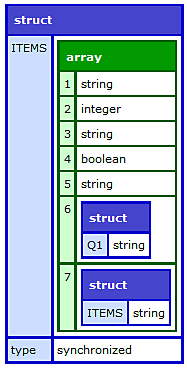
The returned metadata contains the metadata set on the array. The items key contains the metadata of th eitems in the array. The type key contains information whether the array is synchronized or unsynchronized.
We're glad. Tell us how this page helped.
We're sorry. Can you tell us what didn't work for you?
Share additional feedback to help us improve.
0/255
|