Whatever message this page gives is out now! Go check it out!


Generate Knowledge Base output
Last update:
Mar 14, 2024
Learn how to generate a Knowledge Base output in RoboHelp.
What is Knowledge Base output
A knowledge base (KB) is a self-service repository for content, which is easily searchable, intuitive, and robust enough to meet all your content needs.
A knowledge base stores knowledge. The repository contains information such as software tutorials, procedures, and best practices. The information is structured so that you can quickly find specific content as and when you require.
In RoboHelp, you can publish your content in Zoho, Zendesk, Salesforce, and ServiceNow.
Configure a Knowledge Base output preset
The first step in generating the output of a Knowledge Base project is to create an output preset and then configure the various settings of the output preset. You can use the following settings to configure a Knowledge Base output preset:
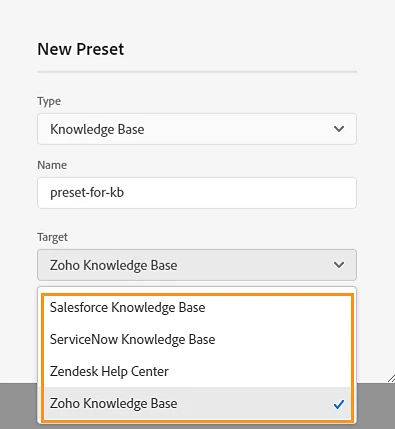
Salesforce Knowledge Base preset
For information on the output settings and the publishing workflow, see Publish to SalesForce Knowledge Base.
ServiceNow Knowledge Base preset
For information on the output settings and the publishing workflow, see Publish to ServiceNow Knowledge Base.
Zendesk Knowledge Base preset
For information on the output settings and the publishing workflow, see Publish to Zendesk Knowledge Base.
Zoho Knowledge Base preset
For information on the output settings and the publishing workflow, see Publish to Zoho Knowledge Base.
We're glad. Tell us how this page helped.
We're sorry. Can you tell us what didn't work for you?
Share additional feedback to help us improve.
0/255
|