Whatever message this page gives is out now! Go check it out!


Create and manage an index
Last update:
Nov 9, 2023
Learn how to work with an index in RoboHelp.
What is an index
An index is an alphabetically sorted list of keywords and bookmarks used in your project. Keywords can include multiple levels of subkeywords. You can associate keywords and subkeywords with topics that contain them and add cross-references to other keywords. You can also use project variables while adding keywords or subkeywords. You can add condition tags to index keywords to choose which keywords to publish in a specific output. You can also publish keywords so that your end users can use the keywords to search for and access specific topics in the output.
You can work with keywords and subkeywords through the Index panel of RoboHelp.
Add keywords to create an index
You can add index keywords/subkeywords in two ways–from Topic properties and from the Index panel.
From Topic properties
- In an open topic, navigate to index in topic properties by clicking Properties panel > Topic tab > Index drop-down section.
- In the Index Keywords field, specify a keyword and press
Enter. To specify a subkeyword, use a colon:between keywords. You can use variables while specifying keywords and subkeywords.As you type in the index keyword field, you get all the keywords and subkeywords already used in the project as the dropdown. The list gets further filtered as you type. You can now select the relevant keyword from the list.
From Index panel
- In an open project, select Index in the Author toolbar.
- In the Index panel, do one of the following:
- Click
 at the upper-right corner of the panel.
- Against an existing keyword, choose Options (
 ) > New Keyword.
- Right-click a keyword and select New Keyword.
An empty field appears in the Index panel.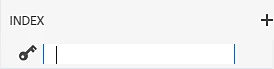
- Click
- In the empty field, specify a keyword and press
Enter. The keyword is added to the Index panel and placed according to alphabetical order of keywords.You can add multiple keywords to create an index.The keywords are also visible in Properties panel > Topic tab > Index drop-down section.
Add subkeywords to keywords
To add a subkeyword to a keyword, follow these steps:
- In an open project, select Index in the Author toolbar.
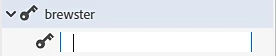
- In the Index panel, against a keyword, choose Options () > New Subkeyword. Alternatively, right-click a keyword and select New Subkeyword.An empty field appears below the keyword.
- In the empty field, specify a subkeyword and press
Enter. The subkeyword is added below the keyword.You can add multiple subkeywords to a keyword.
Link keywords and subkeywords to specific topics
Once you've added keywords and subkeywords to an index, you can link them to specific topics. To do this, follow these steps:
- In an open project, select Index in the Author toolbar.
- In the Index panel, against a keyword/subkeyword, choose Options
 > Add Topic. Alternatively, right-click a keyword/subkeyword and select Add Topic.
- In the Add Topic dialog box, use the Search bar, Recently Used panel, or Contents panel to select a topic in your project.
- Click Link. The topic is added below the keyword/subkeyword.
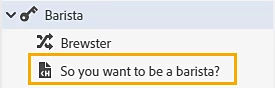 Note:To remove or edit a linked topic, click next to the topic or right-click the topic and select Remove or Edit, respectively.If the linked topic is open, the Properties panel > Topic tab > Index drop-down section displays the associated keywords and subkeywords. For more information, see Index.
Link keywords and subkeywords to other keywords
Once you've added keywords and subkeywords to an index, you can link them to other keywords in the index. To do this, follow these steps:
- In an open project, select Index in the Author toolbar.
- In the Index panel, against a keyword/subkeyword, choose Options > Add Cross Reference. Alternatively, right-click a keyword/subkeyword and select Add Cross Reference.
- In the Insert Cross Reference dialog box, you can filter keywords by typing the first few alphabets. Press the upward and downward arrow keys to navigate through the list of keywords. Press
Enterto insert a keyword.The keyword is added as a cross-reference below the main keyword.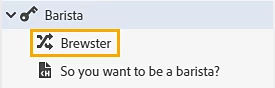 Note:To remove or edit a cross-reference, click next to the cross-reference or right-click the cross-reference and select Remove Cross Reference or Edit Cross Reference, respectively.
You can use a single index file in all outputs and apply condition tags to specific keywords/subkeywords to publish those in specific outputs. You can apply multiple condition tags to keywords and subkeywords in an index. To do this, follow these steps:
- In an open project, select Index in the Author toolbar.
- In the Index panel, against a keyword/subkeyword, choose Options > Apply Condition Tags. Alternatively, right-click a keyword/subkeyword and select Apply Condition Tags.
- In the Apply Condition Tags dialog box, click a condition tag in the left panel.The tag appears in the right panel. To remove the tag, click
 against it.
- Click Apply.In the Index panel, against the keyword/subkeyword, a colored circle indicates that conditional tags are applied.
Rename a keyword or a subkeyword
To rename a keyword/subkeyword in the Index panel, follow these steps:
- In an open project, select Index in the Author toolbar.
- In the Index panel, against the keyword/subkeyword, choose > Rename. Alternatively, right-click the keyword/subkeyword and select Rename.
- Edit the keyword/subkeyword inside the editable box and press
Enter.The edited keyword/subkeyword is reflected in the Index panel and the Index drop-down section in a topic's properties. All the topics in which this keyword/subkeyword is used are updated as well.
Delete a keyword or a subkeyword
To delete a keyword/subkeyword in the Index panel, follow these steps:
- In an open project, select Index in the Author toolbar.
- In the Index panel, against the keyword/subkeyword, choose > Delete. Alternatively, right-click the keyword/subkeyword and select Delete.
- Click Yes in the Confirm dialog box to confirm deletion.The deleted keyword/subkeyword is removed from the Index panel and the Index drop-down section in a topic's properties. It is also removed from all the topics in which it was used.
Link bookmarks to an index
To link an index term to a bookmark from the Properties dialog, follow these steps:
- In an open project, select Index in the Author toolbar.
- In the Index panel, against a keyword/subkeyword, choose Options > Add Topic. Alternatively, right-click a keyword/subkeyword and select Add Topic.
- In the Add Topic dialog box, use the Search bar, Contents panel, or Recently Used panel to select a topic in your project. The selected topic drop-down section displays the associated bookmarks.
- Click Link. The selected bookmark is added below the keyword/subkeyword.
Rename bookmarks linked to an index
To rename a bookmark in the Index panel, follow these steps:
- In an open project, select Index in the Author toolbar.
- In the Index panel, against the bookmark, choose > Properties.
- Edit the title inside the editable box and press Save.
- Alternatively, you can also drag-and-drop an index term and edit the title under the General settings in the Properties panel.
The edited title is reflected in the Index panel and the Index drop-down section in a topic's properties.
Note:
The updated title goes to all the outputs except the CHM output.
Publish an index
By default, an index is published in the output. You can change this setting in RoboHelp while configuring an output preset that you want to use to generate output. To do so, follow these steps:
- Click the Output tab at the left side of the standard toolbar.
- In the Output toolbar, click Output Presets.
- From the Output Presets panel, double-click the output preset that you want to edit.
- Click the Content tab.The Include Index field is selected by default, so index is published by default. You can select or deselect this field depending on whether you want to publish an index.Note:For Frameless and Responsive HTML5 output types, you can also control whether to show or hide an index from the respective skins. To do so, in the Layout tab of the Skin Components panel, you can enable or disable the Show Index option.
Use an index in the output
An index, if published, appears as a panel in the output. The index panel in the output displays all keywords and serves as an additional navigational channel for your end users. In the index panel, one can filter through keywords and click a keyword to quickly navigate to the associated topic. Your end users can use index keywords to quickly search for and access topics of their choice. Index keywords have the same ranking as search keywords.
More like this
- Create and manage a Table of Contents
- Create and manage a glossary
We're glad. Tell us how this page helped.
We're sorry. Can you tell us what didn't work for you?
Share additional feedback to help us improve.
0/255
|