An HTML page comprises three elements: content, layout, and styling. For single sourcing, it is best to separate content from layout and styling. Although CSS files separate styling from content, layout remains embedded in the HTML code. By using master pages, you can separate layout and styling from content.
A master page contains layout information and is associated with a CSS file. A master page is a template for HTML topics. You can define the placeholders for header, footer, and topic. You can include breadcrumbs, Mini TOC, snippets, variables, fields, and symbols. You can also apply condition tags to a master page.
You can create a topic using a master page or associate an existing topic with a master page. When you create a topic using a master page, the topic placeholder content is placed in the resulting topic. If you apply a master page to an existing topic, the topic placeholder content is ignored. In this case, actual content of the topic replaces the topic placeholder in the master page at the time of preview and generation.
The layout information defined in master pages is not visible in Author view. You can see the layout when you generate output or preview an associated topic. The topic content is placed in the topic placeholder, and the layout is inherited from the master page. All placeholders defined in the master page are also populated with relevant information when you generate output.
You can also import and export master pages to use across projects.
To know more about customizing PDFs in master pages, see Customize PDFs.
Add a master page
You can add a master page in two ways:
From the Master Pages panel: When you add a master page using the Master Pages panel or upgrade to RoboHelp 2019 from a previous version, by default, the master page files are stored in the assets/masterpages folder in the Contents panel.
From the Contents panel: When you add a master page to a different project folder in the Contents panel, the master page files are stored in that project folder.
Irrespective of the location in which you add a master page, access and manage all master pages in your project from the Master Pages panel.
To add a master page:
Click the Author tab at the left side of the Standard toolbar.
The Author view opens.
To add a master page through the Master Pages panel:
In the Author toolbar, click Master Pages. The Master Pages panel opens.
Click in the upper-right corner of the panel. The New Master Page dialog box opens.
To add a master page through the Contents panel:
In the Author toolbar, click Contents. The Contents panel opens.
In the Contents panel, right-click a folder, or click Options (), and choose New > New Master Page. The New Master Page dialog box opens.
In the New Master Page dialog box, specify the name of the master page and click Done.
The new master page is added to the Master Pages panel and placed in alphabetical order.
Click the Save All icon at the left side of the standard toolbar.
Edit a master page
You can easily customize a master page to suit your liking. To edit a master page:
Click the Author tab at the left side of the Standard toolbar.
The Author view opens.
In the Author toolbar, click Master Pages. The Master Pages panel opens.
In the Master Pages panel, against the master page you want to customize, choose Options () > Edit.
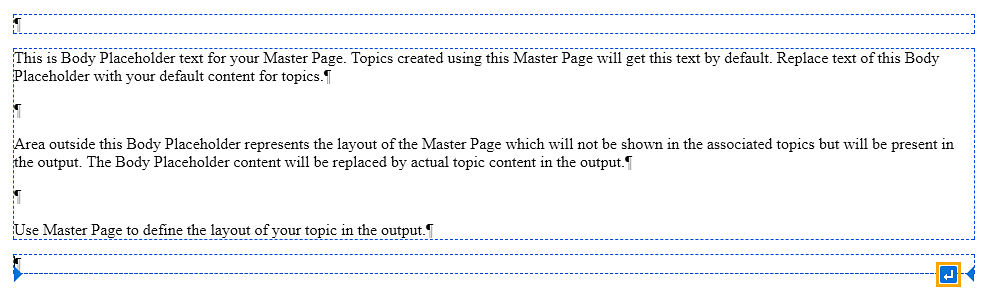
The master page opens as a tab, displaying the header, topic, and footer placeholders.
When you create a topic from a master page, the topic includes content from the master page. Copyright information is an example. When you apply a master page to a topic, actual content of the topic replaces the topic placeholder in the master page at the time of preview and generation.
Customize the header, topic, and footer placeholders as required by inserting breadcrumbs, variables, snippets, Mini TOC, fields, and symbols. You can also apply condition tags to the master page.
For more information, see the following resources:
To insert a paragraph between placeholders, hover the pointer above the appropriate placeholder and click the Insert paragraph indicator.
Insert paragraph indicator
Click the Save All icon at the left side of the standard toolbar.
Insert breadcrumbs
Breadcrumbs appear in a horizontal line showing the trail from the highest level page (home) to the current page the user is on. You can insert breadcrumbs placeholder in a master page. The placeholder shows the automatically generated breadcrumbs based on the TOC.
In the standard toolbar, click the Insert Placeholder icon and then select the Breadcrumbsicon . The breadcrumbs placeholder is inserted at the location of the cursor.
Breadcrumbs placeholder
Click the breadcrumbs placeholder to set its properties.
The Properties panel > General tab displays the Type as Breadcrumbs.
In the General tab, do the following:
Home Page Name Specify the name of the home page of your Help.
Separator Specify or select a separator to separate the elements in breadcrumbs. The default is >.
Prefix Label Specify a label that is prefixed to the breadcrumbs. For example, Navigate to:.
Click the Save All icon at the left side of the standard toolbar.
Insert and customize a Mini TOC
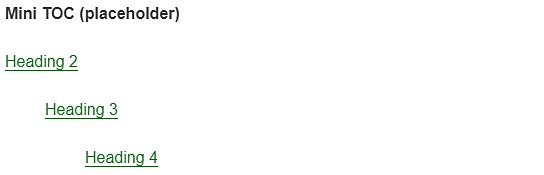
You can insert a Mini TOC in a topic or a master page. The Mini TOC placeholder shows the automatically generated Mini TOC at the time of generation or preview of a topic. You can define the exact location and format of the Mini TOC while designing the layout of the master page. You can also customize the heading levels as required.
To insert a Mini TOC in an open topic or master page:
In the standard toolbar, click the Insert Placeholder icon and then select the Insert Mini TOC Placeholder icon . The Mini TOC placeholder is inserted at the location of the cursor.
Mini TOC placeholder
Click the Mini TOC placeholder to set its properties.
The Properties panel > General tab displays the Type as Mini TOC Caption or Mini TOC List, depending on the location of the pointer.
You can apply inline formatting using the General tab or a style from your style sheet using the Styles tab.
To apply inline formatting, in the General tab, do the following:
For Type: Mini TOC Caption
Select Make list collapsible to toggle the Mini TOC between expanded and collapsed states. You can then specify a different caption for each state in the Caption when Expanded and Caption when Collapsed fields. By default, the mini TOC is in the expanded state initially, you can choose to collapse it by deselecting the Show TOC in expanded form field.
If you do not select Make list collapsible, you can specify a default caption in the Caption field.
Use various Font options to change the font family, style, size, color, and more.
Use the Background options to change the background shade, and add and customize the dimensions of the background image.
For Type: Mini TOC List
In the Use Headings field, use the from and to drop-downs to customize the heading levels. The default range of heading levels is 2 – 4. You can include heading 1 also.
Use various Font options to change the font family, style, size, color, and more.
Use the Background options to change the background shade, and add and customize the dimensions of the background image.
To apply a style from your style sheet, in the Styles tab, do the following:
For Type: Mini TOC Caption
Select Paragraph Styles or Hyperlink Styles from the styles drop-down list. If the Mini TOC list is not collapsible, the default caption style is paragraph. If the list is collapsible, the default caption style is hyperlink.
From the list of styles, select a style to apply it.
Note:
By default, the following styles are applied to different parts in a Mini TOC placeholder:
minitoc-caption to a caption
minitoc-list to a list
minitoc-list-item to each list item
These styles are defined in your project's default style sheet (default.css). In a new project, you can control all aspects of Mini TOC styling by copying new classes from default.css. You can also add twisty images to Mini TOC Caption when it is collapsible.
For Type: Mini TOC List
Select List Styles from the styles drop-down list.
From the list of styles, select a style to apply it.
Click the Save All icon at the left side of the standard toolbar.
Insert special characters
You can insert common characters such as em dashes and en dashes, quotation marks, and much more in an open topic or master page.
To do so, click the Insert Special Character icon in the standard toolbar, and select a character by browsing character categories or searching for keywords. For each special character, you will see its Name and Hex code at the bottom-left corner of the window. The selected character is inserted at the location of the pointer.
Create a topic with a master page
While creating a topic, you can associate it with a master page. For more information, see Create a topic.
Associate a topic with a master page
You can associate an existing topic with a master page by editing the topic's properties. For more information, see Set topic properties.
Create a duplicate master page
You can create a duplicate copy of a master page with a different name and modify it to suit your requirements.
Click the Author tab at the left side of the Standard toolbar.
The Author view opens.
In the Author toolbar, click Master Pages. The Master Pages panel opens.
In the Master Pages panel, against the master page you want to duplicate, choose Options () > Duplicate.
In the Duplicate Master Page dialog box, specify the name of the duplicate copy and click Done.
The duplicate master page is added to the Master Pages panel and placed in alphabetical order.
Customize the duplicate master page if necessary. For more information, see Edit a master page.
Click the Save All icon at the left side of the standard toolbar.
Delete a master page
To delete a master page:
Click the Author tab at the left side of the Standard toolbar.
The Author view opens.
In the Author toolbar, click Master Pages. The Master Pages panel opens.
In the Master Pages panel, against the master page you want to delete, choose Options () > Delete.
In the Confirm dialog box, click Yes to confirm the deletion.
The master page is deleted.
Click the Save All icon at the left side of the standard toolbar.
Locate a master page file in your computer
To see the location of a master page file in your computer:
Click the Author tab at the left side of the Standard toolbar.
The Author view opens.
In the Author toolbar, click Master Pages. The Master Pages panel opens.
In the Master Pages panel, against the master page you want to locate, choose Options () > Show in Explorer.
Windows Explorer opens to display the master page file and its location.
Share this page
Was this page helpful?
We're glad. Tell us how this page helped.
We're sorry. Can you tell us what didn't work for you?
Thank you for your feedback. Your response will help improve this page.
Join our in-person and virtual events to explore technical content and knowledge management trends, hear customer success stories, build skills, and network with peers and industry leaders.


 in the upper-right corner of the panel. The New Master Page dialog box opens.
 ), and choose New > New Master Page. The New Master Page dialog box opens.
 at the left side of the standard toolbar.
 and then select the Breadcrumbs
 icon

 . The Mini TOC placeholder is inserted at the location of the cursor.
 in the standard toolbar, and select a character by browsing character categories or searching for keywords. For each special character, you will see its Name and Hex code at the bottom-left corner of the window. The selected character is inserted at the location of the pointer.