Whatever message this page gives is out now! Go check it out!


What 's New in Summer 2020 release?
Last update:
Sep 29, 2022
Boost your performance and productivity with powerful authoring and extended publishing capabilities that take your content to the next level.
Introducing Adobe RoboHelp on Mac - the widely used and the most advanced operating system yet. Adobe RoboHelp brings in more smart features and enhancements to scale up content creation and reach wider audiences. With built-in Microcontent editor, fully integrated workflow to manage the translation process - both Manual and Machine, to export XLIFF files for your content, online review, PDF enhancements, and more. Collaborate seamlessly with the subject matter experts using web-based review capabilities. Establish a use-by-reference relationship allowing text from one topic to be linked in multiple places by cross-referencing. Easily import HTML or Markdown content as HTML topics. Navigate with new Frameless HTML5 layouts featuring a navigation bar positioned at the top. In addition, this release includes out-of-the-box support to publish to Zendesk, Salesforce, and ServiceNow.
Here’s a brief rundown of the new features and enhancements included in this release.
Feature summary
Introducing RoboHelp on Mac
With the introduction to macOS, Adobe RoboHelp introduces the users to new levels of ease of use, performance, and reliability, giving people the power to work more productively. Adding up to the most beautiful, seamless experience yet - and another big step forward. See the system requirements to deploy RoboHelp on your Mac system.
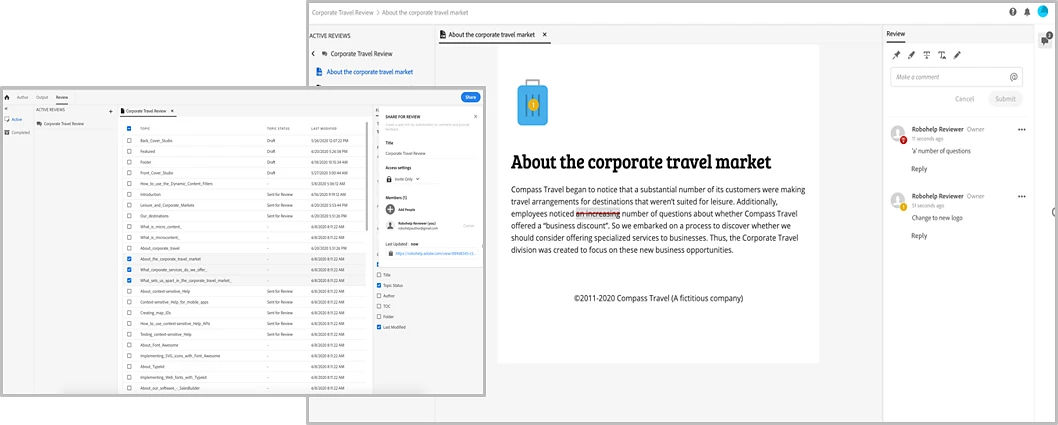
Collaborate using out-of-the-box Online Review
Produce high-quality contextual reviews to streamline live collaboration with reviewers and subject matter experts via secure cloud-based review. Allow multiple reviewers to markup the topics at the same time. Add stakeholders and modify their access at any time. With the new RoboHelp, you have access to a unified platform for team discussion and real-time project collaboration and feedback. For more information, see Review and Collaboration.
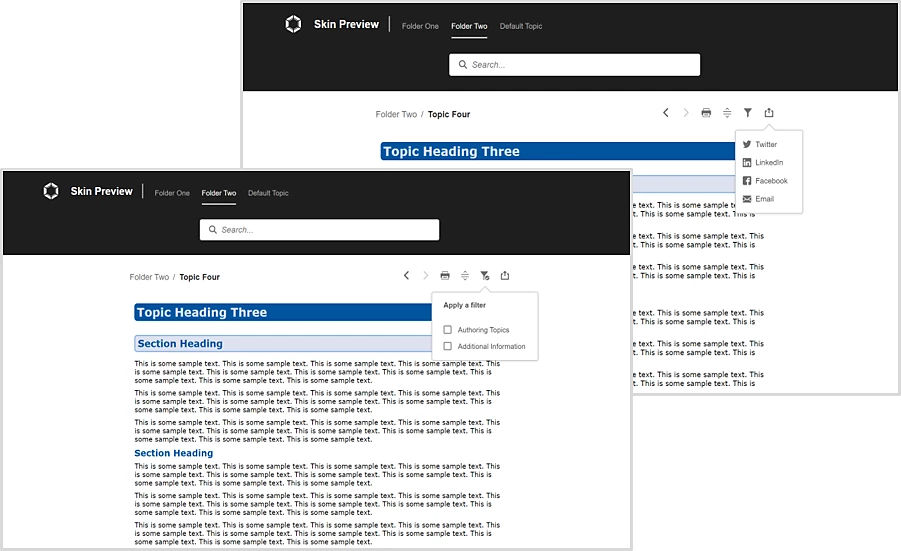
The main navigation is designed to be positioned at the top with a single column layout. The top navigation outputs are responsive to give the user the optimum viewing and reading experience across all devices, mobile, tablet, and desktop. On smaller devices, the top navigation is replaced with a different layout for better reading experience. All toolbar icons are moved under one "View more" icon to handle touch gestures to all icons. Enjoy the new skin layout with a menu at the top, room for a logo and search, and the main content area.
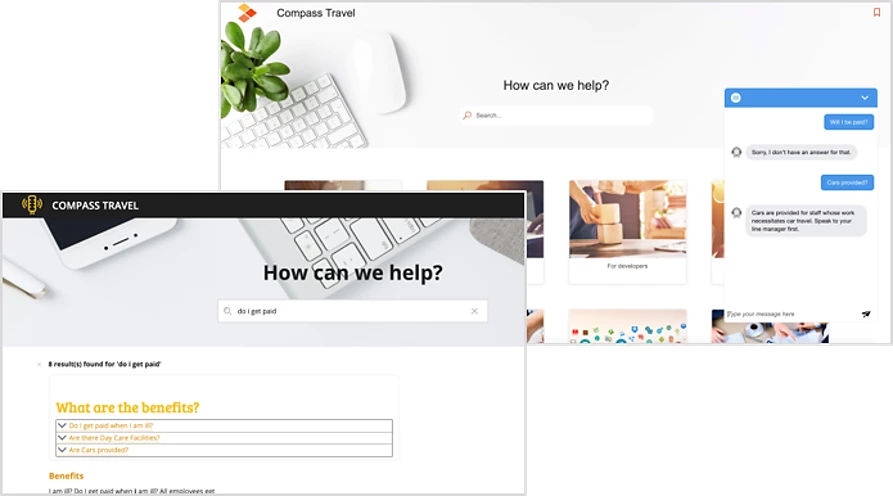
Make a macro impact with Microcontent
Go beyond topic-based authoring to any piece of short, bite-sized snippets of content with built-in microcontent authoring that entices your viewers to check out a larger piece of your content. Create AI-ready microcontent or repurpose your existing content for use as microcontent. Make the content trivially easy for the user by atomizing any long-form content and customize for use in chatbots, and frequently asked questions (FAQ) database, among other applications. Check how to:
- Create information-rich content snippets within Adobe RoboHelp.
- Leverage Microcontent for featured snippets in search results and in-context help.
- Use Microcontent to power next-generation chatbots.
- Integrate the new Microhelp in your environment.
Expand your reach globally with Translation
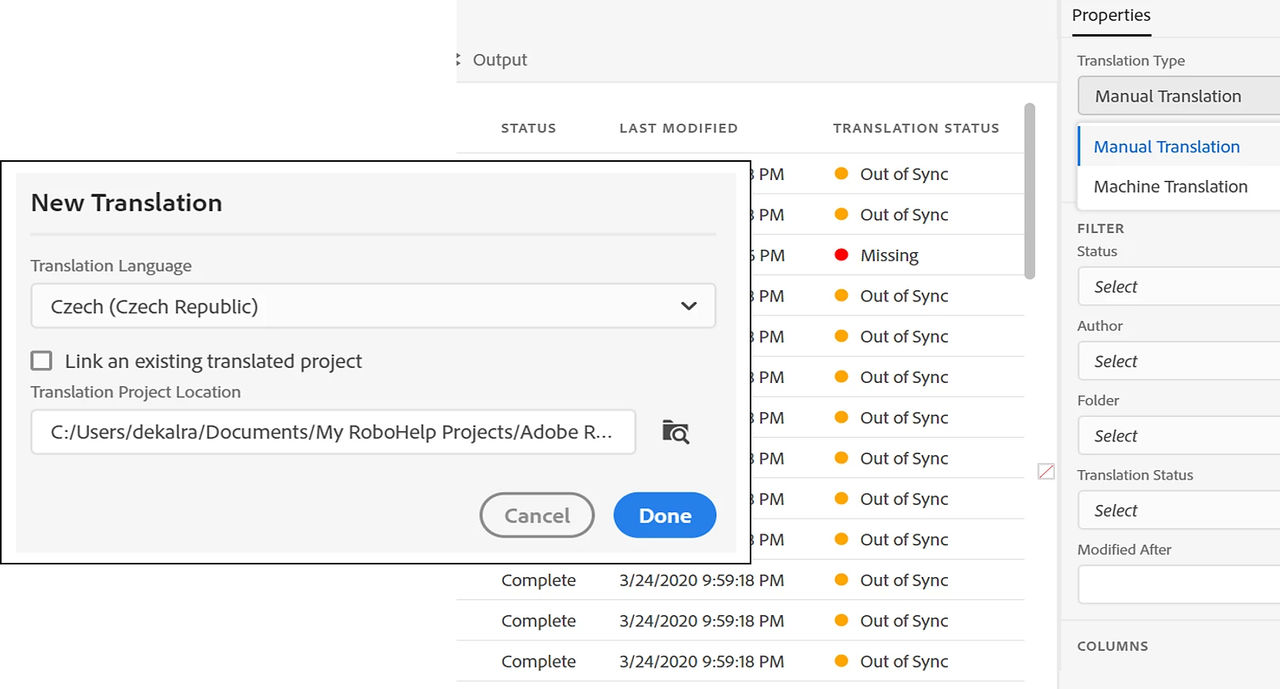
Reach global audience by localizing your content with Machine or Manual translation functionality in 35+ languages. Extend the reach of your created content, optimize costs, and increase discoverability by the users. Export and import your content using the widely supported XLIFF (XML Localization Interchange File) format. Leverage the state-of-the-art machine translation powered by Google Translate, Yandex Translate, and Microsoft Translator APIs. For more information, see Translating content to multiple languages.
Enhanced PDF output
Learn how new PDF output capabilities are evolving to fine-tune and meet your needs. Publish chapter-based printed documentation like a book and have better control over the final output with CSS3. Password protection to keep away the prying eyes from your important files. Improve your PDF accessibility by generating tagged PDF documents. Add secure and dynamic watermarks as protection to your PDF files. Wondering how to:
- Set up the front matter with Cover page, Foreword, Preface, Table of Contents, and much more.
- Set up the back matter with Appendix, Glossary, Back cover, Index, Bibliography, and much more.
- Use multiple columns for an entire publication.
- Embed different kind of fonts in your PDF document
- Reduce the redundancy of images without sacrificing the image quality.
- Combine multiple PDFs into a single PDF.
- Adjust page magnification with Zoom In and Zoom Out settings.
- Save any topic as PDF.
- Export and Import settings as PDF template for reuse.
- Managing cross-references and bookmarks.
For more information on PDF enhancements, see Generate PDF output in RoboHelp.
Explore the world of cross-references
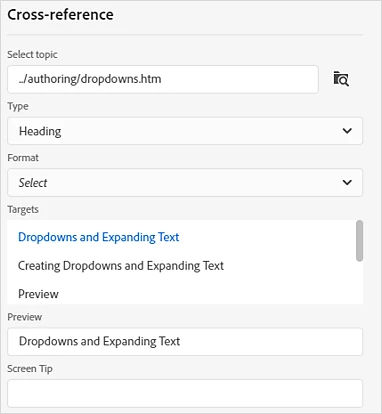
Establish a relationship between a new piece of information and the existing content with cross-references, which would help readers better understand the information. RoboHelp makes it easy to include, update, and maintain cross-references in your publications. Cross-references have the advantage of dynamically changing based on your output types. Use cross-references to link information within the topic or across multiple topics, or to a section in a topic. To learn how to work with cross-references, see Create and manage cross-references.
Powerful integration with Zendesk, Salesforce, and ServiceNow
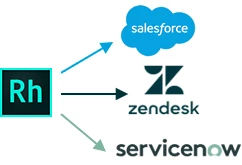
Publish effortlessly to multiple channels to support the different needs of the end-users with robust built-in integrations with leading CRM solutions - Zendesk Help Center, Salesforce Knowledge Base, and ServiceNow Knowledge Base.
See more details on how to
Get Adobe RoboHelp
Visit the Adobe RoboHelp product page to subscribe to RoboHelp.
The latest release of RoboHelp is available only via subscription. However, you can install a 30-day free trial from the product page and even request a demo.
If you are an existing user of an earlier version of RoboHelp (2019 release), you can easily upgrade to the latest version of Adobe RoboHelp. Visit Adobe RoboHelp to know more.
See System requirements to check if your computer supports the latest version of Adobe RoboHelp.
Basic workflow
Create a project
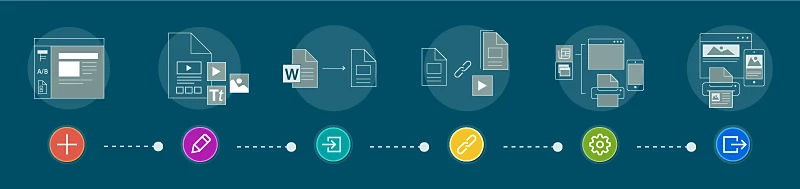
A project is a container for all your content and the various components, such as Table of Contents, snippets, skins, and more, for building the right output. To learn more, see Create your first project.
Using the powerful editor in RoboHelp, you can author your content with all the elements you need, to make your output engaging. Create topics for authoring and add text, images, and multimedia, format the content with text effects, tables, lists, and more. You can preview the content in your desired layout while you are authoring. To know about how to work with a topic, see Work with topics and folders.
Import content
You can import content from other sources such as Microsoft Word files (.docx) into your project. For step-by-step Help, see Import Word documents into a project.
You can link text and images to other content and decide the content hierarchy or organization scheme in your Help system. Create links among different sets of content (topics) and to content that is external to your Help system (such as YouTube videos). For step-by-step Help, see Create and manage links and Create and manage a Table of Contents.
Configure the output
You can select a type of output preset (for example, Responsive HTML5 and PDF) in RoboHelp and configure the settings to customize the appearance and capabilities of your output. You can also implement conditional content to show or hide content depending on the user interest, skill level, and other factors. For more information, see Generate output and What is conditional content.
Generate the output
Generate or publish the output for multiple platforms, such as web, mobile, and print. You can choose from a variety of output presets, such as Responsive HTML5, PDF, Microsoft HTML Help (CHM), Frameless, Mobile App, and more. For step-by-step Help, see Generate output.
To download and start using RoboHelp, see Get started with RoboHelp.
What is Adobe RoboHelp (2019 release)
- 2019 release
- Adobe RoboHelp (2019 release) is a powerful and intuitive application for creating and publishing content. Easily and efficiently develop Help systems, e-learning content, policies, procedures, and knowledge bases with RoboHelp. You can deliver personalized experiences for different audiences and on a wide range of devices - with minimal effort by using out-of-the-box capabilities. Sophisticated content editing, layout creation, formatting, and search capabilities in RoboHelp help you create and deliver impactful, easy-to-manage content experiences. RoboHelp provides modern, Responsive HTML5, and device-friendly output presets for creating fluid and personalized content; your output looks stunning and is easy to consume. Use condition tags and expressions to create interactive and filtered content in several formats and for different screens. You can cater to a wider or more targeted audience. Get started with RoboHelp (2019 release) Need training? Join the Introduction to RoboHelp (2019 release) course.Feature summaryResponsive HTML5 and CSS3 authoring supportCreate highly immersive content experiences using text and multimedia with the out-of-the-box HTML5 and CSS3 authoring support. Easily add videos from YouTube and Vimeo, audio, images, text effects, symbols, and other elements and make your content engaging. The powerful preview capability helps you experience the impact of the content while authoring. For step-by-step Help, see Format your content and Work with images and multimedia.Enrich your content with SVG supportMake your content look super-sharp across mobile, web, and print by using SVGs. You can import and use multiple visuals in SVG files to make your end users experience a smooth output.Intelligent content reuseSave time and effort by efficiently using variables and snippets for content reuse across topics in your project. Any update to a variable or snippet is reflected everywhere you have used that variable or snippet. You can even add a snippet within an existing snippet by drag-and-drop. For step-by-step Help, see Create and use variables for easy updates and Single-source with snippets.Conditional content definition and publishingEasily create rules and apply them to a topic, paragraph, or word using condition tags. With condition tags, you can control the content for the different Help systems you want to generate from the same project. You can also specify the foreground and background colors of conditions and manage them easily. For step-by-step Help, see the following:
- What is conditional content
- Create and apply condition tags
- Configure output presets for conditional content
- Optimize and manage conditional content
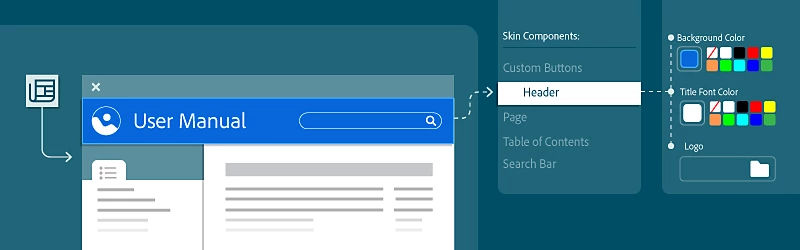
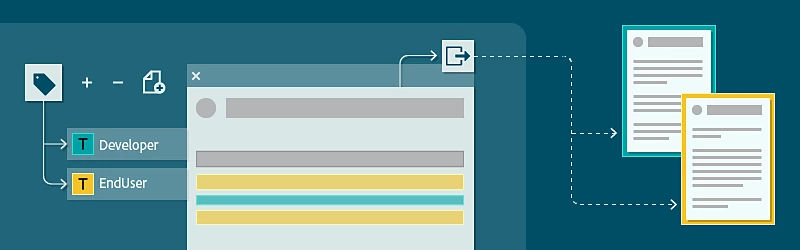 Cleaner project structureRoboHelp maintains all your project contents in a clean and organized structure. Whether it is in the RoboHelp workspace or in the Explorer view of your computer, you find the project assets such as style sheets, skins, and snippets, are all organized in separate folders. For more information, see Get to know the RoboHelp workspace and Create a project.Switch between multiple viewsSwitch between author, code, and preview views at ease when you use the icons in the upper-right corner of the screen. This way, you can quickly see a preview of your content output or its HTML. For more information, see Get to know the RoboHelp workspace.Intuitive interface for configuring object propertiesWhile authoring your content, adjust the properties of the various objects you add with optimal accuracy and unprecedented ease. You can watch them transform in real time with every change. When you select the object you have added, the Properties panel on the right displays all the properties of the selected object. Tweak a value and see the change instantly. For more information, see Get to know the RoboHelp workspace and Format your content.Powerful skin editorCustomize skins to give a unique appearance to your output. With the powerful skin editor of RoboHelp, you can create modern interfaces that are more engaging and user friendly. For step-by-step Help, see Work with skins.
 Optimized search engineDeliver best-in-class search results to end users with a search engine powered by a smart algorithm and highlighting of the searched word. Each output preset comes with configurable search settings. For more information about the search settings of a type of output preset, navigate to the relevant article from Generate output.Multiformat publishingUse Quick Generate to instantly publish content to a wide range of output formats - Responsive HTML5, Microsoft HTML Help (CHM), Frameless, Mobile App, and more.Easily generate content-centric mobile apps for iOS and Android with one click, with a PhoneGap Build license.For more information, start with Generate output.Next-generation Responsive HTML5 layoutsDeliver personalized content experiences with new Responsive HTML5 layouts that provide intuitive navigation and best-in-class search. You can easily show or hide widgets such as glossary and TOC. For step-by-step, see Generate Responsive HTML5 output.Greater content accessibilityDeliver content to accommodate the special needs of your end users. Use 508-compliant HTML5 layouts to create content that is accessible to all users, on multiple platforms, such as web, mobile, and print.Optimized HTML5 outputExperience as much as a 50% reduction in loading time compared to the previous RoboHelp version and a file size savings of about 20 KB per topic. You can also experience smoother transitions between pages with faster and more responsive HTML5 output. For step-by-step Help, see Generate Responsive HTML5 output.Dynamic content filtersDeliver more relevant and highly personalized content experiences with dynamic content filters. Use condition tags and expressions to enable end users to filter content easily. For step-by-step Help, see Configure output presets for conditional content.Ability to add thumbnailsYou can publish images as thumbnails that expand on clicking. This makes content viewing on mobile devices easier for end users.Single-click mobile app generationEasily generate content-centric mobile apps for iOS and Android with one click, with a PhoneGap Build license. For step-by-step Help, see Generate Mobile App output.Favorites in Responsive HTML5 outputIn Responsive HTML5 output, provide end users the option to mark topics as favorites. This saves them time and effort to locate their frequently used content. For step-by-step Help, see Generate Resposive HTML5 output.Git supportEmpower your team members with the ability to collaborate on projects of any size with speed and efficiency using Git support.SharePoint Online supportEnsure everyone stays on the same page by enabling sharing and collaboration across your organization with SharePoint Online.
- Get Adobe RoboHelp (2019 release)
- Visit the Adobe RoboHelp product page to license RoboHelp.To know the product better before you license it, you can install a 30-day free trial from the product page and even request a demo.If you are an existing user of an earlier version of RoboHelp, you can easily upgrade to Adobe RoboHelp (2018 release). Visit Adobe RoboHelp (2019 release) to know more.See System requirements to check if your computer supports Adobe RoboHelp (2018 release).
More like this
We're glad. Tell us how this page helped.
We're sorry. Can you tell us what didn't work for you?
Share additional feedback to help us improve.
0/255
|