Whatever message this page gives is out now! Go check it out!


Create and manage a table of contents
Last update:
Nov 9, 2023
Learn how to work with Table of Contents in RoboHelp for both online and printed output.
Note:
For the latest RoboHelp known issues and workarounds, refer to the RoboHelp: Known issues and workarounds article.
A Table of Contents provides a hierarchy of the sections (earlier called books) and pages (topics) that you have in the output of your project. The Table of Contents gives the reader an ability to view the publication as a whole and its topics. With a Table of Contents, the reader can quickly select and view a topic of their choice.
You can have multiple Tables of Contents in a single project, depending on the type of output that you want for your readers. For example, you can have a Table of Contents to cater to a specific audience (say, Developers) and another Table of Contents for a different audience (say, End users). You can simultaneously maintain the two Table of Contents files in the Table of Contents panel.
At the time of publishing your project, the entire project is not included in the output generated. Only the topics (and the referenced files inside these topics) in the selected Table of Contents file are included.
With RoboHelp, you can create two types of TOCs: "Online TOC" and "Book TOC". The Online TOC  has sections and topics and is applicable for Frameless, Responsive HTML5, and other online outputs whereas, the Book TOC
 has front matter and back matter useful for PDF and Word outputs.
has sections and topics and is applicable for Frameless, Responsive HTML5, and other online outputs whereas, the Book TOC has front matter and back matter useful for PDF and Word outputs.Create a table of contents
To create a Table of Contents:
- In the Author toolbar, select Table of Contents. The Table of Contents panel opens.
- In the Table of Contents panel, click
 to create a Table of Contents.
- In the New Table of Contents dialog box, specify the following:Name Specify the name of the Table of Contents file.Type Select the desired TOC type.
- Online TOC Select this option to make a table of contents based on sections and topics.
- Book TOC Select this option to enable book-related features, like front matter and back matter. See Customize Table of Contents for Book TOC.
- Click Done.The Table of Contents is created in the Table of Contents panel. You can add multiple Table of Contents files in a project. You can expand a Table of Contents file by clicking
 against it.
Edit a Table of Contents
You can edit a Table of Contents file in two modes–quick edit mode and comprehensive edit mode.
Quick edit mode is accessible as a context menu in the Table of Contents panel after you expand a Table of Contents file. This mode does not launch the Table of Contents editor or display the Table of Contents toolbar.
Comprehensive edit mode launches the Table of Contents editor and displays the Table of Contents toolbar at the center of the standard toolbar. To edit a Table of Contents file in the comprehensive edit mode:
- In the Author toolbar, select Table of Contents. The Table of Contents panel opens.
- Launch the Table of Contents editor by doing one of the following in the Table of Contents panel:
- Double-click a Table of Contents file.
- Right-click a Table of Contents file and then click Edit.
- Against a Table of Contents file, choose Options (
 ) > Edit.
The Table of Contents editor opens as a tab and RoboHelp displays the Table of Contents toolbar at the center of the standard toolbar.In edit mode, you can do the following:For Online TOCFor Book TOC
Customize Table of Contents for Online TOC
The Online TOC is an organized listing of the sections and topics of your publication. You can also link another TOC, insert Child Project, insert Child HTML Help file, auto-create TOC as follows:
Insert topic
Quickly insert a topic in the TOC by dragging it from the Contents panel and dropping it in the Table of Contents.
Or, follow these steps:
- Do one of the following:
- In the Table of Contents toolbar, click
 .
- Right-click in the Table of Contents editor and choose Insert Topic.
- In the Table of Contents toolbar, click
- In the Insert Topic dialog box, do the following:
- Project Files Select this option to insert a topic from your project.
- Title By default, the title displays the text specified in the topic title. You can set a different title if you want to override the topic title. Note: Any further change in the topic title will not impact the overridden title.
- Search Use this field to quickly search for a topic. You can also use the Recently Used panel or the Contents panel to select a topic of your choice.
- Click Done.
If you insert a topic in an existing Table of Contents, it is inserted after the currently selected topic. If a section is selected at the time of insertion, the topic is inserted at the end of the list of topics inside the selected section.
Insert section
Quickly insert a section in the TOC by dragging the folder from the Contents panel and dropping it in the Table of Contents. RoboHelp retains the original hierarchy of the section in the Table of Contents.
Or, follow these steps:
- Do one of the following:
- In the Table of Contents toolbar, click
 .
- Right-click in the Table of Contents editor and choose Insert Section.
- In the Table of Contents toolbar, click
- In the Insert Section dialog box, in the Name field, specify the name of the section. You can associate a topic to the section from the Properties panel using the Source field.If you insert a section in an existing Table of Contents, it is inserted after the currently selected topic. If another section is selected at the time of insertion, the new section is inserted at the end of the list of topics in the selected section.Note:If a topic is associated with the section, the user can either use the topic title or specify a different title.
Link Another TOC
You can achieve collaborative authoring in RoboHelp where multiple writers can work on their individual sections. Using another TOC, you can create a merged output from individual TOCs. To do so, you can insert another TOC in your current Table of Contents. RoboHelp retains the original hierarchy of topics and sections in a placeholder, which is expanded as a complete Table of Contents in the output generated.
Quickly insert a Table of Contents by dragging it from the Table of Contents panel and dropping it in the current Table of Contents.
Or, follow these steps:
- Do one of the following:
- In the Table of Contents toolbar, click .
- Right-click in the Table of Contents editor and choose Insert TOC.
- In the Table of Contents toolbar, click
- In the Insert TOC dialog box, from the list of Table of Contents, select one and click Insert.The Table of Contents is inserted as a placeholder. If you insert a TOC in an existing Table of Contents, it is inserted after the currently selected topic. If a section is selected at the time of insertion, it is inserted at the end of the list of topics in the selected section.
Insert Child HTML Help (.chm) File
To merge a CHM file into your project, follow these steps:
- Do one of the following:
- In the Table of Contents toolbar, click
 .
- Right-click in the Table of Contents editor and choose Insert Child HTML Help File.
- In the Table of Contents toolbar, click
- In the Insert HTML Help File dialog box, specify a location for the .chm file. To select a location, click
 .
- Click Insert.
Note:
Insert Child HTML Help (.chm) option is not available for Mac users.
Note:
Insert Child Project and Insert Child HTML Help File are not available in Book TOC mode.
Auto-create TOC
Quickly create a Table of Contents using Auto-create TOC. This feature uses the hierarchy of the folders and topics in your project to create a Table of Contents file.
To auto-create Table of Contents:
- Do one of the following:
- In the Table of Contents toolbar, click
 .
- Right-click in the Table of Contents editor and click Auto-create TOC.
- In the Table of Contents toolbar, click
- In the Confirm dialog box, you can select one or both of the following:
- Delete current TOC before creating new Deletes existing Table of Contents, if any, before auto-creating.
- Create TOC pages for bookmarks If your topics include bookmarks, selecting this field creates an additional page for each bookmark.
Click Ok.Note:If a Table of Contents exists, and you do not select any option in the Confirm dialog box, the new Table of Contents is appended at the end of the existing Table of Contents.
Reorder items in a Table of Contents
To quickly reorder the items inside a Table of Contents file, do one of the following:
- Use drag-and-drop
- Click the following icons in the Table of Contents toolbar or from the Move context menu in the Table of Contents editor:
 Changes the hierarchy of the topic/section by moving it one level above the original level
 Changes the hierarchy of the topic/section by moving it one level below the original level
 Changes the order of the topic/section by moving it above the previous topic/section
 Changes the order of the topic/section by moving it below the next topic/section
Convert Topics to Sections
To convert each topic to a section inside a Table of Contents file, do one of the following:
- Select the topic you want to convert and click the right arrow in the Table of Content toolbar.
- Right-click the topic and choose Convert to Section .
Note: The right arrow changes the hierarchy of the topic by moving it one level below the original level. So, if you click the right arrow on a topic, which is at the same level as the section, it gets merged in that particular section. If there is no section parallel to the topic, the topic remains at the same level and gets converted to section.
changes the hierarchy of the topic by moving it one level below the original level. So, if you click the right arrow on a topic, which is at the same level as the section, it gets merged in that particular section. If there is no section parallel to the topic, the topic remains at the same level and gets converted to section.Delete items in a Table of Contents
To delete an item inside a Table of Contents file, do one of the following:
- Select the item and press
Delete. - Right-click the item and click Delete.
- Against the item, choose Options () > Delete.
Work with a Table of Contents' properties
The Table of Contents editor displays the Properties panel at the right side of the screen.
The Type field displays the type of the currently selected item. For each item, you can set the following:
- Title Use this field to overwrite the existing title of a section or a topic.
Note:
If a topic is associated with the section, the user can either use the topic title or specify a different title.
- Source Displays the path of the selected item. You can replace the selected topic with a different topic from your project by clicking
 , choosing the topic, and clicking Update Topic.
Note:
If the linked topic does not exist, RoboHelp displays a red x mark against the topic in the TOC.
- Hide in output Select to hide the topic from the Table of Contents in the output.
Note:
This feature is useful if you want to publish supplementary files, such as PDF, but do not want to show it in the Table of Contents in the output. To do so, add supplementary files to the TOC, and select Hide in output against each file.
- Apply Tags Click to apply condition tags to the selected item. From the Apply Condition Tags dialog box, select the condition tags you want to apply. The selected tags appear at the right side of the dialog box. Click Apply. The applied tags are displayed in the Properties panel below the Condition Tags drop-down section. In the Properties panel or in the Apply Condition Tags dialog box, you can click
 against a tag to remove it.
- Tile Image Specify the image to use on homepage TOC tiles in the Frameless output. Click to browse and select a desired image. If you do not specify any tile image to any topic or section, then the tile does not appear in the output. This way you can control what all tiles you want to show. If you disable the toggle, then the tile images will be the ones specified in the Skin Editor.
- TOC Icon: You can now include custom TOC icons for specific sections and topics in a Frameless output. From the TOC properties panel, for any section you can specify expand and collapse icons and for topic a single topic icon. In the output, these icons will override the icon specified in the skin. Navigate to the Topic Page tab, click on topic-icon item in the Left Panel section, you can specify the image in the Background property.
Customize Table of Contents for Book TOC
You can customize the TOC layout, as well as your content in the book. You can create special placeholders for displaying front matter and back matter sections as follows:
- Front Matter: Consists of very first pages before the actual content. The front matter can contain a Cover page, foreword, preface, and table of contents.
- Back Matter: What you find at the end of the book. The back matter can include an appendix, a glossary, and an index, all optional.
- Citations: The ones you find at the end of the content. Consists of all the citations used across the project as bibliography.
Insert Front Matter
- In the Table of Contents toolbar, click
 .
- From the options Cover Page, TOC Page, and Other Page, you can include either one of them or all of these front matter elements.
- In the Insert Cover Page dialog box, do the following:
- Title Include a title of your cover page.
- Search Use this field to quickly search for a topic. You can also use the Recently Used panel or the Contents panel to select a topic of your choice.
- Click Done.
You can reorganize your Front Matter section by dragging the cover page to its appropriate location. - Select TOC Page to insert a Table of Contents placeholder.You can reorganize your Front Matter section by dragging the TOC to its appropriate location.
- Select Other Page to insert a new topic in your book. Remember, the new page inside the Front Matter section is for any content user would like to include.
Insert Back Matter
- In the Table of Contents toolbar, click
 .
- From the options Index Page, Glossary Page, Other Page, and Citations, you can include either one of them or all of these back matter elements.
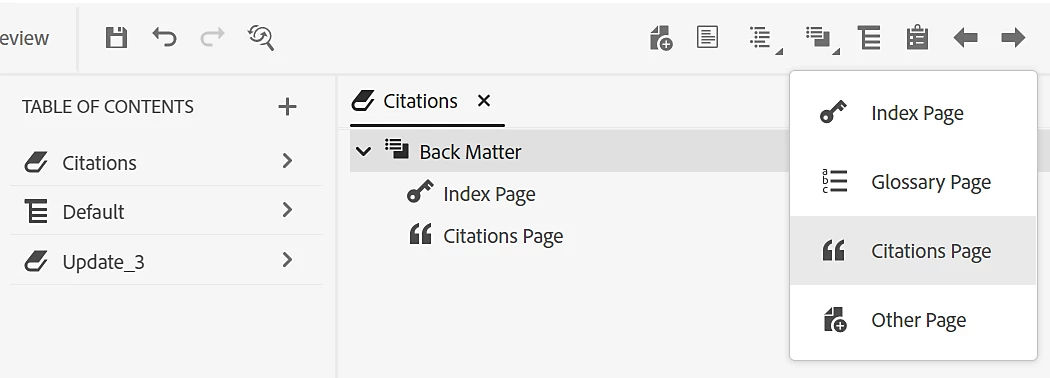
- Select Index Page to locate keywords in your content without having to search. The index is an alphabetically sorted list of words with page numbers (or hyperlinks to pages) where they are mentioned.You can reorganize your Back Matter section by dragging the index to its appropriate location.
- Select Glossary Page for new and specialized terms. When selecting the glossary page option, a dialog box opens, which allows you to select the glossary file to be included.You can reorganize your Back Matter section by dragging the Glossary page to its appropriate location.
- Select Citations Page for the citations used in your book. All the citations used in the topics in TOC gets listed on multiple pages and appear at the end of the PDF output.You can reorganize your Back Matter section by dragging the citation page to its appropriate location.
- Select Other Page to insert a new topic in your book. Remember, the new page inside the Back Matter section is for any content user would like to include.
Note:
- Any section or topic at the first level becomes a chapter in PDF and Word outputs.
- Any topic associated with a section becomes the first topic within this chapter.
- All child sections and topics get flattened on generating the output. This means that all the child sections are removed, and their respective content comes at the second level along with other topics.
Use a desired Table of Contents in your output
To use a Table of Contents in the output:
- Click the Output tab at the left side of the Standard toolbar.The Output view opens.
- In the Output toolbar, click Output Presets.
- In the Output Presets panel, select your desired output preset from the given options. You can choose output presets from among Responsive HTML5, Mobile App, Frameless, eBook, Word, PDF, and more.
- Select the Content tab.
- The Table of Contents field displays all your created Table of Contents files in the project. Use the drop-down list to select your desired Table of Contents file.The selected Table of Contents is then included in your output. See Generate output for details on how to generate the output.
Cut, Copy, and Paste in a Table of Contents
To cut, copy, and paste the content in the active Table of Contents, select your content, and right-click the mouse button for a Quick Menu. Click either Cut or Copy, then place your cursor where you want to put the content and click the Paste command.
Alternatively, if you open two Table of Contents positioned side-by-side, you can also drag items from one Table of Content to another Table of Content, which is a copy-and-paste operation.
Rename a Table of Contents
To rename a Table of Contents:
- In an open project, select Table of Contents in the Author toolbar. The Table of Contents panel opens.
- In the Table of Contents panel, against the Table of Contents that you want to rename, choose Options () > Rename.
- In the Rename Table of Contents dialog box, modify the current name. Click Done.
Delete a Table of Contents
To delete a Table of Contents:
- In an open project, select Table of Contents in the Author toolbar. The Table of Contents panel opens.
- In the Table of Contents panel, against the Table of Contents that you want to delete, choose Options () > Delete.
- In the Confirm dialog box, click Yes to confirm the deletion.
More like this
We're glad. Tell us how this page helped.
We're sorry. Can you tell us what didn't work for you?
Share additional feedback to help us improve.
0/255
|