Whatever message this page gives is out now! Go check it out!


Work with skins
Last update:
Apr 27, 2021
Learn how you can use a skin in RoboHelp to quickly customize the layout of your output.
What is a skin
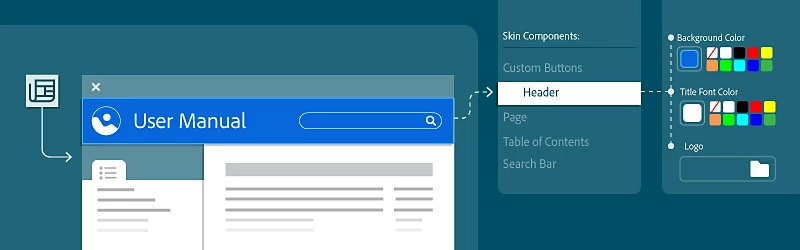
A skin in RoboHelp helps you alter and customize the look and feel of your Help system before publishing it. You can customize a skin by changing colors, buttons, fonts, icons, logos, and background of your output. Whether it is Responsive Html5 or Frameless that you want to publish, RoboHelp provides several predefined skins in the Skins panel of the publishing window. You can apply one of these predefined skins as it is or edit it to achieve the preferred output layout.
Add a skin
You can add a skin in the Responsive HTML5 or Frameless format. To add a skin, do the following:
- Click the Output tab at the left side of the Standard toolbar. The Output view opens.
- In the Output toolbar, click the Skins icon
 .
- In the Skins panel, click New Skin
 . From the drop-down menu, click one of the following options:
- New Frameless Skin To add a Frameless skin. The New Frameless Skin dialog box opens.
- New HTML5 Skin To add a Responsive HTML5 skin. The New Responsive HTML5 Skin dialog box opens.
- In the New Frameless Skin or the New Responsive HTML5 Skin dialog box, select a predefined template in the Templates section. You can preview the selected template in the Preview area.
- In the Name field, modify the default name of the predefined template, if required.
- Click Done.The new skin is added to the Skins panel and placed in alphabetical order of skin names. RoboHelp also opens the skin editor as a tab.
Edit a skin
You can easily customize a skin to suit your liking. To edit a skin, follow these steps:
- Click the Output tab at the left side of the Standard toolbar. The Output view opens.
- In the Output toolbar, click the Skins icon.
- In the Skins panel, against the skin you want to customize, choose Options (
 ) > Edit. RoboHelp opens the skin editor as a tab. The skin editor comprises a live skin preview on the right and the Layout panel on the left side.In a Responsive HTML5 or Frameless skin, a toolbar above the skin editor allows you to do the following:
- Desktop icon (Default layout) Displays your content in the desktop view.
- Phone icon Displays your content in the phone view.
- Tablet icon (Not available in Frameless) Displays your content in the tablet view.
- Toggle highlight icon Toggles the highlighting of skin components in the skin editor.
The skin components and its settings vary according to the type of skin view (desktop, phone, or tablet) you select. - In the Layout panel, click a skin component on the left to set your preferences for the component.On clicking a skin component, RoboHelp displays its current settings and highlights the component in the output preview tab. For example, in Responsive HTML5, clicking Filter displays its current settings and highlights the Filter icon and area in the output preview tab.
- In Frameless skin, in the Home Page or the Topic Page panel, click a drop-down section and select a component to set its styling properties (font, alignment, border, layout, and background) on the right panel. Note: You may choose to completely hide the right panel by disabling the 'Right Panel' radio button.
- Specify the preferred settings for each skin component as required, and click the Save icon in the standard toolbar of the publishing window.RoboHelp applies the new skin settings to your content and displays it in the output preview tab.
Rename a skin
You can rename any skins in your project.
- Click the Output tab at the left side of the Standard toolbar. The Output view opens.
- In the Output toolbar, click the Skins icon. The skins in your project are displayed.
- In the Skins panel, against the skin you want to rename, choose Options () > Rename, or alternatively, press F2.
- In the Rename Skin dialog box, type a new name for the skin and click Done. The skin is renamed.The renamed skin is placed in the alphabetical order in the Skins panel.
Note:
The new name of the skin is automatically reflected in all the Output Presets, that use the skin.
Upgrade a skin
When you upgrade RoboHelp Classic projects, RoboHelp automatically upgrades all Responsive HTML5 skins. If you customized skins outside the RoboHelp Classic skin editor, use the Layout component in the Layout panel in RoboHelp 2019 to add a custom JavaScript or CSS file.
To add a custom JavaScript/CSS file, do the following:
- Click the Output tab at the left side of the Standard toolbar. The Output view opens.
- In the Output toolbar, click the Skins icon.
- In the Skins panel, against the skin you want to customize, choose Options () > Edit.
- In the Layout panel at the left side of the skin editor, click the Layout component.
- Under the User Assets drop-down section, click Add Asset.
- In the Open dialog box, navigate to choose a JavaScript/CSS file and click Open.The file gets added to the User Assets drop-down section. You can add multiple such files.
- Click
 against a file and use drag-and-drop to change its order in a list of files. Click
 to delete a file.
Import a skin
To import a skin, do the following:
- Click the Output tab at the left side of the Standard toolbar. The Output view opens.
- In the Output toolbar, click the Skins icon.
- In the Skins panel, choose New Skin () > Import.
- In the Import Skin dialog box, click
 to navigate to the skin (
.skzor.slzfile) you want to import, and then click Open. The selected skin appears in the Skin File field. Click Done to import the skin.The selected skin is added to the Skins panel and placed in alphabetical order of skin names.Note:- If you import a
.slzfile, which is a RoboHelp Classic file, it is upgraded automatically. For more information, see Upgrade a skin. - If you are importing an Indigo skin and want to use the RoboHelp Classic layout format, select the Keep using older layout for the skin field in the Import Skin dialog box.
- If you import a
Export a skin
To export a skin, do the following:
- Click the Output tab at the left side of the Standard toolbar. The Output view opens.
- In the Output toolbar, click the Skins icon.
- In the Skins panel, against the skin you want to export, choose Options () > Export.
- In the download dialog box, the Downloads folder in your computer is the default location to export a skin. You can navigate to a location of your choice, and then click Save.The skin is saved to the chosen location.
Delete a skin
To export a skin, do the following:
- Click the Output tab at the left side of the Standard toolbar. The Output view opens.
- In the Output toolbar, click the Skins icon.
- In the Skins panel, against the skin you want to delete, choose Options () > Delete.
- In the Confirm dialog box, click Yes to confirm the deletion.The skin is deleted.
Locate a skin file in your computer
To see the location of a skin file in your computer, do the following:
- Click the Output tab at the left side of the Standard toolbar. The Output view opens.
- In the Output toolbar, click the Skins icon.
- In the Skins panel, against the skin you want to locate, choose Options () > Show in Explorer. Windows Explorer opens to display the skin file and its location.
We're glad. Tell us how this page helped.
We're sorry. Can you tell us what didn't work for you?
Share additional feedback to help us improve.
0/255
|