Whatever message this page gives is out now! Go check it out!


Auto save your content
Last update:
Nov 9, 2023
Learn how RoboHelp auto saves your content in a matter of seconds.
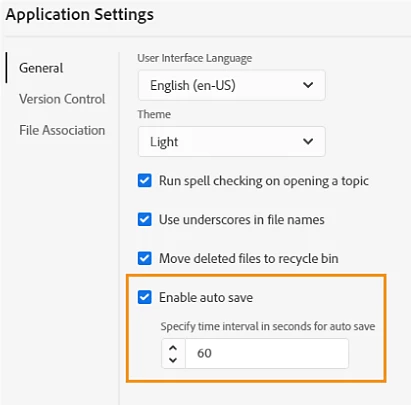
Auto save is a new feature that automatically saves your work at certain intervals. To create a seamless authoring experience, here’s how to set your topics to auto save every minute. This feature is disabled by default, but can be turned on from the menu.
How to enable autosave
To enable, click Edit > Preferences > Enable auto save.
Here you'll find the "Specify time interval in seconds for auto save" option, which by default is set to 60 seconds, meaning that RoboHelp will save your unsaved content every 60 seconds.
How to disable auto save
Uncheck the box for "Enable auto save" if you wish to disable the auto save feature.
More like this
We're glad. Tell us how this page helped.
We're sorry. Can you tell us what didn't work for you?
Share additional feedback to help us improve.
0/255
|