Whatever message this page gives is out now! Go check it out!


Generate PDF output
Last update:
May 22, 2024
Learn how to generate PDF output in RoboHelp. PDFs are great for printing and saving locally for offline use.
What is PDF output
Generating PDF output helps you distribute your project output to the users. Adobe PDF or Portable Document Format is a universal file format for viewing, sharing, and printing content. PDFs preserve fonts, images, and layout of content created with different applications and platforms. They are compact, easy to navigate with links, and effective in printing workflows.
Note:
Java Runtime Environment (JRE) is needed to generate the PDF output. You'd also need a PDF reader on your computer to view PDF files. For more details, see RoboHelp system requirements.
Configure a PDF output preset
The first step in generating the output of a RoboHelp project is to create an output preset and then configure the various settings of the output preset. You can use the following settings to configure a PDF output preset:
General
Use the following options to specify basic output settings, such as output path, langauge, and more.
Output Path Specify a location for the output. To select a location, click  . Ensure that the output path is NOT located inside the project folder.
 Save output path as relative to project: If enabled and you browse to the output path., the path to the output will now be a relative instead of absolute.
Language Use the drop-down list to specify a language. The selected language is then used for labels of Index, Glossary and hyphenation rules in your output. Hyphens break words so that they wrap around to the next line. Specify this setting if you want to change the language specified in project settings.
Post Generation Script To run your custom script after output generation, select the script
.js file from the drop-down list. The .js files displayed in the list are from the Scripting folder of your RoboHelp app data.Content
Use the following options to specify content-related output settings, such as the settings for Table of Contents, referenced topics, condition expression, variable set, and including expanding and drop-down text.
Table Of Contents Use the drop-down list to select a Table of Contents to be included in the output. This drop-down list displays the Tables of Contents available in your project. The first Table of Contents in this drop-down list is selected by default.
The set of files and their references present in the selected Table of Contents appear in the generated output. For book related features like front matter, back matter, etc., see Create and manage a Table of Contents.
Include All Referenced Topics Includes topics that are not part of the Table of Contents but are referenced from topics in the Table of Contents. Deselect this option to exclude the referenced topics in your Word Document output. All the referenced topics are grouped together and added to the end.
Condition Expression Use the drop-down list to specify the condition expression for your output. This setting allows you to easily include or exclude content depending on the desired type of output or user base. Click  to edit the selected condition expression. You can also select None in the drop-down list to not specify any condition expression.
Variable Set Use the drop-down list to specify the variable set to use in this output. In the drop-down list, you can select <Default Variable Set> to use the project's default variable set. Variable sets allow you to implement output-specific use of variables. For example, you can have different variable sets for generating output for customers and internal users.
Include Expanding Text Select this option to include Expanding Text in your PDF output; otherwise, only the Expanding Text title goes into the output. With this option selected, the Expanding Text will be shown in the expanded form in the generated PDF.
Include Drop-down Text Select this option to include Drop-down Text in your PDF output; otherwise, only the Drop-down Text title goes into the output. With this option selected, the Drop-down text will be displayed in the generated PDF.
Metadata
The metadata options includes information about the document and its contents, such as the author's name, keywords, copyright information, and other data fields.
From the Output presets, select PDF>Metadata to add and customize metadata options.
Provide metadata names and values
- Add name by selecting from the drop-down or add a custom metadata by typing directly in the name field.
- Enter the value for the metadata and click on ‘+’ icon. The metadata is added to the list of metadata for the PDF.
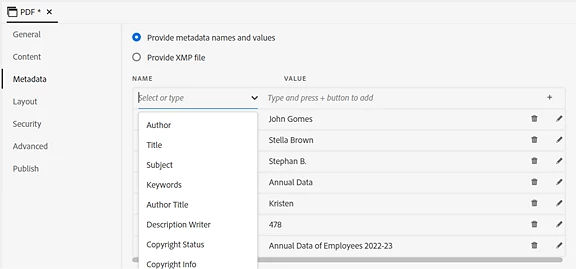
Provide XMP file
Metadata fields can be directly populated by importing XMP (Extensible Metadata Platform) file. You can download a sample XMP file from here.
Download
Get file Sample XMP file
Alternatively, you can generate an XMP file using Adobe Acrobat.
- Click File>Properties in Acrobat.
- Under Description, click Additional Metadata.
- From the left panel, select Advanced. Click on Save. XMP file saved in the device.
Layout
Use the following options to specify the page specifications (size, orientation, margin settings etc.).
Page Size Use the drop-down list to select a desired page size for your output. You can choose from options such as A4, A3, Letter, and more. You can also select Custom to specify your own page width and page height (in mm (millimeters), px (pixels), in (inches), cm (centimeters), pt (points). By default, RoboHelp uses millimeters.
Orientation Select the orientation of the page (Portrait or Landscape).
Page Margin Specify the desired page margin (in mm (millimeters), px (pixels), in (inches), cm (centimeters), pt (points). Click  to set different margins for all four sides and
 to apply the same margin to all four sides.
to set different margins for all four sides and to apply the same margin to all four sides. Specify the top page margin.  Specify the left page margin. |  Specify the bottom page margin.  Specify the right page margin. |
Page Display Select any of the options to set a specific initial view of a PDF document that determines how the document displays when it is opened. It depends on the PDF viewer to honor these settings.
- Single Page View (by default) - Displays one page at a time, with no portion of the next page displayed.
- Single Page Scrolling - Displays a single-page in a continuous vertical column.
- Two Page View - Displays two-page spread side-by-side at a time.
- Two Page Scrolling - Displays facing pages side-by-side with continuous scrolling.
Zoom Select any of the options to resize the page view that determines how the document displays when it is opened.
- 100% - Makes the page appear in its actual size.
- Fit Page - Makes the page width and height to fit within the document pane.
- Fit Page Width - Makes the width of the page fill the width of the document pane.
- Fit Page Height - Makes the height of the page fill the height of the document pane.
Start each topic from a new page Select this option for each of your topics to start from a new page in the output.
Always start chapter from You can opt to start your chapter always from New Page, Odd Page, or Even Page.
- New Page Starts the new chapter from an even-numbered or odd-numbered page.
- Odd Page Starts the new chapter on the next odd-numbered page.
- Even Page Starts the new chapter on the next even-numbered page.
TOC Structure
- Chapter names and topic titles With this option selected, the structure of the generated TOC is based on the chapters and topics in the TOC.
- Use topic heading styles With this option selected, the structure of the generated TOC is based on the heading styles, which by default is applied to heading 1. You can limit the number of levels shown in the generated TOC by adding the heading levels from heading 1 through heading 6.
Advanced
Use the following options to specify advanced print options:
Create accessible (tagged) PDF Select this option to generate tagged PDF. This makes it easier for screen readers to read and navigate a document, hyperlinks, bookmarks, and so on. For example, if a table is tagged, the screen reader will know that it is reading the table and not just lines and text.
Merge PDFs included in the TOC Select this option to merge existing PDFs into your output by adding them to your Table of Contents. The PDFs will be inserted at the location represented in the TOC and the pages will be incremented accordingly.
Create secure PDF Select this option to create a password protected PDF. The end users would then be prompted to provide the password in the text box when enabled.
Embed used fonts Select this option when using fonts that may not be installed on end user's machines. For fonts to work in PDF output, they must be installed on your machine building the output. With this option selected, the used fonts get embedded in the PDF, ensuring the user can see the PDF as intended even if the fonts are not installed on their machine.
Before adding a new external font, clear the font cache. The font cache is at "user.home/.PDFreactor". Example - /Users/rhuser/.PDFreactor.
- To clear the cache from .PDFreactor, delete all the files from this folder.
- Install the new font.
- Start or restart RoboHelp and export the content with the required font.
Embed multimedia files Select this option to embed videos and other multimedia files to your output.
Note:
A security warning appears when there is potentially unsafe active content (such as playing embedded multimedia, URL access, and so on) in the PDF you want to open. If you know and trust the sender, click Allow to download the external content.
Enable JavaScript Enable this option if you have a JavaScript code that you can use to generate the PDF output.
Use automatic hyphenation With automatic hyphenation enabled, words at the end of lines are broken in grammatically correct places.
Use image compression to optimize PDF size Select this option if you want to compress/reduce the size of an image, which can significantly reduce the size of the PDF if the project has lot of heavy images. Remember, the quality of the image reduces when you use compression.
Use full compression to optimize the PDF size When enabled, you’ll be able to generate a PDF file with full compression, which will reduce the size of the PDF significantly.
Use custom resolution (pixels per inch) In HTML pages, the height and width of elements are calculated in pixels, and for PDF, the same is measured in inch. By default, 96 pixels are converted to an inch. Use this setting if you want to change that, setting a higher value will fit more content in an inch and will look smaller in PDF, and vice versa, if you set a lower value.
Use watermark Select this option to superimpose a watermark in your output. You can enter a new text string in the text box with the character casing the way you want.
Enable MathML equations When enabled, you'll be able to render any MathML equation in your content to a PDF output.
PDF conformance From the drop-down list, select the required conformance. A PDF conformance is a set of compliances, such as, content without audio/video, following standards-based metadata, and others. Select the standard to which you want to conform the PDF output to. Based on the standard selected, the various PDF options get enabled or disabled.
Publish
You can publish your output to FTP, SFTP, or File System. To be able to publish your output, first configure a publish profile for the appropriate server type. For more information, see Configure a publish profile for FTP, SFTP, or File System.
After you save the publish profile, RoboHelp displays the profile in the Publish tab. To publish your output, select the appropriate publish profiles and click  .
.By default, only modified files are published using the chosen publish profiles since the last publish.
To publish all files, select Republish All and click . To view the publish log, in the Output Presets panel, against the appropriate output preset, choose  > View Publish Log.
. To view the publish log, in the Output Presets panel, against the appropriate output preset, choose > View Publish Log.Security
The following options are present in the Security tab:
Set password to open the document: When enabled, you can set a password so that any user that opens the PDF will be prompted to enter the password that you've set.
Set the document restrictions: When enabled, you'll be able to set the following options:
- Owner password: An owner password allows certain operations and restrictions that are applied to the PDF document. The following operations are present:
- Printing: When enabled, a user can print the PDF.
- Draft quality printing: Enable this checkbox if you want to preserve printer ink while printing.
- Content copying: Enable this checkbox if you want a user to copy a block of content from the resultant PDF.
- Annotations: Enable this checkbox if you want a user to annotate text in the PDF.
- Content modifications: If you want the user to edit any content on the PDF, enable this checkbox.
- Content copying for accessibility: Allows screen reader software to utilize the text within the PDF file for reading the PDF file.
- Document assembly: When enabled, a user can use the document and add or insert pages (or other documents) to the document.
Generate PDF output
- In the authoring window of your project, click the Quick Generate icon
 in the upper-right corner of the standard toolbar.
- Select a PDF output preset in the Quick Generate dialog box.
- To configure the settings, do one of the following:
- Click the Edit Settings icon
 in the Quick Generate dialog box.
- Click the Output tab at the left side of the Standard toolbar.
The Output view opens. - Click the Edit Settings icon
- In the Output toolbar, click Output Presets. In the Output Presets panel, do one of the following:
- Double-click the desired PDF output preset.
- Click the
 icon next to the desired output preset and select Edit.
- See Configure a PDF output preset to configure the output settings.
- To save your settings, click the Save icon
 in the upper-left corner of the standard toolbar in the Output view.
- Click the Generate Preset icon in the Output Presets panel. You can then view a progress bar next to the selected output preset in the Output Presets panel. Once the output generation is complete, a Success dialog box is visible at the lower-right corner of the screen.After the output generation is complete, click
 in the Output Presets panel to view the output.Note:Alternatively, you can generate the output in the authoring window. Click Quick Generate on the toolbar, select the desired output preset, and click Generate.You can then view a progress bar in the Quick Generate dialog box. After the output generation is complete, click next to the output preset to view the output. In case the output generation failed, click
 next to the selected output preset to view the error log.
More like this
We're glad. Tell us how this page helped.
We're sorry. Can you tell us what didn't work for you?
Share additional feedback to help us improve.
0/255
|