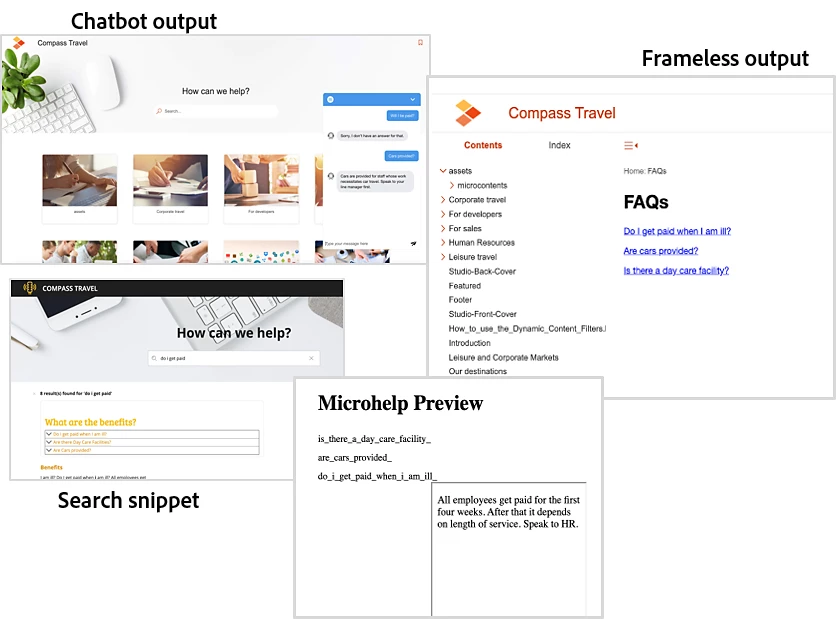
Create Microcontent from the core pieces of your content, then use that Microcontent to promote the larger content.
Introduction to Microcontent
Microcontent is a small, bite-sized snippet of self-contained information delivered through Chatbots, Microhelp, and FAQs.
In addition to topic-based authoring, RoboHelp gives you the ability to create a new microcontent or repurpose your existing content, such as a specific portion of a topic, for use as microcontent, that can be easily digested by Artificial Intelligence (AI) applications.
In RoboHelp, it begins with the creation of Microcontent group, collection of intent, and corresponding response, such as question and answer. In short, Microcontent means small content authored for a specific entity, "Intent." User will define an intent; for example, What is Browse Sequence?, and define its response as a rich text content. The response text can be either authored or can be created using an existing topic content. The intent/response combination can help to spark the curiosity of the user.
Uses of Microcontent
You can consider several types of content to be used as Microcontent, which is engaging, eye-catching and quick to take in. Having created Microcontent in RoboHelp, you can deploy it in a number of different ways for use within Chatbot,Search Snippet, FAQ, or Microhelp, and each one of them can be used in their own way to direct traffic to engage the audience.
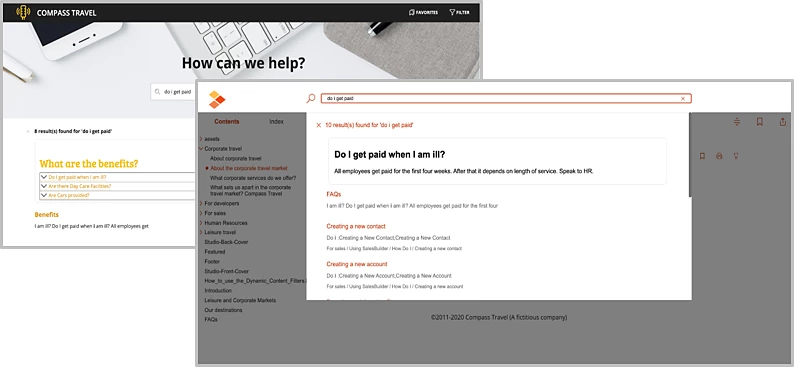
Search Snippet Retrieve a concise response to the search query in all outputs on the homepage and topic page. For more details, see Add FAQ page to a Frameless output.
Microhelp Create small file (HTML, JSON, XML, Text) that developers can access in an app, with or without links to the main help. This is very small in size and sit standalone on a server. This output does not require any phrase or keyword. For more details, see Configure output preset for Microhelp.
Understanding Intents
The term "Intent" is a piece of information intended to assist the user. It is all about what a reader uses when performing a search or interacting with, say a chatbot or something included in a FAQ page. It could be a possible question about the project which the user can query while performing a search or while interacting with the chatbot.
Let us understand this with an example:
Suppose the owner of a coffee shop has authored a project which imparts training to the new employees on how to brew coffee, and other drinks. The trainee will have the project's output with him in the form of a help website. If he wants to look up "how to make cappuccino," he will simply type it in the search box, and get the response about the query. So "how to make cappuccino" forms an intent. There is a concept of "Phrases," too. A Phrase is associated with an intent. Here, the phrases for "how to make cappuccino" can be
1. how to prepare cappuccino.2. how to brew cappuccino... and so on;
basically, all the possible ways in which the question "how to make cappuccino" can be asked by the user.
Now, the intent described above can be used in the chatbot, can be enlisted as a FAQ, or as a search snippet in all outputs.
Create Microcontent Group
You can create multiple Microcontent groups to help organize your intents into different groups. To create a Microcontent Group, follow these steps:
Do one of the following:
In the Author toolbar, select Microcontent. The Microcontent Group panel opens.
In the Author toolbar, select Contents. The Contents panel opens.
Do one of the following:
In the Microcontent panel, click . The New Microcontent Group dialog box opens.
In the Contents panel, right-click the folder or click against it, and choose New > Microcontent Group. The New Microcontent Group dialog box opens.
In the New Microcontent Group dialog box, specify the Name of the Microcontent Group. The corresponding File Name is automatically added with .mc extension.
Click Done.
The Microcontent Group is added to the Microcontent panel.
Create intent and response in the Microcontent panel
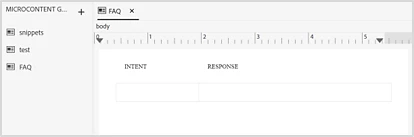
The Microcontent file opens in the authoring area, as a single row table, where you can add intent and response. Each intent that you create should become associated with a response.
How to add intents and responses
The left column "Intent" lets you create a new intent in a text form. For example: "What are the Employee benefits?"
Whereas, the right column "Response" lets you create rich content, and offers familiar options as topic creation, such as adding cross-reference, hyperlink, image, variable, snippet, and drop-down content.
Intent properties
An Intent can have multiple phrases defined to map to the same response. For example, What is Navigation Sequence w.r.t. What is Browse Sequence? An intent can have metadata like keywords for example,navigation, sequence, order, etc. for Browse Sequence intent.
The Intent properties are shown on the right in the properties panel and represent the defining characteristics of an intent.
Name Displays the name of the intent added in the left column.
Phrases Add new alternative phrases for each intent that would have the same answer. Alternative phrases are very useful as it is impossible to predict the phrasing a user will use. Adding an alternate phrase improves the chance that the matching response is displayed for the end user, even though the main intent is not used. For example:"What are the Employee benefits" or "What are the advantages for employees" or "Employee welfare."
Keywords Add tags and keywords associated with your content so that the user can use them in his search. Adding keywords is again very useful as the user might enter a word or two where the same information would be relevant.
ID You can enter IDs for use with the Microhelp output.
Condition Tags You can apply condition tags so that a particular intent within a group is not included when the output has the selected tag(s) applied.
Create response using existing topic content
You can create response to your intent by using an existing topic or snippet. To do so, follow the steps below:
In the Author toolbar, select Contents and open a topic of your choice from the Contents panel.
Select the required content in a topic and right-click. A context menu appears.
Select Add to Microcontent from the context menu.
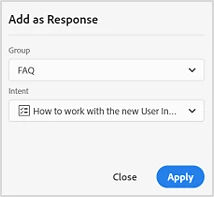
In the Add as Response dialog box, specify the Group and Intent.
Click Apply.
The response gets added to the selected intent.
Generate Microcontent output
Before you generate your Microcontent output in RoboHelp, you need to create and configure an output preset. Once the output preset is ready, you can use the preset to generate the output in various forms such as, Chatbot, Microhelp, and FAQ.
Create a Microcontent output preset
To create an output preset in RoboHelp, follow these steps:
Click the Output tab at the left side of the Standard toolbar. The Output view opens.
In the Output toolbar, click Output Presets. The Output Presets panel opens.
In the Output Presets panel, click .
In the New Preset dialog box, specify the following:
Type Use the drop-down list to either select Chatbot, Frameless, or Microhelp preset type, as required.
Name Specify a name for the output preset.
Click Done.
You can access the output preset from the Output Presets panel in the Output toolbar. Alternatively, you can access the output preset in the Quick Generate dialog box of the authoring window.
Configure output preset for Chatbot
You can use the following settings to configure the various settings of the Microcontent output preset for Chatbot:
General
Use the following options to specify basic output settings, such as title, Chatbot engine, output path, language, and post generation script.
Title Specify the title for the generated output.
You can use variables in the title. To do so, type Ctrl+Shift+9 and select a variable from the drop-down list, and then press Enter. Note that if you have provided a variable set in the Content tab > Variable Set field, the value of the selected variable is picked from the variable set during output generation.
Chatbot Engine From the drop-down, select a Chatbot Engine. Currently, Chatbot output has connectors to allow Google Dialogflow integration.
Output Path Specify a location for the output. To select a location, click . Ensure that the output path is NOT located inside the project folder.
Language You can create chatbots in a number of languages to reach to a much broader audience. Specify this setting to create chatbot in one of the languages listed in the drop-down.
Post Generation Script To run your custom script after output generation, select the script .js file from the drop-down list. The .js files displayed in the list are from the Scripting folder of your RoboHelp app data.
Content
Use the following options to specify content-related output settings, such as Microcontent groups, condition expression, and variable set.
Microcontent Groups Use the drop-down list to select as many Microcontent Groups as you need, storing multiple intents/responses from the selected groups, hence resulting in various responses to the user's query.
Condition Expression Use the drop-down list to specify the condition expression for your output. This setting allows you to easily include or exclude content depending on the desired type of output or user base. Click to edit the selected condition expression. You can also select None in the drop-down list to not specify any condition expression.
Variable Set Use the drop-down list to specify the variable set to use in this output. In the drop-down list, you can select <Default Variable Set> to use the project's default variable set. Variable sets allow you to implement output-specific use of variables. For example, you can have different variable sets for generating output for customers and internal users.
Dialogflow
Use the following options to specify output settings, such as Client-info JSON and Embed Code.
Client Info JSON Specify the JSON file containing the credentials for Google Dialogflow agent. For Dialogflow Authentication setup, click on the note at the end for step-by-step guide to procure the Client Info JSON file.
Click on browse and add the JSON file. Select the Microcontent Groups from Content before hitting the publish button.
Client
The following settings contain a set of predefined messages for use with the sample agent only. You can either accept or amend the default strings, like Welcome text, Default text, Error messages, etc. and then generate the chatbot output.
Welcome Message Use this as the first response that bot sends to the user who initiates a live chat. For example: "How can I help you?"
Default Response It's a fallback response for your messenger chatbot when a user sends a message and your chatbot is not set up to have an answer for.
Retry Message It refers to the process retrying to deliver the response that failed to be delivered. If the delivery of a response fails, the retry message is displayed. For example: "Allow me a minute to help you."
Input Box Placeholder Text It specifies a prefedined text visible in the Chatbot UI. The text is displayed in the input field before the user enters a text of the expected format.
Error Message It is shown when the bot fails to fetch any response from the dialogflow server. For example: "Please contact the administrator."
Embed Code Copy-paste this code in the HTML Head section in which you want to render the chatbot.
Configure output preset for Microhelp
You can use the following settings to configure the various settings of the Microcontent output preset for Microhelp:
General
Use the following options to specify basic output settings, such as output path, format, language, and post generation script.
Output Path Specify a location for the output. To select a location, click . Ensure that the output path is NOT located inside the project folder.
Format Specify the desired format for your Microcontent.
HTML5 + CSS3 - Use to generate output in markup language with styling (for example, controlling the size of text, font type, background color, etc.).
HTML5 - Use to generate output in markup language without styling.
JSON - Use to generate output in JSON format.
XML - Use to generate output in XML format.
Text - Use to generate output in text format.
Language Specify this setting for adding language attribute in the content.
Post Generation Script To run your custom script after output generation, select the script .js file from the drop-down list. The .js files displayed in the list are from the Scripting folder of your RoboHelp app data.
Content
Use the following options to specify content-related output settings, such as Microcontent groups, condition expression, and variable set.
Microcontent Groups Use the drop-down list to select as many Microcontent Groups as you need, storing multiple intents/responses from the selected groups, hence resulting in various responses to the user's query.
Condition Expression Use the drop-down list to specify the condition expression for your output. This setting allows you to easily include or exclude content depending on the desired type of output or user base. Click to edit the selected condition expression. You can also select None in the drop-down list to not specify any condition expression.
Variable Set Use the drop-down list to specify the variable set to use in this output. In the drop-down list, you can select <Default Variable Set> to use the project's default variable set. Variable sets allow you to implement output-specific use of variables. For example, you can have different variable sets for generating output for customers and internal users.
Publish
Click Quick Generate on the toolbar, select the desired output preset, and click Generate.
You can then view a progress bar in the Quick Generate dialog box. After the output generation is complete, click next to the output preset to view the output.
To publish all files, select Republish All and click . To view the publish log, in the Output Presets panel, against the appropriate output preset, choose > View Publish Log.
Add FAQ page to Frameless output
You can author a group of Microcontents and then combine them to create FAQs. To add FAQ page in Frameless output, follow these steps:
Quickly insert a Microcontent in the TOC by dragging it from the Contents panel and dropping it in the Table of Contents.
Or, follow these steps:
In the Author toolbar, select Table of Contents in which you want to add a Microcontent file.
Do one of the following:
In the Table of Contents toolbar, click .
Right-click in the Table of Contents editor and choose Insert Topic.
In the Insert Topic dialog box, search for a Microcontent file of your choice. Click Done.
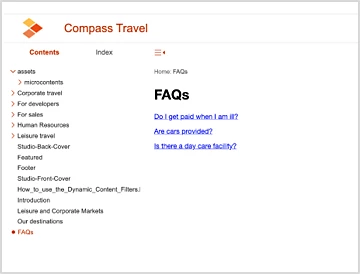
The Microcontent file is added as FAQs in your output.
An illustration of how the FAQ page looks
You can also retrieve a concise response to the search query in all outputs on the homepage and topic page. Note: A response will be displayed as a snippet in search results if the searched words are present in the intent, phrases, or keywords of your intent.
Search snippets on Frameless homepage and topic page
Share this page
Was this page helpful?
We're glad. Tell us how this page helped.
We're sorry. Can you tell us what didn't work for you?
Thank you for your feedback. Your response will help improve this page.
Join our in-person and virtual events to explore technical content and knowledge management trends, hear customer success stories, build skills, and network with peers and industry leaders.


 . The New Microcontent Group dialog box opens.
 against it, and choose New > Microcontent Group. The New Microcontent Group dialog box opens.
 .
 . Ensure that the output path is NOT located inside the project folder.
 to edit the selected condition expression. You can also select None in the drop-down list to not specify any condition expression.
 on the toolbar, select the desired output preset, and click Generate.
 next to the output preset to view the output.
 . To view the publish log, in the Output Presets panel, against the appropriate output preset, choose
 > View Publish Log.
 .