Whatever message this page gives is out now! Go check it out!


Translating content to multiple languages
Last update:
Nov 30, 2023
Learn how RoboHelp enables you to translate your content in multiple languages, in a matter of minutes.
RoboHelp enables you to localize your authored content with a fully integrated manual and machine translation workflow in more than 35+ languages. Read this article to learn how RoboHelp enables you to extend the reach of your content to the wider audience.
Manual Translation RoboHelp content is exported to the industry-standard XLIFF format, which can be provided to Translation vendors. After the XLIFF content is translated, it can be imported into RoboHelp, creating a translated version of the original RoboHelp project.
Machine Translation To automate translation workflows, the translation service providers are integrated with RoboHelp for translating content into multiple languages. The translation provider translates a large amount of content using an automated translation system in real-time, and the translated content is automatically imported back once APIs translate the content.
To get started with translations, a Translation project should be set up. It requires specifying the target language, translation method (manual/machine translation), translation provider and the content to be translated.
RoboHelp automatically assigns a unique identifier to each project, and creates an association between the primary (source) project and the child (translation) project. All actions of the translation management happen from the primary project, even for the child projects. For more details on Project ID, see Create a Project in RoboHelp.
Create a Translation project
To create a Translation project in RoboHelp, follow these steps:
- Open the RoboHelp project you want to translate.
- Click the Translations
 tab at the bottom side of the left toolbar.
- The Translation panel opens.
- Click
 to add a new Translation.
- In the new Translation dialog box, specify the following:
- Translation Language Select the target language into which the project content would be translated.
- Link an existing translated project Select this option if you already have the translated version of this project, then no new translation project is created in this case.
- Translation Project Location To select a location, click
 . You may select the RoboHelp project (.rhpj) or an empty folder location, depending on if you want to link to an existing project or not.
- Click Done.
Manage Translation
Do one of the following to manage the Translation project:
- On the Translation panel, double-click the language. The translation editor opens on a separate editor tab.
- Alternatively, right-click the language and choose Manage from the context menu.
Quick start: Filter by specific tabs
With so much of content, it can be difficult to find what all files are required to be sent for Translation. RoboHelp manages to extract all the translatable content from all the files to reduce the user's workload. To manage the translation files in a better way, the following three tabs are available at the upper-right corner of the authoring screen.
Depending on the selected tab, RoboHelp displays the filter options in the Filters panel. Let's take a closer look by clicking the corresponding tab.
Tab | Description |
|---|---|
Topics | The Topics tab displays all the topics in your project, which include
|
Author | The Author tab displays
|
Output | The Output tab displays
|
Assets | The Assets tab displays all the files which are not part of the Topic, Author, or Output tabs. These include binary files like images and multimedia. Initially, these files are in "Not Translated" status but can be sent for translation. You can force sync them to get them "In Sync" status. In this case, the files are then copied to the translated project as well. |
Configure translation-related properties in the properties panel to specify how to translate your content. The configuration includes the following information:
Choosing the right translation type
Manual or Machine: You can choose one of the following translation type for your content:
- Manual Translation The content is sent to the translation vendor by the user in XLIFF file format for translation.
- Machine Translation The translation provider performs the translation using machine translation in real time.
Translation Project Path
Click to open the target path which the user chose while creating the translation project.
to open the target path which the user chose while creating the translation project.Applying Filters
RoboHelp includes a large set of filter configurations for the user to determine which files are to be translated. You can choose the authored content using provided filters to control the content to be translated in your project. To customize your selection, use the following options in the Filters panel:
- Translation status You can filter files based on their translation status. The Master project maintains the status of translation and keeps a record of each translated file. The translation status of a file shows its translation state in the end-to-end workflow. Following is the list of status:
- Not Translated Indicates with a gray dot that the translation has not been initiated. This happens when you add new topics which are not part of the translated project yet.
- Out of Sync Indicates with a yellow dot that the source and the translated topics are not identical.
- For example, in the case of Machine Translation, if you update the source, the source content may no longer match the translation provided by the Machine Translation provider. If this happens, the Translation Status displays "Out of Sync."
- Missing Indicates with a red dot the files which are deleted at the destination translated project.
- In Sync Indicates with a green dot the files which are in sync with the ones in the translated project.
- Topic Status Filter the topics based on their topic status and select the filtered topics to send for translation.
- Author Filter the topics based on their Author name, provided in topics metadata.
- Folder Filter files based on the folders present in the project.
- Modified After Filter files based on their last modified date time.
- Columns Choose among various columns that you want to see in the files list.
Translating projects using Machine Translation
In the Translation Profile field, select the previously created Translation Profile.
- Click the Translations tab at the bottom side of the left toolbar. The Translation panel opens.
- Choose Translation Type as Machine Translation in the Properties panel. Select an existing Translation Service API Profile or create a new one.
- Select files among various categories such as Topics, Author, Output. You can also filter the files before selecting and sending for translation.
- Click Machine Translate from the standard toolbar. The Machine Translate dialog box opens.
- The dialog box displays the topics to be sent for translation.
- Click Ok.
Create profile for Machine Translation
- Click Edit
 .
- The Translation Profiles dialog box opens.
- Click + to create a new profile.
- Name Shows the default profile name. Modify the name if required.
- Translation Provider API From the dropdown, select a Machine Translation API from the following. You can only select one provider when applying Machine Translation to the entire project.
- Google Translation API
- Yandex Translate API
- Microsoft Translator Text API
- DeepL API
- Custom Provider API You would need to provide a custom script with API configuration. For more details, see Configure a translation framework for a service provider.
- API Key Enter the API key for the selected Translation Service API. The API key would be stored in the Credential Manager service of the OS the user uses.
- End Point Specify the endpoint for selected Translation Service API.
- Add Header You can add fields for custom headers in translation profile. Click the 'Add Header' button to display a field for adding custom headers in key-value pair. You can also delete an added field by clicking the Remove icon next to it.
For information about API key and End Point, visit the provider's website. - Click Validate to verify that the credentials entered are correct and complete.
- Click Save.
Translating projects with Manual Translation
Select Manual Translation in the Properties panel to indicate that the translation is to be performed manually.
- Click the Translations tab at the bottom side of the left toolbar. The Translation panel opens.
- Choose Translation Type as Manual Translation in the Properties panel.
- Select files among various categories e.g. Topics, Author, Output. You can also filter the files before selecting and sending for translation.
Export to XLIFF
RoboHelp will export the selected files to XLIFF format, which can be sent to a translation vendor.
- Click Export to XLIFF
 from the standard toolbar. The Export to XLIFF dialog box opens.
- The dialog box displays the files to be exported.Click OK.
- Select a location where you want to export the files as XLIFF. Note the export location for later use.The exported files are exported at the selected location under <selected-location>/translations/<language-code> as a <context-name>.xlf file.
- RoboHelp converts the selected files to XLIFF format. A separate .xlf file is created for each file.
- After the export is completed, a success message "Export successful" is displayed at the right bottom of the screen.
Once you have successfully exported the files, you can share them with the Translation provider, who will translate them as per the target language.
Import XLIFF
Once the translation vendor processes the exported XLIFF files, you can import them into the RoboHelp project.
- Click Import XLIFF
 from the standard toolbar.
- Navigate to the location where you have translated XLIFF files from the vendor. Select the folder which contains the translated XLIFF files.Note:The current project will not be changed during import, the imported files will be updated in the translation project.
- The Import dialog box opens which displays the list of files to be imported in the translation project.Click OK.
- After importing, files are shown with In Sync status in the current project.
- Only the XLIFF files exported in the current project would be imported, stray XLIFF files of other projects would be discarded during import, in case, the folder is a heterogeneous mix of multiple projects' XLIFF files.
Note:
Ensure all translation activities, including Export/Import XLIFF files, are managed from the primary project only.
Reviewing the translated content
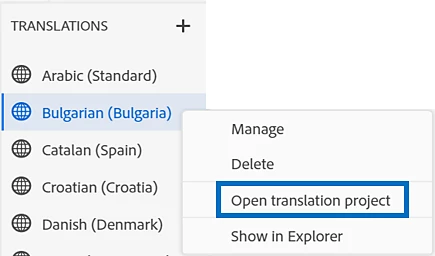
After the translation job is completed, you can open the translated project to review the files translated by right-clicking on the translation file in the Translation panel.
Using Translate attribute
The translate attribute indicates whether the content of the element should be translated when the topic is localized, or whether to leave them unchanged. You may want to identify the content that should not be translated.
Filter an element or text for translation based on translate attribute
- In an open topic, select the text, or a block element like a paragraph, etc. and then click the Attributes tab in the Properties panel.
- The Attributes options display three values:
- "default" If there is no attribute assigned to the parent, the default behavior would be "yes", and the content would be sent for translation.
- "yes" This attribute indicates that the element or selected text will be translated when the page is localized.
- "no" This attribute indicates that the element or selected text will not be translated.
- Select the content for which you want to set up a translate attribute, and then choose among the available Attribute values.
- Click Save.
Force synchronization
The Force Synchronization (Force Sync) tool copies the selected files to the language project. For instance, this can be useful when the user does not want to send some file for translation but sync them from the master to the language project.
- Select files from various categories e.g. Topics, Author, Output, Asset tabs, and click Force Sync
 from the standard toolbar.
- The Force Sync Files dialog box opens which displays the list of files to be copied from the current project to the translation project and displays two options, Update translation status only and Copy files and update translation status.
- Update translation status only It allows you to update your translation status to In Sync, even without translation.
- Copy files and update translation status It allows you to copy the files from the master to the language project and update the translation status to In Sync, even without translation.
- Select one of the options as above and click OK.
We're glad. Tell us how this page helped.
We're sorry. Can you tell us what didn't work for you?
Share additional feedback to help us improve.
0/255
|